 Saas

monday.com Work Management
A board-first work platform that is the fastest to adopt in the division, with a 3-seat minimum and action caps that decide which plan you really need
Scored on the published rubric, from documentation, pricing and verified user reports.
Best for: Teams of 3 to 40 that want a colourful board they can reshape without an admin, need Gantt and guest access on a mid-priced plan, and can live with monthly caps on automation actions.
Verdict
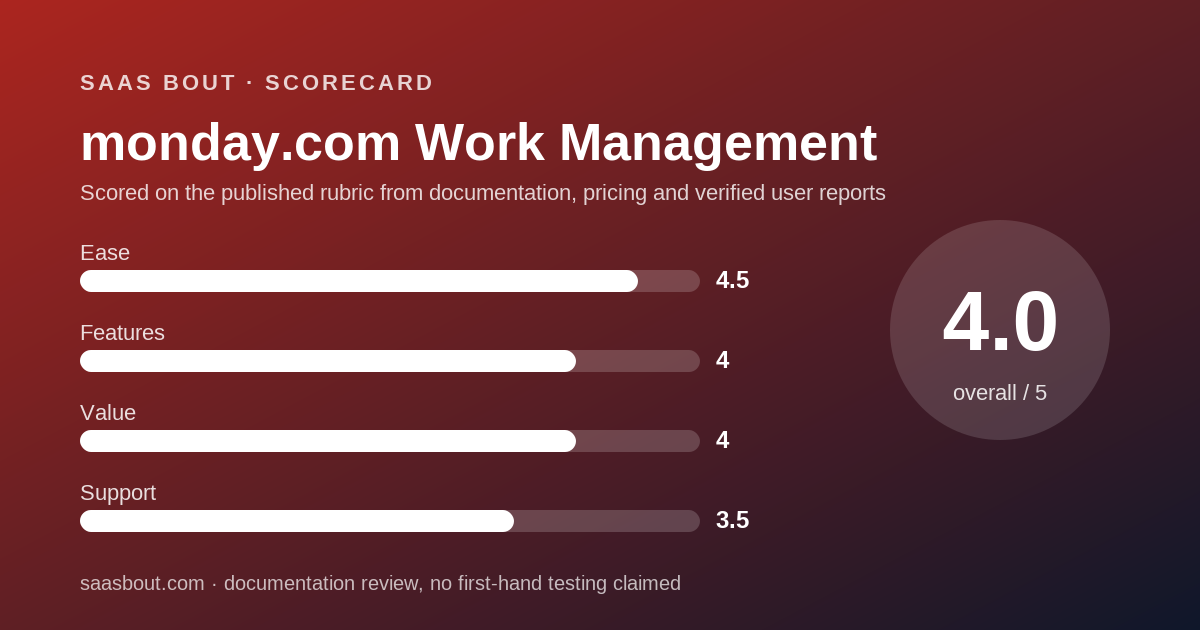
monday.com Work Management is the visual favourite of the project management division and finishes second on our card with a 32: ease 9, features 8, value 8, support 7. This is a documentation review: every figure comes from monday.com's pricing page and the support article it links to, plus verified user reports on Trustpilot and G2 comparison pages, all read on October 10, 2026, not from paid trials or staged demos. Ease scores 9, the top of the division, because the board model needs no training and the plan cards are the clearest here. Standard at $12 per seat per month billed annually includes Timeline and Gantt, Calendar, guest access and 250 automation actions plus 250 integration actions per month. Pro at $19 raises those caps to 25,000 each. Features score 8 because the free plan stops at 2 seats and 3 boards, and because storage is not listed for any plan. Value scores 8: Standard for 10 seats is $120 per month, competitive, but the 3-seat minimum and the undisclosed monthly price cost a point. Support scores 7 because 24/7 support is listed only on Enterprise. Buy it if the team adopts tools visually. Skip it if you automate heavily on a budget.
Visit monday.com Work Management
We have no affiliate relationship with this vendor. Link goes to the official site.
Where it is strong
- Standard at $12 per seat per month billed annually includes Timeline and Gantt, Calendar view, guest access and 3 workflows
- Pro at $19 raises automation and integration actions to 25,000 per month each, with private boards, time tracking and 10,000 API calls per day
- Basic includes unlimited free viewers and unlimited items, so read-only stakeholders cost nothing
- 14-day free trial of Pro with no card, per the pricing page, plus a free plan that never expires for 2 seats
- Pricing page prints 10-seat totals next to each plan, the clearest cost display in the division
- Partial refund within 30 days on annual plans, per the pricing FAQ
Where it falls short
- Paid plans start at 3 seats, so a solo user or a pair pays for a third seat
- Monthly per-seat prices are not listed for most plans; the FAQ says only that monthly is not discounted
- Standard caps automations at 250 actions per month and integrations at 250, low for a team that automates daily
- Free plan is limited to 2 seats, 3 boards, 3 docs and 8 column types
- Storage per plan is not published on the pricing page
At a glance
| Starting price | $9/seat/mo billed annually (Basic); monthly price not listed |
|---|---|
| Pricing note | From $9/seat/mo billed annually for Basic, $12 for the Standard tier most teams need, 3-seat minimum (pricing page, checked October 10, 2026) |
| Free plan | Up to 2 seats, 3 boards, 3 docs, 8 column types, 200+ templates |
| Seat minimum | 3 seats on paid plans; quote required above 40 users |
| Trial | 14 days of Pro, no credit card |
| Refunds | Partial refund within 30 days of purchase on annual plans |
| Support channels | Help centre and community on all plans; 24/7 expert support listed on Enterprise; phone not mentioned |
| Automations | Standard 250 actions/month; Pro 25,000; Enterprise up to 250,000 |
| Integrations | Standard 250 actions/month; Pro 25,000; API 1,000 calls/day on Standard, 10,000 on Pro, 25,000 on Enterprise |
What monday.com Work Management actually is
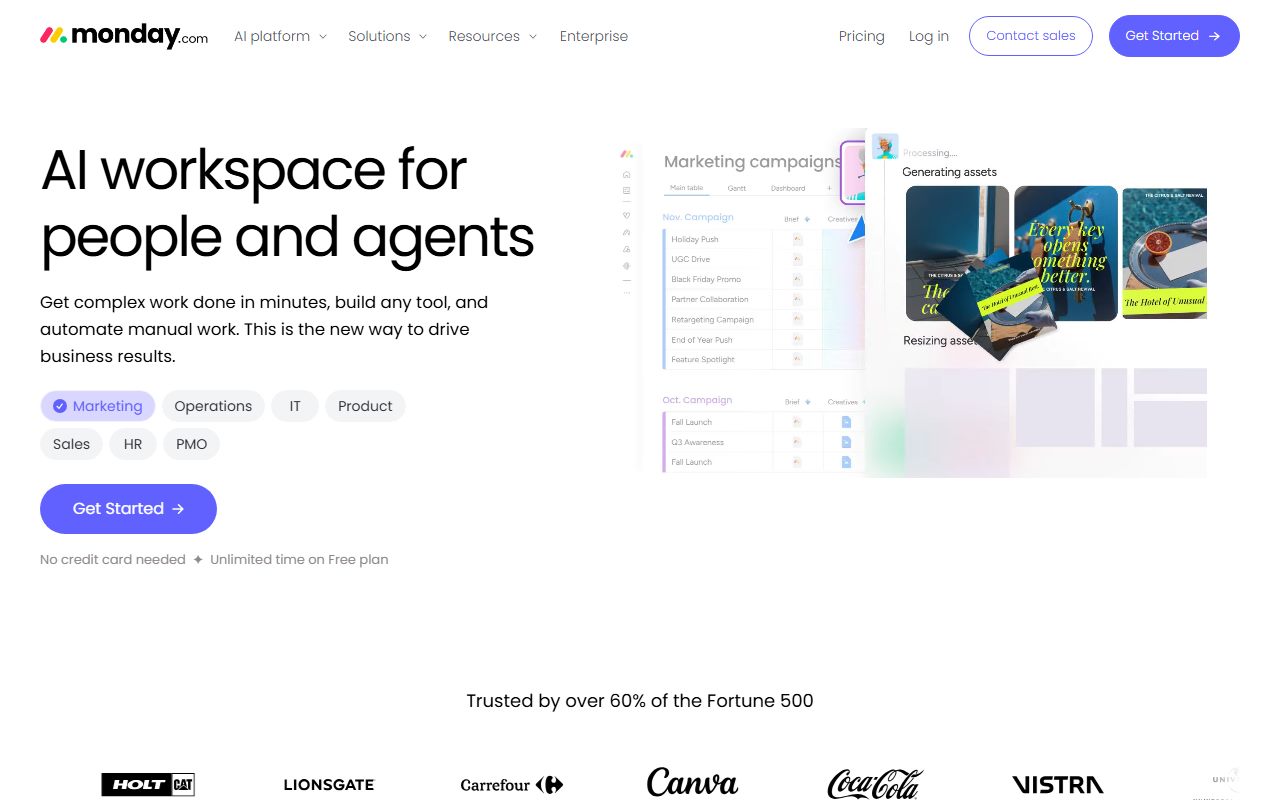
monday.com Work Management is a board. Each board is a table of items, each column has a type, status, person, date, number, timeline, and every other view, Kanban, Gantt, Calendar, dashboard, is a lens on the same rows.
The company sells four products on the same engine: Work Management, CRM, dev and service. This scorecard covers Work Management only. The CRM product is priced separately, from $12 per seat, and would belong in the CRM division alongside Pipedrive and HubSpot CRM.
The board model is why monday.com is the easiest fighter in this division to adopt and also why its limits are counted in actions per month rather than in features. The bout that settles most purchases is Asana vs monday.com.
Who monday.com is best for
monday.com suits teams that configure by dragging, not by reading documentation.
- Teams of 3 to 40 in marketing, operations or creative work who want a shared visual board
- Managers who need Gantt and a calendar at a mid-tier price, which Standard includes
- Companies with many read-only stakeholders, since viewers are free and unlimited from Basic
- Agencies that invite clients to specific boards, available through guest access on Standard and Pro
- Teams that want to see the 10-seat total before talking to sales
- Buyers who want a 14-day trial of the top self-serve plan before paying
Who should skip it
Three profiles will be happier elsewhere.
- Solo users and pairs who need paid features, because the minimum is 3 seats
- Automation-heavy teams on a Standard budget, capped at 250 actions per month
- Teams that need a free plan for 5 or 10 people, where ClickUp and Trello go further
What the free plan includes and what each plan adds (as of October 2026)
Free covers up to 2 seats, 3 boards, 3 docs, 8 column types, 200+ templates and the mobile apps, per the pricing page checked October 10, 2026. It is a trial that never expires rather than a working plan for a team.
Basic at $9 per seat per month billed annually adds unlimited items, unlimited free viewers and 1,000 AI credits per month. It does not list Gantt or guest access.
Standard at $12 is the plan most teams need. It adds Timeline and Gantt, Calendar view, guest access, 3 workflows, 250 automation actions and 250 integration actions per month, 2,000 AI credits and 1,000 API calls per day.
Pro at $19 adds private boards, advanced views, time tracking, advanced columns, 20 workflows, 25,000 automation and 25,000 integration actions per month, 3,000 AI credits and 10,000 API calls per day. The pricing page labels it the most popular plan.
Enterprise is quoted. It lists 250 workflows, up to 250,000 actions per month, 25,000 API calls per day, portfolio and resource management, multi-level permissions, a 99.9 percent uptime SLA and 24/7 expert support with tailored onboarding.
How the pricing is structured
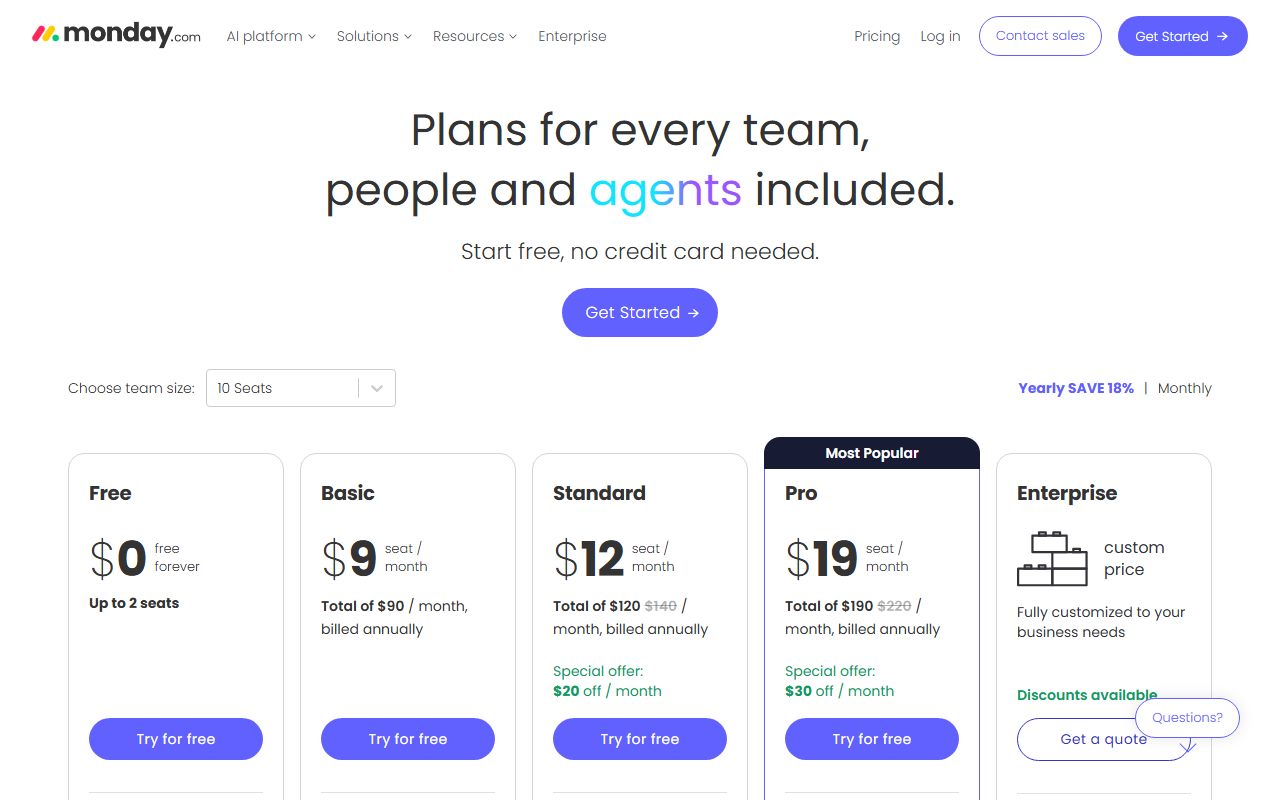
Per seat, per month, billed annually in one upfront payment. The page uses a dollar sign without naming a currency and states that prices exclude tax.
The minimum is 3 seats on any paid plan, so the real entry price is $27 per month for Basic, $36 for Standard and $57 for Pro, editorial calculations from the per-seat rates. A quote is required above 40 users.
monday.com is unusual in printing 10-seat totals on the plan cards: $90 for Basic, $120 for Standard, $190 for Pro, with Standard and Pro shown next to struck-through $140 and $220. The page does not label the struck-through figures; the FAQ says annual billing saves 18 percent and that monthly billing is not discounted.
Monthly per-seat prices are not listed for most plans. A team that wants to pay monthly has to start checkout to see the number. That is the single least transparent element on an otherwise clear page.
The FAQ lists a partial refund for annual plans cancelled within 30 days and no refunds for downgrades afterwards. Cards and PayPal are accepted; invoices are available for Enterprise above a minimum fee.
Ease of use: what the 9 is built from
monday.com scores 9 on ease, the top of the division, because the board needs no explanation and the pricing page needs no decoder. Column types, colours and drag-to-reorder are the interface; the 200+ templates cover most starting points.
G2 comparison pages read on October 10, 2026 give monday Work Management an overall 4.7 out of 5 across more than 15,000 reviews, with visual design and ease of use the two most repeated strengths. Trustpilot praise says the same: an attractive, intuitive interface.
The point comes off for the parts you only meet later: the 3-seat minimum at checkout, the action caps that surface when an automation stops firing, and the AI prompts that some Trustpilot reviewers describe as clutter. None of that slows the first week, which is what this round measures.
Features: what the 8 is built from
Features score 8. Standard carries what a small team needs, Gantt, calendar, guests, dashboards, and Pro adds time tracking and private boards without a jump to enterprise pricing.
Two points come off. The free plan at 2 seats and 3 boards is the thinnest in the division; Asana gives 2 users unlimited projects, ClickUp gives unlimited members, Trello gives 10 collaborators and 10 boards. And storage is not listed for any plan, so a team that attaches large files cannot plan from the page.
The caps are honest but tight. Standard's 250 automation actions per month works out at about 12 per working day, an editorial calculation. A team that automates status changes on every item will reach Pro quickly. Dashboards that combine boards are described per product on the page but not for Work Management specifically.
Value: what the 8 is built from
Value scores 8. At 10 seats on Standard, $120 per month billed annually, monday.com sits between ClickUp Core at $80 and Asana Starter at $109.90 on one side and Trello Premium at $100 on the other, per the four pricing pages read on October 10, 2026. It is not the cheapest, but Standard includes Gantt and guests, which Asana's and Trello's entry plans do not.
At the next tier, Pro at $190 for 10 seats undercuts Asana Advanced at $249.90 and comes in above ClickUp Business at $170.
Two points come off for the 3-seat minimum, which taxes the smallest teams, and for monthly prices that are not printed. The partial refund window and the 14-day Pro trial earn some of that back. The money round is scored line by line in Asana vs monday.com.
Support: what the 7 is built from
Support scores 7 because the pricing page says most about support on the plan a small team will not buy. Enterprise lists 24/7 expert support, tailored onboarding, daily webinars and a 99.9 percent uptime SLA. Free, Basic, Standard and Pro list no support channel on their cards, and phone support is not mentioned anywhere on the page.
The support centre article on how to contact monday.com could not be read on October 10, 2026, so hours and response-time targets for self-serve plans are not stated here.
Verified reports are split. G2 comparison pages list a quality-of-support score of 8.9 out of 10 from 9,813 reviews, among the highest in this division. Trustpilot's TrustScore is 2.1 out of 5 from 3,441 reviews, with slow chat queues and chatbots that do not resolve issues the most repeated complaint.
Trustpilot's distribution is 71 percent five-star, so the low TrustScore reflects its weighting of recent reviews, 87 in the last 12 months. We weight G2 more but dock for what the vendor leaves unpublished.
What verified users report
G2 comparison pages, read October 10, 2026, rate monday Work Management 4.7 out of 5 across more than 15,000 reviews, with quality of support at 8.9 from 9,813 responses. Visual design and ease of use lead the praise.
Trustpilot shows 3,441 reviews and a TrustScore of 2.1 out of 5. The praise matches G2: a powerful, flexible tool with an attractive interface and good visibility across teams. The complaints cluster in three places: slow support with long chat queues, subscription friction including the 3-seat minimum for solo users and price increases, and bugs plus unwanted AI prompts.
The pattern across both sites is a product people like to use and a billing relationship some people do not. That matches what the pricing page shows: clear plan cards, a hidden monthly rate, a seat minimum.
Limits stated by the vendor
Published on the pricing page as of October 10, 2026.
- Free plan: 2 seats, 3 boards, 3 docs, 8 column types
- Paid plans: minimum 3 seats; quote required above 40 users
- Automation actions per month: 250 on Standard, 25,000 on Pro, up to 250,000 on Enterprise
- Integration actions per month: 250 on Standard, 25,000 on Pro
- Workflows: 3 on Standard, 20 on Pro, 250 on Enterprise
- API calls per day: 1,000 on Standard, 10,000 on Pro, 25,000 on Enterprise
- AI credits per month: 1,000 Basic, 2,000 Standard, 3,000 Pro
- Storage per plan: not published
Alternatives
Asana. Choose it if your work is many projects rolling up to portfolios and goals, or if you are exactly 2 people, since Asana's free plan has no board cap. Otherwise choose monday.com for a board the whole team will actually update. Scorecard in our Asana review; the bout is Asana vs monday.com.
ClickUp. Choose it if price decides and automation volume is high: Core is $8 per user per month billed annually with 1,000 automation actions and unlimited storage, and the free plan allows unlimited members. Otherwise choose monday.com if a cleaner interface is worth $4 per seat. Full card in our ClickUp review.
Trello. Choose it if a kanban board is the entire requirement, especially for 10 or fewer people on the free plan. Otherwise choose monday.com when you need Gantt, dashboards and column types beyond cards. See our Trello review.
All four are ranked in the best project management software for small teams fight card.
Bottom line
monday.com Work Management finishes second on the card with a 32 and wins the ease round outright. Standard at $12 per seat per month billed annually is the plan to buy: Gantt, calendar, guests and dashboards for $120 a month at 10 seats.
Buy it for a team of 3 to 40 that adopts tools visually and automates modestly. Skip it if you are 1 or 2 people, if you need a free plan for a whole team, or if you fire hundreds of automations a month on a Standard budget; read the ClickUp review in that case.
Every figure above comes from monday.com's pricing page, Trustpilot and G2 comparison pages read on October 10, 2026. Monthly prices and self-serve support hours are not published there; check before you sign.
Buy it if
- Your team of 3 to 40 learns tools by looking at them, because the board model needs no admin
- You need Gantt and guest access at a mid-tier price, which Standard delivers at $12 per seat
- Many stakeholders only read, since Basic and above include unlimited free viewers
- You want to see the 10-seat total before you talk to sales, which the pricing page prints
Skip it if
- You are 1 or 2 people who need paid features, because the minimum is 3 seats
- You run hundreds of automations a month on a Standard budget, where the 250-action cap bites
- You need a free plan for a whole small team, since monday.com's stops at 2 seats and 3 boards
Frequently asked
Does monday.com have a free plan?
Yes. The Free plan covers up to 2 seats, 3 boards, 3 docs, 8 column types, 200+ templates and the iOS and Android apps, per the pricing page checked October 10, 2026. It never expires. Gantt, guest access and automations require Standard at $12 per seat per month billed annually.
How much does monday.com cost for 10 people?
The pricing page itself prints the 10-seat totals billed annually: Basic $90 per month, Standard $120, Pro $190, with Standard and Pro shown against struck-through figures of $140 and $220. Enterprise is quoted. Prices exclude tax. Monthly billing is not discounted, and its per-seat rates are not listed.
What is the minimum number of seats on monday.com?
Three. The pricing FAQ, read October 10, 2026, says paid plans start from 3 users, while the Free plan covers up to 2. A two-person team that wants Gantt therefore pays for 3 Standard seats, $36 per month billed annually, an editorial calculation. Above 40 users a quote is required.
What is the difference between monday.com Standard and Pro?
Pro at $19 per seat per month billed annually raises automation and integration actions from 250 to 25,000 per month each, workflows from 3 to 20, API calls from 1,000 to 10,000 per day, and adds private boards, time tracking, advanced columns and advanced views. Standard at $12 already includes Timeline, Gantt, Calendar and guest access.
Is there a monday.com free trial?
Yes. The pricing page lists a 14-day free trial of the Pro plan for work management, with no credit card. When it ends you can pick a paid plan with at least 3 seats or fall back to the Free plan, which keeps 2 seats and 3 boards.
Does monday.com offer refunds?
Partially. The pricing FAQ says annual subscriptions cancelled within 30 days of purchase receive a partial refund, and that there are no refunds for downgrades after that. Compare ClickUp, which lists a 30-day full refund, and Asana, which lists no refunds at all.
Sources
- monday.com pricing page, including plan cards and FAQ - checked October 10, 2026
- monday.com support centre - checked October 10, 2026
- Trustpilot: monday.com reviews - checked October 10, 2026
- G2 comparison pages: monday Work Management rating and quality of support - checked October 10, 2026
Update history
- October 10, 2026 - First scorecard. Pricing, caps and seat minimum read from monday.com/pricing; user reports from Trustpilot and G2 comparison pages. Support centre contact article returned 403 and could not be read.
Visit monday.com Work Management
We have no affiliate relationship with this vendor. Link goes to the official site.