 Saas
Asana vs monday.com (2026): which wins for small teams
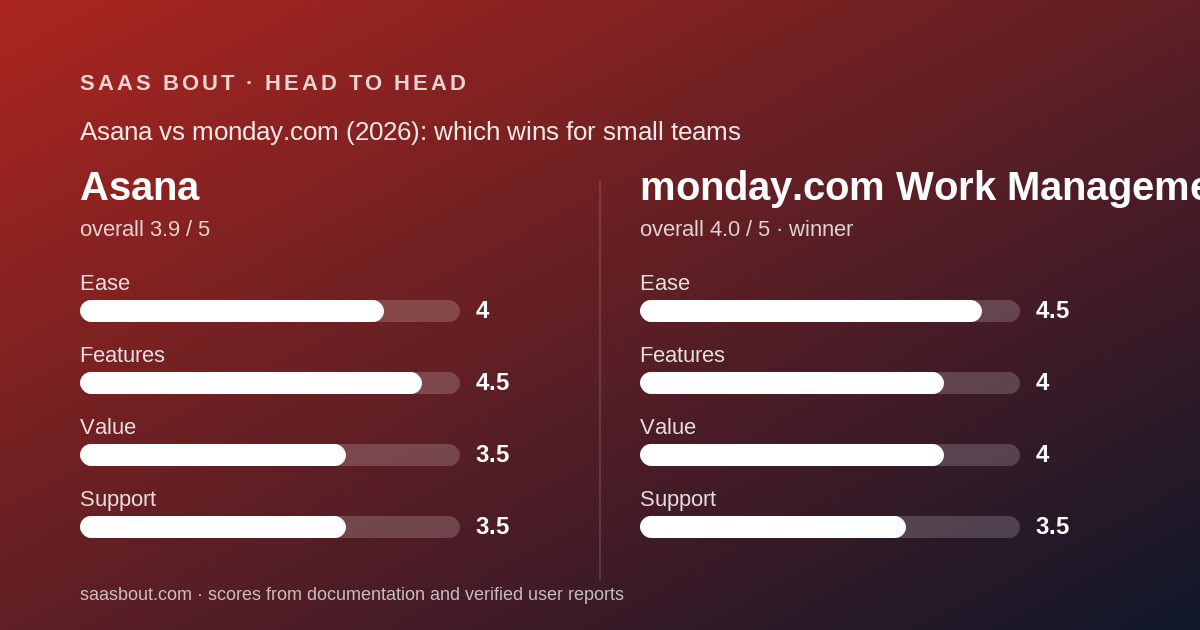
monday.com Work Management wins this bout on points, 32 to 31 on our four-round card, by taking ease 9 to 8 and value 8 to 7 while Asana takes features 9 to 8 and the two tie on support at 7. Both scorecards are built from the vendors' pricing pages and help centres plus verified user reports on Trustpilot and G2 comparison pages, all read on October 10, 2026. No paid trials, no staged demos. If you are 2 people, Asana's free plan settles it, because monday.com's free plan stops at 3 boards and its paid plans start at 3 seats. If you are 3 to 40 people who want a board with Gantt and guests for $12 per seat, monday.com Standard does what Asana charges $10.99 for without Gantt's neighbours, portfolios and goals, until you reach Asana Advanced at $24.99.
 3.9Asana
 4.0monday.com Work Management
Specification by specification
| Spec | Asana | monday.com Work Management |
|---|---|---|
| Entry paid price (annual billing) | $10.99/user/mo (Starter); $13.49 monthly | $9/seat/mo (Basic); monthly price not listed |
| Plan most small teams need | Starter $10.99: Timeline, Gantt, dashboards, unlimited automations, forms | Standard $12: Timeline and Gantt, Calendar, guest access, 250 automation actions/month |
| Management tier | Advanced $24.99: portfolios, goals, resource management, proofing | Pro $19: private boards, time tracking, 25,000 automation actions/month |
| Free plan | Personal: 2 users, unlimited tasks and projects, 100 MB per file | Free: 2 seats, 3 boards, 3 docs, 8 column types |
| Seat minimum | None; seats sold in published increments (1 up to 5 users, then 5, 10, 25, 50) | 3 seats on paid plans; quote above 40 users |
| 10 users on the plan most teams need | $109.90/month (Starter, editorial calculation) | $120/month (Standard, printed on the pricing page) |
| Automations | Unlimited on Starter and above | 250 actions/month on Standard, 25,000 on Pro, up to 250,000 on Enterprise |
| Trial | Not stated on the pricing page | 14 days of Pro, no credit card |
| Refunds | None, per the pricing FAQ | Partial refund within 30 days on annual plans |
| Support published per plan | Forum, Help Center, direct support, Customer Success listed; plan split not readable | 24/7 expert support on Enterprise only; nothing listed on self-serve plans |
| Verified user rating | G2 ease 8.6/10, support 8.5/10 (about 11,000 reviews); Trustpilot 1.4/5 from 320 | G2 4.7/5 (15,000+ reviews), support 8.9/10; Trustpilot 2.1/5 from 3,441 |
| Round 1 ease | 8 | 9 |
| Round 2 features | 9 | 8 |
| Round 3 value | 7 | 8 |
| Round 4 support | 7 | 7 |
| Total | 31 | 32 |
The short answer
monday.com wins by one point, 32 to 31, and the margin is as narrow as it looks. The fight is decided by team size and by what the team needs above the board.
- Asana is best for 2-person teams on the free plan, and for teams of 10 to 50 that run many projects and need portfolios, goals and workload views in one tool
- monday.com is best for teams of 3 to 40 that want a visual board they can reshape without an admin, with Gantt and guest access at $12 per seat
- Winner on the card: monday.com Work Management, by taking ease and value
- This is a documentation bout: every number comes from the two pricing pages and help centres plus Trustpilot and G2 comparison pages, read October 10, 2026
Round 1, ease: monday.com takes it 9 to 8 because the board needs no explanation
monday.com's board is a table with typed columns, and that is the entire interface. Colours, drag to reorder and 200+ templates mean most teams are working within an hour. G2 comparison pages rate it 4.7 out of 5 across more than 15,000 reviews with visual design and ease of use the most repeated strengths.
Asana is also easy to start, with three familiar views on the free plan, but it carries more structure to learn: projects, sections, portfolios, goals, rules. G2 puts its ease-of-use score at 8.6 out of 10 across roughly 11,200 reviews, with the recurring note that the feature set can overwhelm.
Both pricing pages cost a little. Asana's seat increments mean a 12-person team buys 15 seats. monday.com's 3-seat minimum means a pair buys 3. monday.com prints 10-seat totals on the plan cards, which is the clearest cost display in the division and worth the extra point.
Full scoring in the Asana review and the monday.com review.
Round 2, features: Asana takes it 9 to 8 on the layers above the board
Asana's ladder is coherent. Personal gives 2 users unlimited projects. Starter at $10.99 per user per month billed annually adds Timeline, Gantt, dashboards, unlimited automations, forms, custom fields and unlimited free guests. Advanced at $24.99 adds portfolios, goals, resource management, approvals, proofing and Salesforce, Tableau and Power BI connections, per the pricing page checked October 10, 2026.
monday.com Standard at $12 matches the planning layer, Timeline and Gantt, Calendar, guest access, dashboards, and Pro at $19 adds time tracking and private boards. Portfolio and resource management appear only on the quoted Enterprise plan.
The decisive difference is automation. Asana lists unlimited automations from Starter. monday.com caps Standard at 250 automation actions and 250 integration actions per month, about 12 a day on an editorial calculation, and Pro at 25,000. A team that automates every status change will feel that cap within weeks.
Two things pull Asana back. Its AI is metered at 5 requests per user per month with packs at $0.50 per request. And monday.com's free plan, 2 seats and 3 boards, is the thinnest here, but Asana's Personal plan is only two users as well. Asana wins the round on automation and on the management layer.
Round 3, value: monday.com takes it 8 to 7 at 10 seats and above, Asana at exactly 2
At 10 users billed annually, Asana Starter costs $109.90 per month and monday.com Standard $120, per the two pricing pages read October 10, 2026. Asana is $10 cheaper on the headline, and the round still goes to monday.com. Here is why.
Standard includes guest access and Gantt for the whole team; Starter does too, so at this tier the tools are close and Asana's $10 saving is real. But at the next tier, where a growing team lands within a year, Asana Advanced is $249.90 for 10 users against monday.com Pro at $190. The gap is $60 a month, $720 a year, an editorial calculation.
Refunds tilt it further. Asana's FAQ says there are none. monday.com's says annual plans cancelled within 30 days receive a partial refund, and it offers a 14-day Pro trial with no card; Asana's pricing page states no trial length.
Asana wins at exactly 2 users, where Personal is free with unlimited projects and monday.com's free plan offers 3 boards. It also wins for 1 or 2 users who need paid features, because monday.com makes them buy 3 seats. Above that, monday.com's totals are lower where it counts and its purchase terms are kinder. For the cheapest option at every size, see ClickUp and Trello.
Round 4, support: scored 7 each, both vendors publish less than they should
Neither pricing page tells a self-serve buyer what support they are paying for. Asana's comparison table lists the Forum, Academy, webinars, Help Center, Developer Guide, direct Asana Support and Customer Success options with eligibility requirements, but the plan-by-plan checkmarks could not be read on October 10, 2026, and the Help Center makes no hours or response-time claims.
monday.com lists 24/7 expert support, tailored onboarding and a 99.9 percent uptime SLA on Enterprise and nothing on Free, Basic, Standard or Pro. Phone support is not mentioned on either page. monday.com's contact-support article returned a 403 and could not be read.
Verified reports lean monday.com's way on G2, 8.9 out of 10 from 9,813 reviews against Asana's 8.5 from about 7,600. Trustpilot is unkind to both: Asana 1.4 out of 5 from 320 reviews, monday.com 2.1 from 3,441, with chatbot loops and slow replies the common complaint. We score the round even because the gap in verified ratings is small and the gap in published commitments is nil.
The bill at 2, 10 and 25 seats
Two seats. Asana costs $0 on Personal with unlimited projects, or $21.98 per month on Starter billed annually if Gantt is needed. monday.com costs $0 on Free with 3 boards, or $36 per month because Standard requires 3 seats. Asana wins at this size at any plan.
Ten seats. Asana Starter $109.90, monday.com Standard $120, both billed annually; monday.com's figure is printed on its pricing page, Asana's is an editorial calculation. On the next tier, monday.com Pro $190 against Asana Advanced $249.90. monday.com wins once the team needs the second tier.
Twenty-five seats. Asana sells 25 seats exactly, in steps of 5 up to 30: Starter $274.75, Advanced $624.75 per month billed annually. monday.com Standard is $300 and Pro $475, editorial calculations from the per-seat rates. The gap at the management tier is now $149.75 a month, almost $1,800 a year.
Monthly billing changes the picture only for Asana, which prints it: Starter $13.49 and Advanced $30.49 per user. monday.com does not list monthly per-seat prices for Work Management and says only that monthly is not discounted, so a team that insists on monthly billing has to start checkout to learn the number.
Integrations and AI: both metered, in different units
Asana lists 100+ integrations on every plan including free, adds Salesforce, Tableau and Power BI on Advanced, and lists Jira Cloud two-way sync in its comparison table. monday.com counts integrations in actions rather than apps: 250 integration actions a month on Standard, 25,000 on Pro, with API calls capped at 1,000 and 10,000 a day respectively, per the two pricing pages read October 10, 2026.
AI follows the same split. Asana meters 5 AI requests per user per month, capped at 50 per account on Starter and Advanced, with AI Studio credits of 50K and 75K per billing account and packs at $0.50 per request. monday.com bundles 1,000, 2,000 and 3,000 AI credits a month on Basic, Standard and Pro. Neither page says what one request or one credit buys, so neither can be priced per task.
The practical read: a team that connects many apps lightly is fine on either; a team that syncs one system heavily will hit monday.com's action caps and should budget for Pro, or look at ClickUp, which lists 1,000 automation actions on its $8 plan.
What users report side by side
The praise is almost interchangeable. Asana users on both G2 and Trustpilot say it works well for tracking projects and task lists across teams. monday.com users say it is powerful, flexible and attractive, with good visibility across teams.
The complaints differ in a useful way. Asana's Trustpilot complaints are about billing mechanics: trial features added to projects that then lock, hard cancellations, refused refunds. monday.com's are about scale: slow chat queues, the 3-seat minimum for solo users, price increases, bugs and unwanted AI prompts.
Read together, Asana's risk is the subscription and monday.com's risk is the ceiling. A small team that reads its own invoice carefully is safer with Asana's terms than its reviewers were; a team that automates heavily will hit monday.com's caps before it hits its price.
Limits side by side: the caps you will actually hit
Published on the two pricing pages as of October 10, 2026.
- Free plan: Asana 2 users with unlimited projects; monday.com 2 seats with 3 boards and 3 docs
- Seat rules: Asana sells in increments of 1, 5, 10, 25 and 50 by team size; monday.com requires 3 seats and a quote above 40
- Automations: Asana unlimited from Starter; monday.com 250 actions a month on Standard, 25,000 on Pro
- AI: Asana 5 requests per user per month plus AI Studio credits; monday.com 1,000 to 3,000 AI credits a month by plan
- API: Asana does not publish a call limit on the pricing page; monday.com 1,000 calls a day on Standard, 10,000 on Pro
- File size: Asana 100 MB per file on Personal; monday.com does not publish storage
- Refunds: Asana none; monday.com partial within 30 days on annual plans
- Trial: Asana not stated; monday.com 14 days of Pro
Choose Asana if
Asana is the right corner for four kinds of team.
- You are exactly 2 people, because the Personal plan is free with unlimited projects and no board cap
- You run 10 or more projects at once and need portfolios, goals and workload views, which Advanced delivers at $24.99
- You automate without counting, since Starter lists unlimited automations against monday.com's 250 actions a month
- A security team will review the purchase, because Enterprise and Enterprise+ publish SAML, SCIM, audit logs and data residency
Choose monday.com if
monday.com is the right corner for four others.
- Your team of 3 to 40 learns by looking, since the board needs no admin and no training
- You want Gantt, calendar and guests on one mid-tier plan, which Standard delivers at $12 per seat
- You will reach the management tier within a year, where Pro at $190 for 10 seats undercuts Asana Advanced at $249.90
- You want a trial and a refund window, with 14 days of Pro and a partial refund within 30 days on annual plans
Frequently asked
Answers below are drawn from the two pricing pages and help centres read on October 10, 2026. Both fighters are ranked against ClickUp and Trello in the best project management software for small teams fight card.
Bottom line
monday.com Work Management wins by a point, 32 to 31, and the point comes from the first week and the invoice: the board is easier to adopt, the 10-seat totals are printed, Pro undercuts Advanced, and there is a trial and a refund window. Asana wins the features round on unlimited automations and the layers above the board, and it wins outright for any two-person team.
Buy monday.com Standard for a team of 3 to 40 that wants a board with Gantt and guests. Buy Asana Advanced for a team that already runs portfolios. Buy Asana Personal if you are two. If the budget is the first filter, neither is the division's cheapest; read the ClickUp review and the Trello review before deciding.
Prices and caps change; both vendors' pages were read on October 10, 2026. Check them before you sign.
Frequently asked
Which is cheaper for a 10-person team, Asana or monday.com?
On the plan most small teams need, Asana Starter is $109.90 per month and monday.com Standard $120, both billed annually, per the pricing pages read October 10, 2026. At the next tier monday.com Pro is $190 against Asana Advanced at $249.90. Asana is cheaper at entry; monday.com is cheaper once you need more.
Can I switch from Asana to monday.com?
monday.com's pricing page does not list an Asana importer, and Asana's does not list a monday.com exporter, as read October 10, 2026. Both products support CSV export and import of tasks, so lists and boards can move; automations, dashboards and portfolios have to be rebuilt by hand in the new tool.
Does monday.com have a free plan like Asana?
Both have one, and both stop at 2 users. Asana Personal allows unlimited tasks and projects. monday.com Free allows 3 boards, 3 docs and 8 column types. For a two-person team Asana's free plan is the more usable; for 3 or more people both require a paid plan, and monday.com requires at least 3 seats.
Which has better Gantt charts, Asana or monday.com?
Both include Timeline and Gantt on the plan most small teams buy: Asana Starter at $10.99 per user and monday.com Standard at $12 per seat, billed annually, per the pricing pages. Asana lists resource management and capacity planning on Advanced and Enterprise; monday.com lists resource management on Enterprise only. The pricing pages do not describe dependency features in detail.
Which is better for a solo user, Asana or monday.com?
Asana. monday.com's pricing FAQ says paid plans start from 3 users, so a solo user who needs Gantt pays for 3 Standard seats, $36 per month billed annually on an editorial calculation. Asana sells Starter one seat at a time for teams up to 5, at $10.99 per month billed annually.
Visit Asana
We have no affiliate relationship with this vendor. Link goes to the official site.
Visit monday.com Work Management
We have no affiliate relationship with this vendor. Link goes to the official site.