 Saas
Saas
ClickUp
The most tool per dollar in the division, with unlimited free members and 24/7 support on every plan, held back by density and a pricing page showing two plan ladders at once
Scored on the published rubric, from documentation, pricing and verified user reports.
Best for: Teams of 3 to 50 that want tasks, docs, whiteboards, Gantt and automations in one workspace at the lowest paid price in the division, and have one person willing to set it up.
Verdict
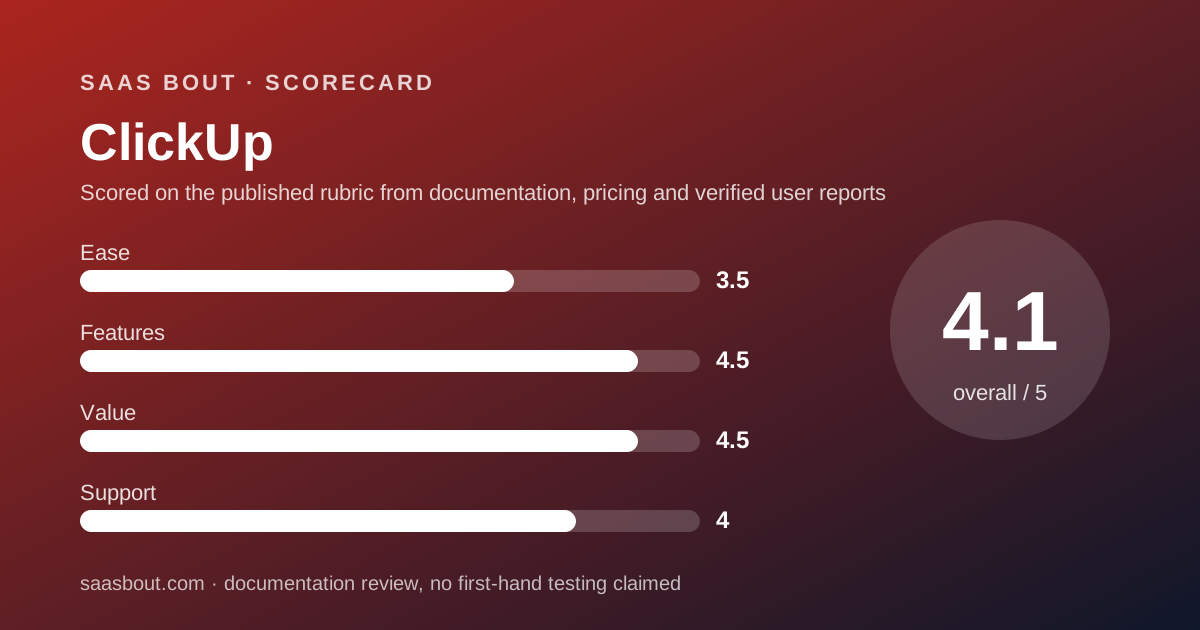
ClickUp is the value fighter of the project management division and it takes the card with a 33: ease 7, features 9, value 9, support 8. This is a documentation review: every figure comes from ClickUp's pricing page and FAQ plus verified user reports on Trustpilot and G2 comparison pages, all read on October 10, 2026, not from paid trials or staged demos. Value scores 9 because Core at $8 per user per month billed annually includes unlimited storage, Gantt, custom fields, 1,000 automation actions a month and live chat support, and because Free Forever allows unlimited members and guests. Features score 9 for the same reason: tasks, docs, whiteboards, forms and AI live in one workspace. Ease scores 7, the lowest in the division, because reviewers on both Trustpilot and G2 describe a steep setup and a heavy interface, and because the pricing page on the day we read it showed two plan ladders, Unlimited at $7 and Core at $8, without saying which applies. Support scores 8: 24/7 support is listed on every plan including Free, live chat from Core, priority on Enterprise and Max. Buy it if you want the most tool per dollar and will invest a week in setup. Skip it if a plain board is enough.
Visit ClickUp
We have no affiliate relationship with this vendor. Link goes to the official site.
Where it is strong
- Core at $8 per user per month billed annually includes unlimited storage, Gantt, custom fields, 1,000 automation actions a month and live chat support
- Free Forever allows unlimited members and guests with full permissions, unlimited tasks and 100 automation actions a month
- 24/7 support is listed on every plan including Free, per the comparison table
- 30-day full refund stated in the pricing FAQ, the most generous refund policy in the division
- Business at $17 raises automations to 10,000 actions a month and lists per Space to 400, with pooled AI credits of 1.5K per user
- Usage limits that are hit block new creation but never delete data, per the FAQ
Where it falls short
- The pricing page read on October 10, 2026 showed two conflicting plan ladders: Unlimited $7/$10 and Business $12/$19 on one set of cards, Core $8 and Business $17 on another
- Free Forever storage is 60 MB total for attachments, the tightest free storage cap in the division
- Gantt and custom fields are trial-only on Free Forever, with no trial duration stated anywhere on the page
- Reviewers on Trustpilot and G2 repeatedly describe a steep learning curve and an interface that slows with large workspaces
- AI is a separate ladder: Brain AI $9 and Everything AI $28 per user, plus Super Credits at $10 per 10,000
What ClickUp actually is
ClickUp is a workspace that tries to be every tool a team opens in a day: tasks, docs, whiteboards, chat, forms, goals, dashboards and an AI layer on top. The hierarchy is Workspace, Space, Folder, List, task, and every setting can be changed at every level.
That ambition is both the pitch and the complaint. It is why ClickUp scores 9 on features and 9 on value, and why it scores 7 on ease, the lowest in the division.
It is not a CRM, though people bend it into one. A team that needs a deal pipeline should read the CRM fight card and Pipedrive review instead.
In this division ClickUp fights Asana, monday.com Work Management and Trello. It takes the card on points; the ranking is in the best project management software for small teams guide.
Who ClickUp is best for
ClickUp suits teams with more needs than budget and one person who enjoys configuring software.
- Teams of 3 to 50 that want to replace a task tool, a docs tool and a whiteboard with one subscription
- Startups and agencies on a tight per-seat budget, since Core is $8 and Free Forever has no member cap
- Teams that automate heavily, because Core includes 1,000 actions a month and Business 10,000
- Operations leads who want custom fields, task types and dashboards without an enterprise contract
- Teams that invite many external guests, with guest seats bundled on every paid plan
- Buyers who want a refund window, since the FAQ lists 30 days
Who should skip it
Three profiles will fight the tool more than use it.
- Teams with nobody willing to own setup, the most repeated weakness in verified reviews
- Teams whose whole requirement is a kanban board, where Trello is lighter
- Free-plan teams that attach large files, because storage is capped at 60 MB total
What the free plan includes and what each plan adds (as of October 2026)
Free Forever is the most open free plan in the division on people and the tightest on storage. It lists unlimited members and guests with full create and edit permissions, unlimited tasks, 5 Spaces, 40 lists per Space, 100 folders per Space, 100 automation actions a month across 5 active rules, 1 form, 500 AI credits per workspace and 60 MB of attachment storage, per the pricing page checked October 10, 2026. Gantt and custom fields are marked trial-only.
Core at $8 per user per month billed annually, shown against a regular price of $12, adds unlimited storage and Spaces, custom fields and task types, Gantt, guest permissions, 200 lists per Space, 1,000 automation actions a month, 1K pooled AI credits per user and live chat support.
Business at $17 billed annually, regular $25, raises automations to 10,000 actions a month, lists per Space to 400 and pooled AI credits to 1.5K per user, and widens guest seats to 10 plus 5 per additional paid user.
Enterprise is custom and Max is listed at $100 per user per month billed annually, regular $120. Both list 1M automation actions a month, 1,500 lists per Space, 10,000 API calls per minute and priority support; Max adds premium support and 10K pooled AI credits per user.
AI is a separate ladder: Brain AI at $9 per user with 1,500 Super Credits a month, Everything AI at $28 with 5,000, and extra credits at $10 per 10,000.
How the pricing is structured
Per user, per month, billed per workspace, with yearly billing described as saving up to 33 percent. The page uses a dollar sign without naming a currency.
The complication is that on October 10, 2026 the page carried two plan ladders. The first set of cards, with a monthly and yearly toggle, listed Free Forever, Unlimited at $7 yearly or $10 monthly, Business at $12 yearly or $19 monthly, and Enterprise.
A second set listed Free Forever, Core at $8, Business at $17, Enterprise and Max at $100, each with a struck-through regular price, and the comparison table used the second set's names. The FAQ still referred to an Unlimited plan in its guest-seat section.
We report both and score on the newer ladder, because the comparison table and feature limits are written against it. A buyer should confirm which prices their workspace is offered before quoting a budget.
For 10 users billed annually, Core is $80 per month and Business $170, editorial calculations. On the older cards the same team would pay $70 or $120.
Upgrades apply to the whole workspace, not to individual users, and each workspace is billed separately. Added users are prorated. The FAQ lists a 30-day full refund, discounts for nonprofits, students, educators and startups, and bank transfer for qualifying Enterprise orders. Usage limits are cumulative and do not reset; hitting one blocks new creation for that feature without deleting data.
Ease of use: what the 7 is built from
ClickUp scores 7 on ease, the lowest in the division, and the score is built from three sources that agree. Trustpilot reviewers, read October 10, 2026, name a steep learning curve from extensive setup and many features, and an interface that feels sluggish with large amounts of data. G2 summaries repeat the density point.
The pricing page itself, with two plan ladders and trial labels that give no duration, asks the buyer to do work a pricing page should do for them.
The free plan with no card and no member cap earns points back: a team can start without a purchase decision at all.
The round is about the first week, and the first week in ClickUp is spent choosing which of its many defaults to switch off. monday.com and Trello both score 9 here for the opposite reason.
Features: what the 9 is built from
Features score 9, joint top with Asana. Core at $8 already includes the things rivals gate higher: unlimited storage, Gantt, custom fields, task types, guest permissions, 1,000 automation actions a month.
Docs, whiteboards, forms and chat sit in the same workspace, which is the feature Asana and monday.com do not match without integrations. Dashboards and goals are present without an enterprise contract.
The point comes off for AI being sold as a second subscription, and for the limits that reset only by upgrade: 40 lists per Space on Free, 200 on Core, 400 on Business. The API cap of 100 calls per minute on every plan below Enterprise is also low for a team that syncs ClickUp with other systems.
Integrations are not counted on the pricing page; the vendor does not publish a figure there.
Value: what the 9 is built from
Value scores 9, the best in the division. Core at $80 per month for 10 users billed annually undercuts Trello Premium at $100, Asana Starter at $109.90 and monday.com Standard at $120, per the four pricing pages read October 10, 2026, and it includes unlimited storage and Gantt where Asana Starter and Trello Standard do not.
Business at $170 for 10 users is also the cheapest second tier: monday.com Pro is $190 and Asana Advanced $249.90.
The free plan with unlimited members means a 10-person team can run on $0 if it accepts 60 MB of storage and 100 automations a month. The 30-day refund removes most of the purchase risk.
The point comes off for the second AI ladder, which can double the per-user cost, and for the price uncertainty created by two sets of cards.
Support: what the 8 is built from
Support scores 8 because ClickUp publishes more about support per plan than any rival here. The comparison table lists 24/7 support on every plan including Free Forever, live chat support from Core, priority support on Enterprise and Max, and premium support on Max. Enterprise cards also list live onboarding training and a customer success manager.
G2 comparison pages list a quality-of-support score of 8.9 out of 10 from 6,578 ratings, joint top of the division with monday.com. Trustpilot's TrustScore is 4.2 out of 5 from 716 reviews, with 61 percent five-star, by far the best Trustpilot standing in this division.
Two points come off because response-time targets are not published, and because 22 percent of Trustpilot reviews are one star, with complaints about bugs and performance that support cannot fix on a call.
What verified users report
G2 comparison pages, read October 10, 2026, rate ClickUp about 4.7 out of 5 across more than 11,000 reviews, with support quality at 8.9 and summaries describing support as responsive.
Trustpilot shows 716 reviews, a TrustScore of 4.2, 61 percent five-star and 22 percent one-star. The praise is consistent: everything in one place, AI summaries that save time, flexibility and a modern interface. The complaints are consistent too: sluggish performance with large workspaces, a steep early learning curve, and pricing that feels high for business use once AI is added.
The split tells you who to be. Teams that invest in setup report the highest satisfaction in the division; teams that expected a board out of the box report the opposite.
Limits stated by the vendor
Published on the pricing page as of October 10, 2026.
- Free Forever storage: 60 MB of attachments; paid plans unlimited
- Spaces on Free: 5; lists per Space 40 on Free, 200 on Core, 400 on Business, 1,500 on Enterprise and Max
- Automation actions per month: 100 Free, 1,000 Core, 10,000 Business, 1M Enterprise and Max; active rules 5 on Free, unlimited on paid
- API: 100 calls per minute on Free, Core and Business; 10,000 on Enterprise and Max
- Pooled AI credits per user per month: 1K Core, 1.5K Business, 3K Enterprise, 10K Max
- Guest seats: paid plans include unlimited read-only guests plus a bundled number of external guest seats
- Usage limits are cumulative and do not reset; trial feature durations are not stated
Alternatives
monday.com Work Management. Choose it if the team adopts tools by looking at them and you can accept a 3-seat minimum and action caps. Standard at $12 per seat includes Gantt and guests in a far simpler interface. Otherwise choose ClickUp for $4 less per seat and ten times the automation actions. Scorecard in our monday.com review.
Asana. Choose it if structured portfolios and goals matter more than price and you want the cleanest upgrade ladder. Otherwise choose ClickUp when the budget decides and docs must live beside tasks. See our Asana review and the bout Asana vs monday.com.
Trello. Choose it if a kanban board is the whole job and the team is 10 or fewer. Otherwise choose ClickUp when you outgrow cards and need Gantt, custom fields and dashboards on a paid plan that costs less than Trello Premium. See our Trello review.
All four are ranked in the best project management software for small teams fight card.
Bottom line
ClickUp takes the division with a 33 by winning value outright and tying features at 9. Core at $8 per user per month billed annually is the plan to buy: unlimited storage, Gantt, custom fields, 1,000 automations and live chat for $80 a month at 10 seats, with a 30-day refund behind it.
It loses the ease round to everyone, and that is the honest caveat. Buy it if someone on the team will own the setup. Buy monday.com if nobody will, and Trello if a board is enough.
Every figure above comes from ClickUp's pricing page, Trustpilot and G2 comparison pages read on October 10, 2026, on a day the page showed two plan ladders. Confirm the ladder your workspace is offered before you budget.
Visit ClickUp
We have no affiliate relationship with this vendor. Link goes to the official site.