 Saas
Trello
The simplest board in the division and the cheapest paid plan, with a free tier for 10 collaborators, but timelines, calendars and dashboards all sit behind the Premium wall
Scored on the published rubric, from documentation, pricing and verified user reports.
Best for: Teams of 2 to 15 whose entire process fits on a kanban board, who want the lowest paid price in the division and are happy to add Power-Ups rather than wait for native features.
Verdict
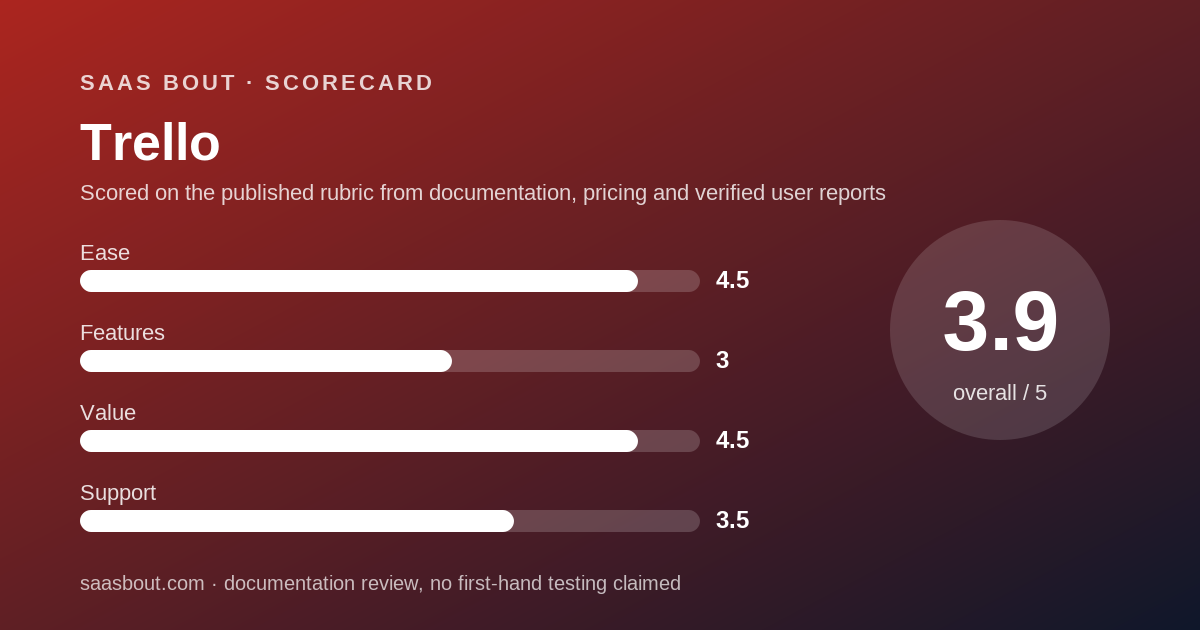
Trello is the lightweight of the project management division and finishes fourth on our card with a 31: ease 9, features 6, value 9, support 7. This is a documentation review: every figure comes from Trello's pricing page in US dollars plus verified user reports on Trustpilot and G2 comparison pages, all read on October 10, 2026, not from paid trials or staged demos. Ease scores 9, tied for the top of the division, because a board of lists and cards needs no training and the free plan covers 10 collaborators and 10 boards per Workspace. Value scores 9 because Standard at $5 per user per month billed annually is the cheapest paid plan here and Premium at $10 still undercuts every rival's equivalent tier. Features score 6, the lowest round on any card in the division, because Calendar, Timeline, Table, Dashboard and Map views all require Premium, the free plan caps command runs at 250 a month and files at 10 MB, and the pricing page publishes no integration count. Support scores 7: the only explicit support line on the page is 24/7 Enterprise Admin support, and the per-plan support row could not be read. Buy it if a board is the whole job. Skip it if you need a timeline on day one.
Visit Trello
We have no affiliate relationship with this vendor. Link goes to the official site.
Where it is strong
- Standard at $5 per user per month billed annually is the cheapest paid plan in the division, with unlimited boards, custom fields and 250 MB per file
- Free plan covers 10 collaborators and 10 boards per Workspace with unlimited cards and unlimited Power-Ups per board
- Premium at $10 adds Calendar, Timeline, Table, Dashboard and Map views plus unlimited command runs and admin controls
- Enterprise is priced on the page at $17.50 per user per month billed annually, $210 per user per year, rather than hidden behind a quote
- Downgrading keeps paid features until the prepaid period ends, per the pricing FAQ
- Prices are stated in US dollars, the only page in this division that names its currency
Where it falls short
- Calendar, Timeline, Table and Dashboard views all require Premium at $10, double the Standard price
- Free plan caps automation at 250 Workspace command runs a month and attachments at 10 MB per file
- The pricing page does not state the length of the Premium free trial
- Per-plan support levels could not be read from the comparison table; only 24/7 Enterprise Admin support is stated explicitly
- Multi-board guests are billed at the full member rate, and SSO requires a separate Atlassian Guard subscription from $4 per user per month
At a glance
| Starting price | $5/user/mo billed annually (Standard); $6 billed monthly; prices in USD |
|---|---|
| Pricing note | From $5/user/mo billed annually for Standard, $10 for Premium where the Timeline, Calendar and Dashboard views live (pricing page, checked October 10, 2026) |
| Free plan | 10 collaborators per Workspace, 10 boards, unlimited cards, unlimited Power-Ups per board, 250 command runs/month, 10 MB per file |
| Seat minimum | None stated; Workspace members and team admins are billable |
| Trial | Premium free trial available to all users; length not stated on the pricing page |
| Refunds | Not addressed on the pricing page; downgrades keep paid features until the prepaid period ends |
| Support channels | 24/7 Enterprise Admin support on Enterprise; other plans' support row not readable on the pricing page |
| Automations | 250 command runs/month on Free, 1,000 on Standard, unlimited on Premium and Enterprise |
| File size | 10 MB per file on Free, 250 MB on Standard and above; storage unlimited |
What Trello actually is
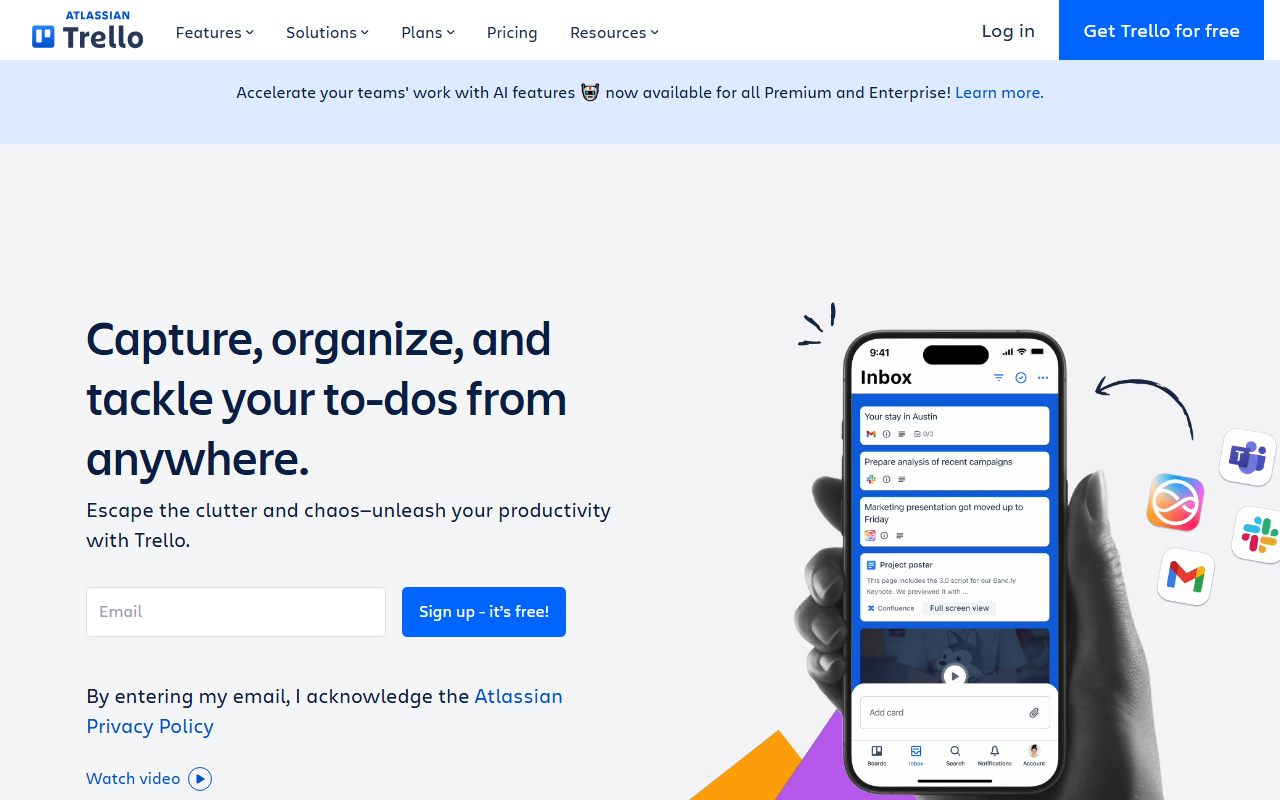
Trello is a kanban board owned by Atlassian. A Workspace holds boards, a board holds lists, a list holds cards, and a card holds everything else: checklists, due dates, attachments, comments. Power-Ups bolt extra behaviour onto a board, and Butler automation runs rules against cards.
That is the whole model, and it has not changed in principle since the product launched. Views beyond the board, Calendar, Timeline, Table, Dashboard and Map, were added later and live on the Premium plan.
Trello is not a work management platform in the sense that Asana or monday.com use the phrase. There are no portfolios, goals or resource management on any plan listed on the pricing page. It is also not a CRM; a sales team should read the CRM fight card.
In this division Trello fights Asana, monday.com and ClickUp. It finishes fourth on points in the best project management software for small teams ranking, and wins two rounds outright.
Who Trello is best for
Trello suits teams whose process is a sequence of columns.
- Teams of 2 to 15 that run editorial calendars, support queues, hiring pipelines or simple sprints from a board
- Teams of 10 or fewer who want a free plan that covers everyone, since Free allows 10 collaborators
- Budget-first buyers, because Standard at $5 is the cheapest paid plan in the division
- Companies already inside Atlassian, where Enterprise connects to Atlassian Guard for SSO
- Non-technical teams that want zero setup, since a board is usable in minutes
- Teams that extend tools with marketplace add-ons, because Power-Ups are unlimited per board on every plan
Who should skip it
Three profiles will outgrow it fast.
- Teams that need Timeline, Calendar or Dashboard views at the entry price, since those start at Premium
- Teams that automate heavily on the free plan, capped at 250 command runs a month
- Managers who need workload, goals or portfolio views, which Trello does not list
What the free plan includes and what each plan adds (as of October 2026)
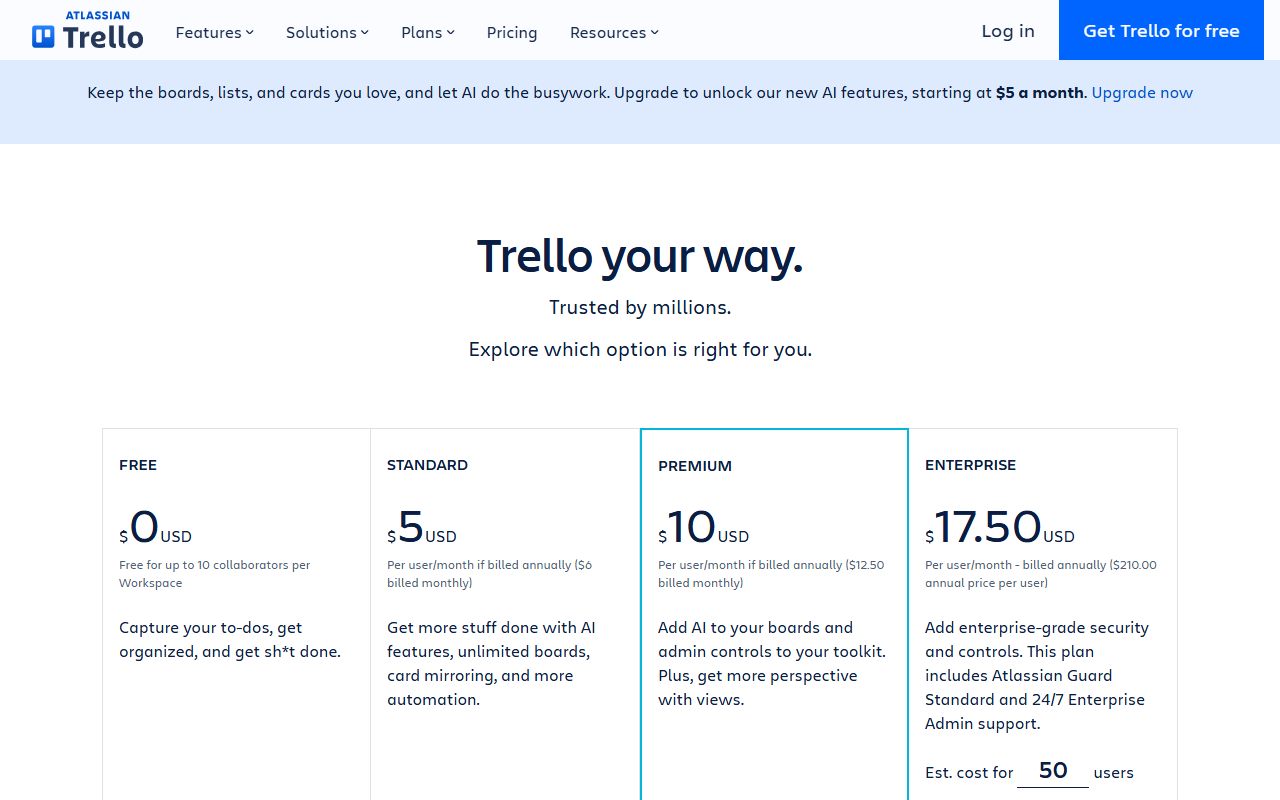
Free is stated as free for up to 10 collaborators per Workspace. It lists up to 10 boards per Workspace, unlimited cards, unlimited Power-Ups per board, 250 Workspace command runs a month, unlimited storage at 10 MB per file, Inbox, assignees and due dates, custom backgrounds, mobile apps and two-factor authentication, per the pricing page checked October 10, 2026.
Standard at $5 per user per month billed annually, or $6 monthly, adds AI features, unlimited boards, Planner, advanced checklists, card mirroring, custom fields, collapsible lists, single-board guests, saved searches, 1,000 command runs a month and 250 MB per file.
Premium at $10 billed annually, or $12.50 monthly, adds the views: Calendar, Timeline, Table, Dashboard and Map, plus Workspace views, unlimited command runs, admin and security features, Workspace-level templates, collections, observers and simple data export.
Enterprise at $17.50 per user per month billed annually, $210 per user per year, adds unlimited Workspaces, organisation-wide permissions, organisation-visible boards, public board management, multi-board guests, attachment permissions, Power-Up administration, SSO and user provisioning via Atlassian Guard, and 24/7 Enterprise Admin support. A monthly Enterprise price is not listed.
AI appears on every paid card, and the comparison table lists Quick Capture, AI summarisation, AI organisation and AI-generated boards, without stating usage limits.
How the pricing is structured
Per user, per month, in US dollars, the only pricing page in this division that names its currency. Annual billing is $5, $10 and $17.50 for Standard, Premium and Enterprise; monthly is $6 and $12.50 for the first two, with Enterprise monthly not listed.
For 10 users billed annually, Standard costs $50 per month, Premium $100 and Enterprise $175, editorial calculations. Monthly billing makes Standard $60 and Premium $125.
Who is billable matters. Workspace members and team admins are billed; single-board guests on Standard are not; multi-board guests are billed at the member rate. A client invited to three boards costs the same as an employee.
The Premium trial is available to all users with no length stated. Downgrading keeps Standard or Premium features until the prepaid period ends, after which the Workspace reverts to Free with 10 boards. Refunds are not addressed on the page.
Atlassian Guard, needed for SSO, is a separate subscription starting at $4 per user per month. Nonprofit and education discounts are available, sizes not stated. Trello is cloud-only.
Ease of use: what the 9 is built from
Trello scores 9 on ease, tied with monday.com at the top of the division. A board of lists and cards is the most widely understood interface in work software, the free plan needs no card and covers a whole small team, and the pricing page is short and in a named currency.
Trustpilot reviewers, read October 10, 2026, lead with easy, simple and visual; G2 summaries highlight the community and the availability of help resources.
The point comes off because simplicity moves work into Power-Ups. A team that needs more than a board ends up curating add-ons, each with its own settings and sometimes its own price. That is configuration by another name.
Features: what the 6 is built from
Features score 6, the lowest round on any card in this division, and the reason is the Premium wall. Calendar, Timeline, Table, Dashboard and Map views all sit at $10 per user. Asana puts Timeline and Gantt on its $10.99 Starter plan; monday.com puts Gantt on its $12 Standard; ClickUp puts Gantt on its $8 Core. Trello's $5 Standard has none of them.
The free plan's 250 command runs a month and 10 MB per file are the tightest automation and file limits here, excepting ClickUp's 60 MB total storage.
Nothing on the pricing page lists resource management, workload, goals or portfolios on any plan. Dependencies between cards are not listed as native. Integration count is not published; Power-Ups are unlimited per board, which is a different claim.
What Trello does, it does completely: unlimited cards everywhere, unlimited boards from $5, custom fields and advanced checklists from $5, and a Timeline that is enough for teams that want dates on a line rather than a critical path.
Value: what the 9 is built from
Value scores 9, tied with ClickUp at the top. Standard at $50 per month for 10 users billed annually is the cheapest paid plan in the division by a wide margin: ClickUp Core is $80, Trello's nearest rival, per the pricing pages read October 10, 2026.
Premium at $100 for 10 users is still below Asana Starter at $109.90 and monday.com Standard at $120, and it includes Dashboard and Calendar views that Asana Starter has and monday.com Standard partly has. It is above ClickUp Core at $80, which also has Gantt and unlimited storage.
The free plan for 10 collaborators and 10 boards is the broadest free offer here on people and boards together; only ClickUp's unlimited members goes further on headcount.
The point comes off because the price you compare is Premium, not Standard, the moment anyone asks for a calendar, and because multi-board guests and the Guard subscription add cost that the headline hides.
Support: what the 7 is built from
Support scores 7 because the pricing page says almost nothing readable about it below Enterprise. The comparison table has a support row, but the per-plan entries could not be read on October 10, 2026. The only explicit statement is that Enterprise includes Atlassian Guard Standard and 24/7 Enterprise Admin support. The Atlassian support article on Trello support offerings returned a 404 the same day.
G2 comparison pages list Trello's quality-of-support score at 8.5 out of 10 from roughly 7,400 responses, the lowest of the four fighters here but close to Asana.
Trustpilot shows a TrustScore of 2.2 out of 5 from 226 reviews, 50 percent five-star and 19 percent one-star, with support that is hard to reach and a chatbot that fails to resolve issues the most repeated complaint. The round would score higher if the vendor published hours per plan.
What verified users report
G2 comparison pages, read October 10, 2026, rate Trello 4.4 out of 5 from 13,962 reviews, the lowest overall G2 score in this division by a tenth to three tenths of a point, with quality of support at 8.5.
Trustpilot shows 226 reviews and a TrustScore of 2.2. Praise is uniform: easy to use, simple, visual, good for assigning tasks and sharing files, flexible for personal and team use. Complaints cluster around support reachability, confusing account closure and trial cancellation with unexpected charges, concerns about data being used for AI training by default, and frequent logouts and outages.
The shape is familiar from this division: the product is liked, the account relationship less so. The AI-training concern is specific to Trello and worth checking in Atlassian's settings before a team adopts it.
Limits stated by the vendor
Published on the pricing page as of October 10, 2026.
- Free plan: 10 collaborators per Workspace, 10 boards per Workspace
- Command runs per month: 250 on Free, 1,000 on Standard, unlimited on Premium and Enterprise
- File size: 10 MB per file on Free, 250 MB on Standard and above; storage unlimited
- Views: Calendar, Timeline, Table, Dashboard and Map on Premium and Enterprise only
- Guests: single-board guests on Standard; multi-board guests on Enterprise, billed at member rate
- SSO and provisioning: via Atlassian Guard, a separate subscription from $4 per user per month
- Premium trial length: not stated; refunds: not addressed
Alternatives
ClickUp. Choose it the moment the team needs Gantt, custom fields and unlimited storage on a paid plan, because Core at $8 per user per month billed annually includes all three for less than Trello Premium. Otherwise choose Trello if a board is enough and simplicity is worth more than features. Scorecard in our ClickUp review.
monday.com Work Management. Choose it if you want a board that grows into Gantt, dashboards and typed columns without add-ons, and you are 3 or more people. Otherwise choose Trello for 1 or 2 people, or for 10 or fewer on the free plan. See our monday.com review.
Asana. Choose it if the team runs many projects and needs timelines and portfolios in the base paid tiers. Otherwise choose Trello when the budget is $5 per seat and the process is one board. See our Asana review and the bout Asana vs monday.com.
All four are ranked in the best project management software for small teams fight card.
Bottom line
Trello finishes fourth with a 31 and wins two rounds outright, ease and value. Standard at $5 per user per month billed annually is the cheapest paid plan in the division, and the free plan for 10 collaborators is the one most small teams can actually live on.
The 6 on features is the honest caveat. Every view beyond the board costs $10 per user, and at that price ClickUp Core includes more. Buy Trello if a board is the whole job. Buy Premium only after confirming the team will use the views it pays for.
Every figure above comes from Trello's pricing page, Trustpilot and G2 comparison pages read on October 10, 2026. Trial length and per-plan support hours are not published there; check before you sign.
Buy it if
- A kanban board is your entire process and nobody is asking for a Gantt chart
- You are 10 or fewer people on 10 or fewer boards, because the free plan covers that outright
- You want the cheapest paid plan in the division, which Standard is at $5
- You already pay for Atlassian tools, since Enterprise plugs into Atlassian Guard for SSO
Skip it if
- You need Timeline, Calendar or Dashboard views on a $5 budget, because they start at Premium
- Your team automates more than 250 actions a month on the free plan, where the command run cap stops you
- You need resource management, goals or portfolios, which Trello does not list on any plan
Frequently asked
Is Trello free?
Yes. The Free plan is for up to 10 collaborators per Workspace with 10 boards, unlimited cards, unlimited Power-Ups per board, 250 Workspace command runs a month, 10 MB per file with unlimited storage, and two-factor authentication, per the pricing page checked October 10, 2026. Calendar and Timeline views require Premium.
How much does Trello cost for 10 people?
Billed annually, Standard is $50 per month and Premium $100 per month for 10 users, editorial calculations from the $5 and $10 per-user prices on the pricing page, October 2026. Billed monthly the same team pays $60 or $125. Enterprise is $175 per month at $17.50 per user billed annually.
What is the difference between Trello Standard and Premium?
Premium at $10 per user per month billed annually adds the views: Calendar, Timeline, Table, Dashboard and Map, plus Workspace views, unlimited command runs, admin and security features, Workspace templates, collections, observers and simple data export. Standard at $5 has unlimited boards, custom fields, advanced checklists, card mirroring and 1,000 command runs a month.
How long is the Trello Premium free trial?
The pricing page read on October 10, 2026 says a free trial of Trello Premium is available to all users but does not state its length. The Atlassian support article on the trial returned a 404 on the same day. Check the trial banner inside your Workspace for the current duration.
Does Trello have Gantt charts?
Trello's Premium plan includes a Timeline view, which shows cards on a date axis, per the pricing page. The page does not use the word Gantt and does not list dependencies between cards as a native feature. Teams that need true dependency-based Gantt should compare Asana Starter or monday.com Standard.
Is Trello worth it for a small team in 2026?
For a team of 10 or fewer that works from a board, the free plan is the best free offer in this division on people and boards. Standard at $5 is the cheapest paid step anywhere here. The moment the team needs a calendar or timeline, Premium at $10 is the real price, and ClickUp Core at $8 includes more.
Sources
- Trello pricing page, including plan cards and FAQ - checked October 10, 2026
- Atlassian support documentation for Trello - checked October 10, 2026
- Trustpilot: Trello reviews - checked October 10, 2026
- G2 comparison pages: Trello rating and quality of support - checked October 10, 2026
Update history
- October 10, 2026 - First scorecard. Pricing and limits read from trello.com/pricing (USD); Atlassian support articles on trial length and support offerings returned 404 and could not be read. User reports from Trustpilot and G2 comparison pages.
Visit Trello
We have no affiliate relationship with this vendor. Link goes to the official site.