 Saas
Saas
HubSpot CRM
The heavyweight with the best free corner in the division, and the steepest climb once you start paying for seats
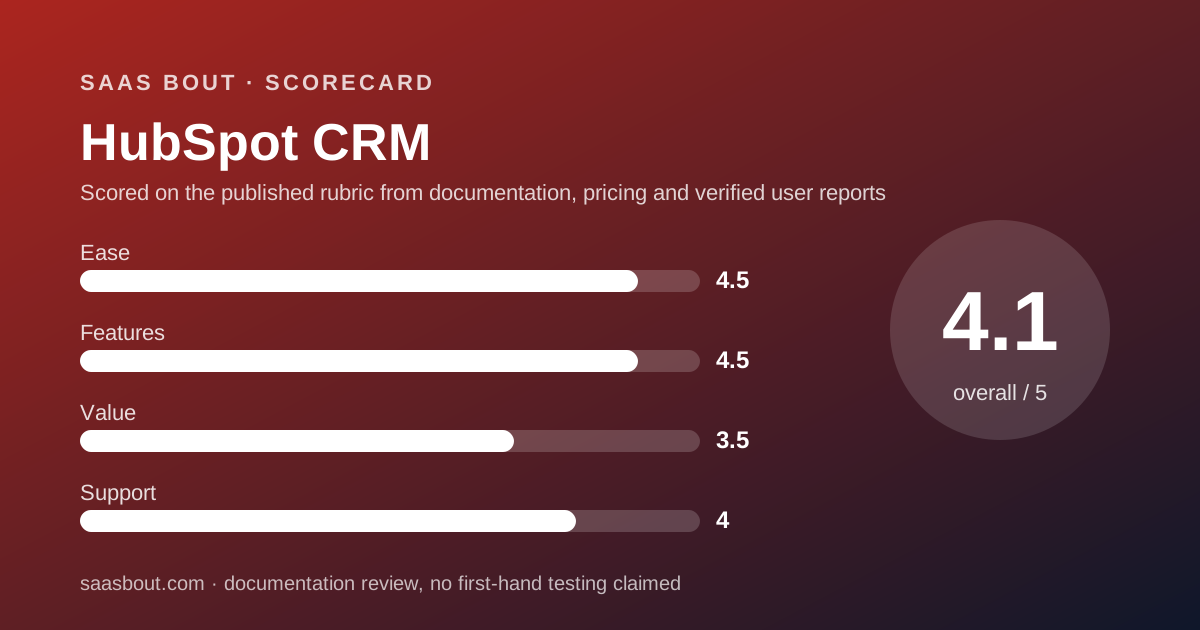
Scored on the published rubric, from documentation, pricing and verified user reports.
Best for: Teams of 2 to 50 that want marketing, sales and service records in one database, start free, and can live with a steep per-seat climb when they outgrow Starter.
Verdict
HubSpot CRM enters this bout as the heavyweight with the best free corner in the division. Two users, 1,000 contacts, deal pipelines, email tracking and a meetings link cost nothing, with no expiry date, per the pricing page checked October 10, 2026. Ease and features both score 9 on our 10-point card. This is a documentation review: every number here comes from HubSpot's pricing page, its Product and Services Catalog and its Knowledge Base, not from staged demos or paid trials. The value round is where it loses points. Sales Hub Starter is listed at $20 per seat per month, Professional jumps to $100 per seat plus a $1,500 one-time onboarding fee, and Enterprise is $150 per seat plus $3,500. A 10-person team moving from Starter to Professional sees its bill climb five-fold before the onboarding fee. Support is email only on Starter and adds phone on Professional and Enterprise. If you want one database for marketing and sales and you are small today, HubSpot is the right opening pick. If you only need a pipeline, read the Pipedrive bout first.
Visit HubSpot CRM
We have no affiliate relationship with this vendor. Link goes to the official site.
Where it is strong
- Free tier covers 2 users and 1,000 contacts with no time limit, per the pricing page checked October 10, 2026
- No seat minimums on any Sales Hub tier for customers who signed after March 5, 2024, per the Product and Services Catalog
- View-only seats are free on paid tiers, so managers and finance can read the CRM without paying
- Marketing, sales and service records share one contact database, so there is no sync layer to maintain
- Over 2,000 apps in the HubSpot Marketplace, per the product page
- Workflows scale from 50 on Starter to 1,000 on Enterprise, with sequences triggered by workflows at the top tier
Where it falls short
- Professional costs $100 per seat per month plus a $1,500 onboarding fee, five times the Starter list price
- Starter workflows have restricted triggers and actions, per the catalog, so real automation starts at Professional
- The free tier was capped at 1,000 contacts and 2 users for new accounts from September 18, per the Knowledge Base
- Phone support is absent on Free and Starter; those tiers get community, Academy and email only
- HubSpot Credits for AI features are metered at $0.01 each and do not roll over month to month
What HubSpot CRM actually is
HubSpot CRM is the shared contact database under five paid products HubSpot calls Hubs: Marketing, Sales, Service, Content and Operations. The CRM itself is free. What you pay for is a Hub, and for a sales team that Hub is Sales Hub.
That structure matters for this CRM bout. Pipedrive and Zoho CRM sell a sales tool. HubSpot sells a seat in a platform where the sales tool is one wing of the building.
The upside is one contact record that marketing, sales and support all write to. The downside is that the pricing page is really three pricing pages, and the number you see first is rarely the number you pay.
This is a documentation review. The scorecard below is built from the pricing page, the Product and Services Catalog and the Knowledge Base, all read on October 10, 2026, plus verified user reports on Capterra.
Who HubSpot CRM is best for
The free tier and the shared database decide who should pick this fighter.
- Two-founder startups that need a real CRM today and have fewer than 1,000 contacts
- Teams where marketing already runs HubSpot and sales wants the same contact record
- Agencies and consultancies whose partners read the pipeline but never edit it, because view-only seats are free
- Companies that plan to buy Professional within a year and can absorb the $1,500 onboarding fee
- Sales teams that want sequences, playbooks and forecasting in one tool without stitching add-ons together
- Anyone who values a large integration marketplace: the product page lists over 2,000 apps
Who should skip it
Some teams will pay for a building when they only need a room.
- Teams that only want a visual deal pipeline: Pipedrive does that for $14 to $24 per seat
- Budget-first teams of 5 to 15 reps, because the jump from Starter to Professional is five-fold per seat
- Teams that need phone support from day one without buying Professional
What the free tier includes (as of October 2026)
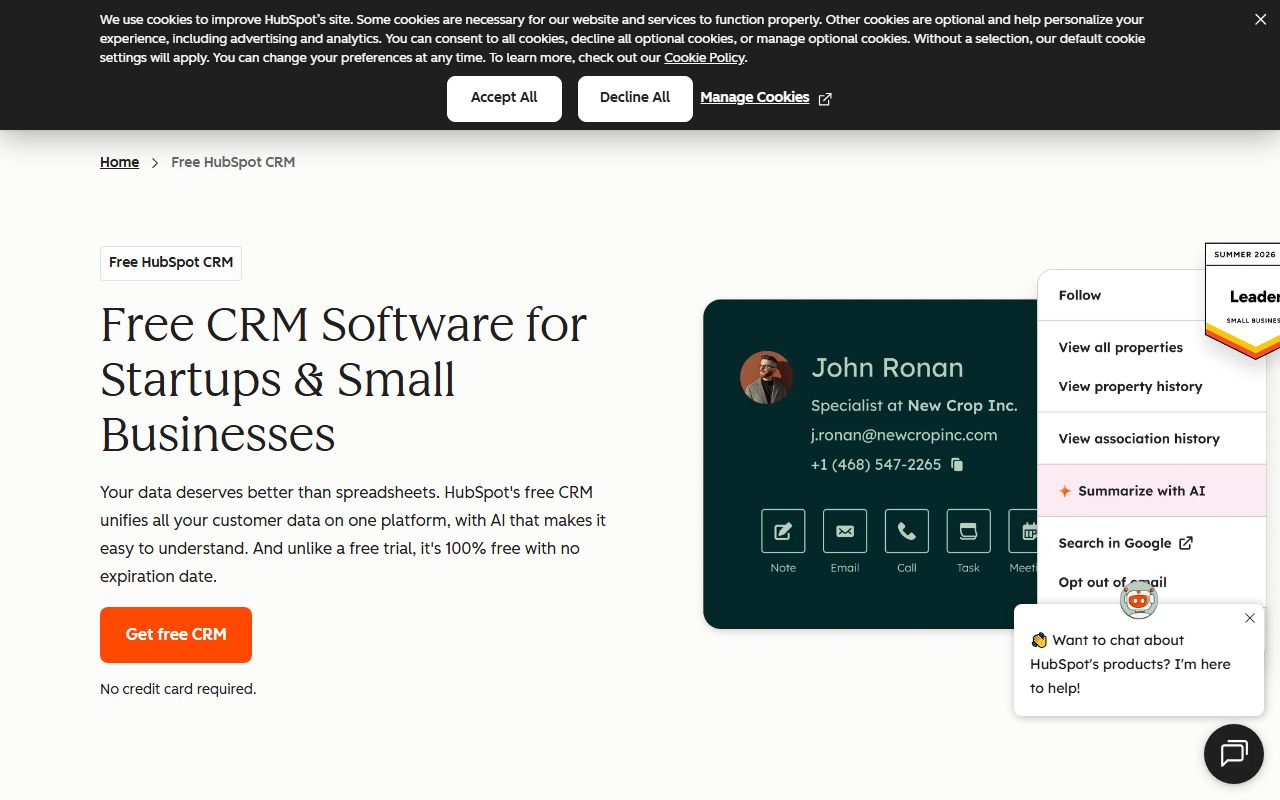
The free tier is the best corner in this division and the main reason HubSpot scores 9 on ease. Per the pricing page checked October 10, 2026, it covers up to 2 users and 1,000 contacts, with no expiry date and no credit card.
The Knowledge Base FAQ, last updated June 20, 2026, states that from September 18 new free accounts are limited to 1,000 contacts and 2 users. Older free accounts may carry older limits, so check the Usage and Limits page inside your own account.
Feature-wise, the free tier lists contact and deal management, email tracking, email templates and scheduling, document sharing, meeting scheduling, live chat and sales quotes. It also includes Gmail, Google Workspace and Outlook integration.
The caps that bite are small: up to 3 canned snippets, 3 email templates and 1 personal meetings link, all carrying HubSpot branding. Support on the free tier is the HubSpot Community, HubSpot Academy and the Knowledge Base, with no email or phone channel.
What sits behind the paywall
Starter removes branding and lifts the small caps. Per the Sales Hub pricing page, Starter raises snippets to 5,000, templates to 10,000 and meeting links to 1,000 with branding removed. It adds 30 dashboards, 15 pipelines, 500 calling minutes per month and 50 workflows with restricted triggers and actions.
Professional is where the sales engine lives. The catalog lists 300 fully customizable workflows, 100 pipelines, 75 dashboards, 3,000 calling minutes and up to 3 phone numbers. Sequences are capped at 5,000 per account with up to 500 email sends per user per day.
Enterprise lifts those to 1,000 workflows that can trigger sequences, 350 pipelines, 100 dashboards, 12,000 calling minutes, 5 phone numbers and 1,000 sends per user per day. Playbooks go from 5 on the lower tier to 5,000 at the top.
AI features draw on HubSpot Credits: 500 per month on Starter, 3,000 on Professional, 5,000 on Enterprise. Extra credits cost $0.01 each, and included credits reset monthly without rolling over, per the pricing page.
How the pricing is structured
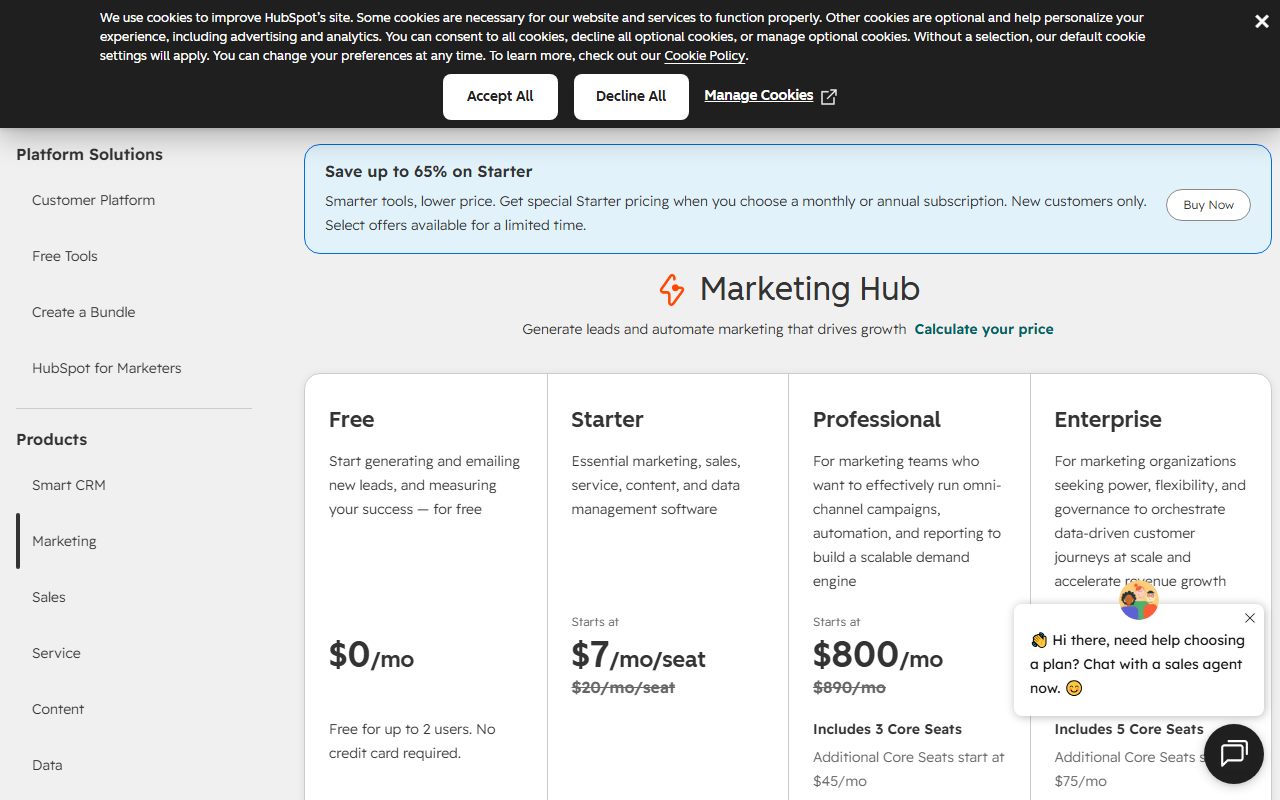
The headline prices, per the Product and Services Catalog checked October 10, 2026: Sales Hub Starter $20 per seat per month, Professional $100 per seat per month, Enterprise $150 per seat per month billed annually.
The pricing page also shows Starter starting at $7 per seat per month. That is a new-customer promotion marked as saving up to 65 percent, limited time. Budget on the $20 list price unless the promotional rate is written into your contract.
Professional carries a one-time $1,500 onboarding fee and Enterprise a one-time $3,500 fee. Both are listed separately from the per-seat price. Starter lists no onboarding fee.
Seats are the unit. Starter uses Core Seats, Professional and Enterprise use Sales Seats. The catalog states that customers who signed after March 5, 2024 face no additional seat minimums. View-only seats are free.
For a 10-person team, our editorial arithmetic: Starter at list is $200 per month. Professional is $1,000 per month plus the $1,500 fee, about $13,500 in year one. Enterprise is $1,500 per month plus $3,500, about $21,500 in year one.
That five-fold step from Starter to Professional is the single biggest fact on this card. The fight card for small sales teams shows how it compares at 5, 10 and 20 seats.
Ease of use: what the 9 is built from
HubSpot scores 9 of 10 on ease, the joint highest in this cluster. Three documented facts drive it.
First, the free tier means a team can be working in the real product within minutes, with no trial clock and no card. Second, the Gmail, Google Workspace and Outlook integrations are on the free tier, so email logging starts on day one.
Third, HubSpot Academy is free to everyone, including free accounts, and user reviews on Capterra repeatedly name the training as a reason adoption went smoothly.
It loses the last point because the Hub structure makes the product bigger than a pure pipeline tool. Verified users on Capterra describe setup taking longer than planned while the team learned where functions lived. Pipedrive is the simpler fighter if the pipeline is all you need.
Features: what the 9 is built from
Feature depth is HubSpot's strongest round. Within Sales Hub alone the catalog documents sequences, playbooks, calling, meeting links, quotes, custom reporting, forecasting across team hierarchies and goal tracking.
The free tier already includes deal pipelines, a reporting dashboard and the Breeze Assistant. Professional adds forecasting and custom goals. Enterprise adds forecasting across team hierarchies and sequences triggered by workflows.
Integration breadth is the other pillar: the product page lists more than 2,000 apps in the HubSpot Marketplace. Compared with the 500-plus Pipedrive lists, that is the widest corner in the bout.
The point it drops is tier gating. Starter workflows have restricted triggers and actions, per the catalog, so a Starter team cannot build the automations the marketing material shows. Real automation begins at $100 per seat.
Value: what the 7 is built from
Value is scored at a realistic team size, and at 10 seats HubSpot takes the lowest score of the three fighters.
At 2 seats it is unbeatable: free. At 10 seats on Starter it is $200 per month at list, competitive with Zoho CRM Standard at $140 and Pipedrive Growth at $240. The problem is what Starter leaves out: restricted workflows and email-only support.
The moment a 10-person team needs real automation, the bill becomes $1,000 per month plus $1,500 onboarding. Pipedrive Premium at $49 per seat delivers automations, sequences and lead routing for $490 per month with no onboarding fee. Zoho Enterprise is $400 per month.
HubSpot still earns a 7 rather than lower because of the free tier, free view-only seats, the lack of seat minimums and the fact that one subscription can replace separate marketing and service tools. For a pure sales team, those strengths count for less.
Support: what the 8 is built from
Support channels are published tier by tier, which already beats fighters who hide them. Per the Sales Hub pricing page checked October 10, 2026: Free gets the HubSpot Community, Academy and Knowledge Base; Starter adds email; Professional and Enterprise add phone.
Support is offered in English, French, German, Japanese and Portuguese on the free tier, per the CRM pricing page. Paid onboarding is mandatory on Professional and Enterprise and the fee covers a guided setup rather than ongoing help.
The score stops at 8 because Starter customers paying $20 per seat have no live channel, and because Capterra reviewers in 2026 describe a gap between what sales calls promised about implementation help and what onboarding delivered. Those are individual accounts, not a pattern we can quantify, but they recur.
What verified users report
On Capterra, HubSpot CRM holds 4.5 of 5 across 4,491 reviews, with ease of use at 4.4 and customer service at 4.4, page last updated September 30, 2026.
The recurring praise: the platform is intuitive, integrates with the tools teams already run, and the free training and certifications shorten onboarding. Several reviewers describe moving from Dynamics or spreadsheets and staying for years.
The recurring complaints, in order of frequency as we read them: cost rises quickly as contacts and tiers grow; small businesses feel priced out at the Professional step; imports can create duplicate properties and company records that are hard to clean; and a few 2026 reviews dispute sales promises about onboarding and refunds.
None of these are quotes we can verify individually. They are themes across a large sample, which is how we weight them.
Limits stated by the vendor
Limits worth copying into your evaluation sheet, all from the catalog or pricing pages checked October 10, 2026:
- Free: 2 users, 1,000 contacts, 3 snippets, 3 templates, 1 meetings link with branding
- Starter: 50 workflows with restricted triggers, 15 pipelines, 30 dashboards, 500 calling minutes, 500 credits per month
- Professional: 300 workflows, 100 pipelines, 75 dashboards, 3,000 calling minutes, 3 phone numbers, 3,000 credits, 500 sequence sends per user per day
- Enterprise: 1,000 workflows, 350 pipelines, 100 dashboards, 12,000 calling minutes, 5 phone numbers, 5,000 credits, 1,000 sequence sends per user per day
- Custom reports: the catalog lists caps of 100 and 500 across the upper tiers without a clean mapping; confirm with HubSpot before relying on either
- Calling is not supported in all countries, per the pricing page
Alternatives
Two fighters in the same CRM division are worth reading before you sign.
Pipedrive. Choose Pipedrive if your team sells from a pipeline and does not need marketing automation in the same tool. Growth at $24 per seat includes full email sync, automations and sequences. Otherwise choose HubSpot if marketing and sales must share one record. Read the Pipedrive review and the HubSpot CRM vs Pipedrive bout.
Zoho CRM. Choose Zoho if you want the deepest customization per dollar and can tolerate a longer setup. Enterprise at $40 per seat includes territory management, sandboxes and custom functions. Otherwise choose HubSpot if you want a simpler start and a bigger marketplace. Read the Zoho CRM review.
Bottom line
HubSpot CRM wins the free round outright and ties for the top score on ease and features. It loses the value round at 10 seats, and that is the round most small sales teams care about.
Start here if you are 2 people, or if marketing already lives in HubSpot. Budget for the Professional step before you commit, because that is where the real automation and the real cost begin.
If the pipeline is all you need, the fight card puts Pipedrive ahead on points. Our method for scoring every round is on the method page.
Visit HubSpot CRM
We have no affiliate relationship with this vendor. Link goes to the official site.