 Saas

DocuSign
The deepest compliance and feature table in this division, sold on an envelope allowance of 100 per user per year that most buyers never read before they sign
Scored on the published rubric, from documentation, pricing and verified user reports.
Best for: Teams that need a named compliance control - HIPAA through a BAA, data residency, 21 CFR part 11, FedRAMP - and that can count their annual sending volume before they commit to a year.
Verdict
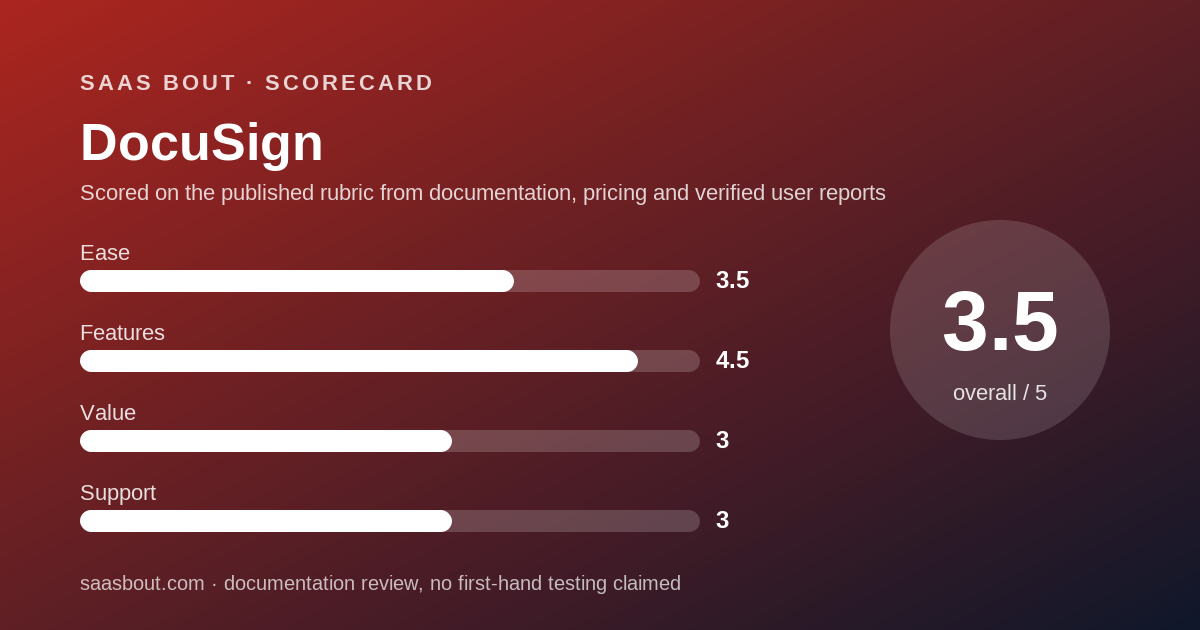
DocuSign scores 28 on our four-round card: ease 7, features 9, value 6, support 6. It takes third place in the e-signature division behind Dropbox Sign on 31 and PandaDoc on 30, and it loses on exactly one number. This is a documentation review. Every figure comes from the Docusign pricing page rendered in a headless browser, the plan catalogue embedded in that same page, the pricing FAQ and the Trustpilot profile for docusign.com, all read on October 24, 2026. No paid trials, no staged demos. Features scores 9 because no rival here publishes a comparable grid: 21 CFR part 11, FedRAMP moderate, DoD IL4, HIPAA through a BAA, data residency, remote online notarisation, qualified electronic signatures under eIDAS. Value scores 6 because every one of those lines reads Contact sales, and because the self-serve plans meter sending. Standard and Business Pro include 100 envelopes per user per year on annual billing and 10 per user per month on monthly billing. Past that the page says each extra envelope is billed pay-as-you-go at a set rate, and that rate is not printed. Ease scores 7: three different prices exist for every plan. Support scores 6. Buy it if a regulator names your control. Skip it if your volume is lumpy.
Visit DocuSign
We have no affiliate relationship with this vendor. Link goes to the official site.
Where it is strong
- The compliance grid is the widest in this division: ISO 27001 and SOC 2 Type II on every plan, and HIPAA through a BAA, data residency, 21 CFR part 11, FedRAMP moderate, DoD IL4 and Docusign Monitor all listed as available on Enhanced plans
- Qualified electronic signatures under eIDAS appear on the Enhanced column, which reads AeS, SeS, QeS where the three self-serve plans read SeS only
- A 30-day money-back refund is published for annual plans bought on Docusign.com, covering Personal, Standard, Business Pro, the three IAM plans and the real estate plans
- Recipients never pay and never need an account: the FAQ says agreements arrive by email from dse@docusign.net and can be completed without a Docusign login
- Signing is offered in 44 or more languages and the service is described as used in 180 or more countries, both on the plan comparison table
- Business Pro puts payment collection, bulk send, PowerForms, web forms, locked templates and the public API on a $45 per user per month annual plan rather than on a quote
- The page carries a working plan catalogue for three billing modes at once, so a buyer can read the upfront annual, the annual-billed-monthly and the no-commitment monthly price of the same plan side by side
Where it falls short
- Standard and Business Pro meter sending: 100 envelopes per user per year on annual billing, or 10 per user per month if you pay monthly, which is 120 a year for a higher monthly price
- Overage has no published price. The FAQ says each extra envelope is billed pay-as-you-go at a set per-envelope rate, and that rate appears nowhere on the page
- Every plan has three prices and the page shows one of them by default, so $11, $10 and $15 are all the real monthly price of Personal depending on the billing mode you pick
- The API is not available below Business Pro: the comparison table marks Industry-leading APIs as not included on Personal and Standard
- Single sign-on, data residency, HIPAA through a BAA, 21 CFR part 11, FedRAMP, remote notarisation and Docusign Monitor are all Contact sales, with no published price anywhere on the page
- Self-serve stops at 50 users; the footnote says to call 1-877-720-2040 if you need more
- The annual-billed-monthly mode is a year-long commitment in disguise: cancel after the first 30 days and the FAQ says you owe the remaining balance plus taxes and any overage costs
- Neither a free plan nor a free trial appears on this pricing page; the words free trial are not on it as read on October 24, 2026
- Trustpilot showed 1.3 out of 5 from 1,268 reviews for docusign.com on October 24, 2026, the weakest public standing of the three fighters on this card
At a glance
| Starting price | $11/user/mo on an annual commitment billed monthly ($132/yr); $10/mo if the year is paid upfront; $15/mo with no commitment |
|---|---|
| Pricing note | From $11 a month on an annual commitment billed monthly, which the card totals at $132 for the year, or $15 a month with no commitment, for one user and 5 envelopes a month (pricing page and the plan catalogue embedded in the same page, checked October 24, 2026) |
| Team plan | Standard $30/user/mo annual billed monthly ($360/yr), $25/mo paid upfront, $45/mo no commitment |
| Top self-serve plan | Business Pro $45/user/mo annual billed monthly ($540/yr), $40/mo paid upfront, $65/mo no commitment |
| Free plan | None shown on the pricing page as read October 24, 2026 |
| Envelope allowance | Personal 5 a month; Standard and Business Pro 100 per user per year on annual billing, or 10 per user per month on monthly billing; Enhanced custom |
| Overage | Pay-as-you-go at a set per-envelope rate; the rate is not printed on the page |
| Seats | Personal 1; Standard and Business Pro 1 to 50; above 50 users the page says to call sales |
| API | Not included on Personal or Standard; included on Business Pro and Enhanced. Separate developer plans run $50/mo annual ($600/yr) to $480/mo annual ($5,760/yr) |
| Compliance | ISO 27001 and SOC 2 Type II on all plans; HIPAA through a BAA, data residency, 21 CFR part 11, FedRAMP moderate, DoD IL4 all Contact sales |
| Refund | 30 days from purchase on annual plans bought on Docusign.com, usable once per customer |
| Add-ons | Send with SMS from $0.36 a delivery; recipient identity verification from $2.40 an attempt; both require a Standard or Business Pro plan first |
What DocuSign actually is
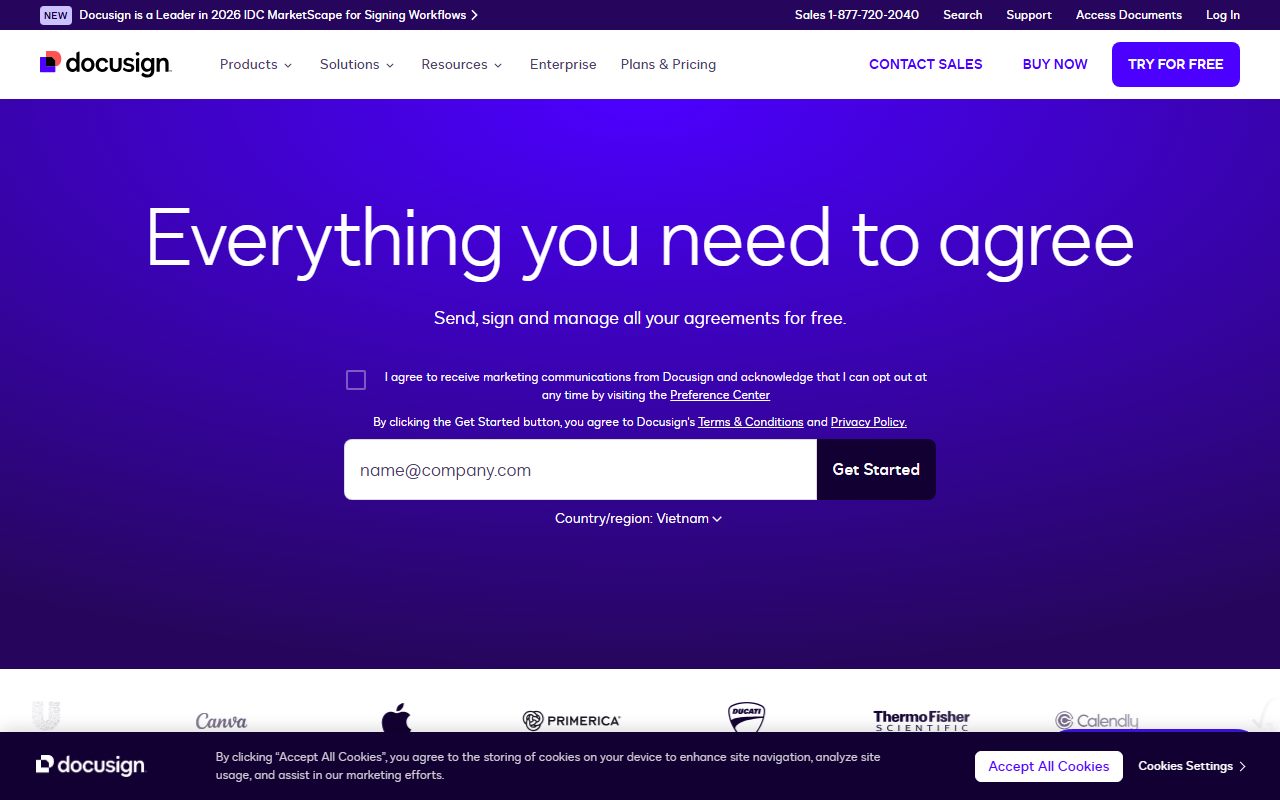
DocuSign sells signature capacity, not seats. The seat price is the headline. The envelope allowance is the product.
An envelope is the unit. The pricing FAQ defines it as an electronic record holding one or more documents sent for signature, with one or many signers, counted once when it goes out.
It counts whether or not anyone signs it. A deal that dies after the contract is sent still spends an envelope.
That definition is the whole review. Every price below is a price for a number of envelopes, and the number is smaller than most buyers expect.
Around the four eSignature plans sit three other lines on the same page: developer plans priced on API volume, real estate plans, and Intelligent Agreement Management plans that drop the envelope cap entirely.
The page shows one price per plan at a time. The catalogue behind it carries three.
Teams whose real bottleneck is pipeline rather than paperwork should start with the CRM fight card for small sales teams instead.
Who DocuSign is best for
One profile fits this fighter better than any rival on the card: the buyer whose control list is written by somebody else.
- Teams under a HIPAA business associate agreement, since the row exists here and reads Contact sales on Enhanced
- Life sciences and regulated manufacturing, where 21 CFR part 11 is named on the table
- Public sector suppliers who need FedRAMP moderate authorisation or DoD IL4
- Companies with an EU data residency requirement, listed as available on Enhanced plans
- Sales teams that collect a deposit at signature, which Business Pro supports
- Businesses whose annual volume fits inside 100 envelopes per user per year
- International operations, given 44 or more signing languages and qualified signatures on Enhanced
Who should skip it
Three profiles will pay more than they planned here.
- Anyone whose sending spikes, because the allowance is annual and the overage rate is unpublished
- Developers on a budget, since the API is marked not included below Business Pro
- Buyers who want to test first, as the pricing page shows no free plan and no free trial
What each plan includes (as of October 2026)
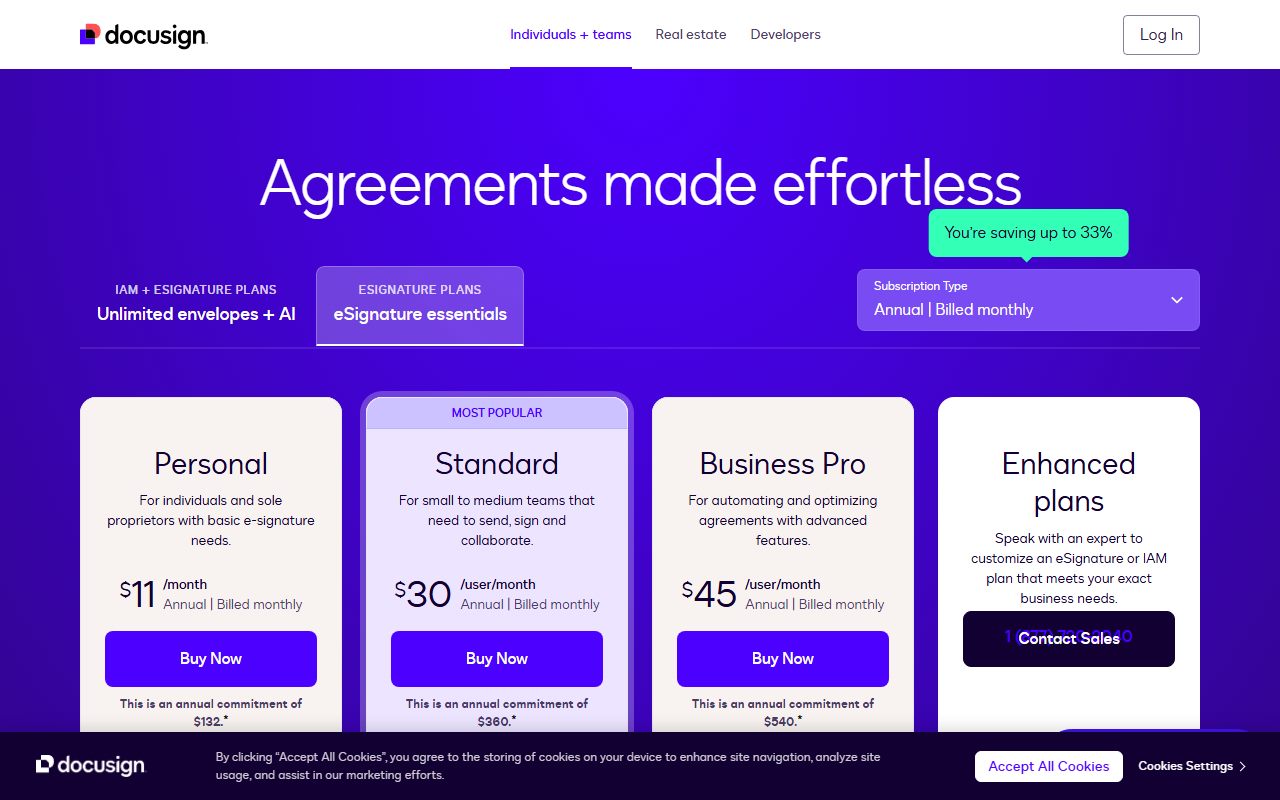
Four cards. Three of them have a Buy Now button and a number.
Personal is for a single user. Its card lists 5 envelopes a month, stored agreements, an AI-assisted summary, reusable templates and 1,000 or more integrations.
Standard is badged MOST POPULAR. Its card lists 100 envelopes per user per year, shared templates, real-time commenting, custom branding, delegated signing, plus a one-time bonus of 5 SMS deliveries and 5 identity verifications.
Business Pro adds web forms, payment collection during signing, interactive form fields, real-time data verification as signers type, and bulk sending. Its envelope line is the same 100 per user per year.
Enhanced plans are a sales call: customised envelope limits, centralised org management, 24/7 live technical support, all security configurations, single sign-on and document generation inside Salesforce.
Three of those five Enhanced bullets are things the comparison table marks as unavailable on every self-serve plan. That is where the value round goes.
How the pricing is structured
Every plan has three prices. The page shows one.
The toggle is labelled Annual | Billed monthly, and it is the default. In that mode Personal shows $11 a month with the line This is an annual commitment of $132.
Standard shows $30 a user and $360. Business Pro shows $45 a user and $540.
Every one of those multiplies out: 11 by 12 is 132, 30 by 12 is 360, 45 by 12 is 540.
The plan catalogue inside the same page carries the other two modes. Paid upfront for the year, Personal is $10 a month and $120 for the year, Standard $25 and $300, Business Pro $40 and $480.
With no commitment at all, Personal is $15 a month, Standard $45 and Business Pro $65.
So the honest answer to what Standard costs is $25, $30 or $45 a month per user, and the page's badge of up to 33 percent saving is the gap between $45 and $30.
The FAQ says the annual-billed-monthly mode enrols you for a full year paid in instalments, cancellable penalty-free within 30 days, after which you owe the remaining balance plus taxes and overage.
That is a 12-month contract presented as a monthly price, disclosed in a footnote.
The envelope allowance is the number to read first
This is where a cheap-looking plan turns expensive.
Standard and Business Pro annual plans include up to 100 envelopes per user per year. The monthly versions of the same plans include up to 10 per user per month.
A two-person team on annual Standard therefore has 200 envelopes for the year, and pays $720 for them. That is $3.60 an envelope, an editorial calculation from the published figures.
If that team sends 40 contracts in March and 5 in July, the annual number may still work. If it sends 30 a month all year, it runs out in July.
What happens then is the weakest disclosure on the page. The FAQ says the excess is billed pay-as-you-go, where Docusign will charge a set per-envelope rate.
A set rate that is not set down anywhere on the page. The only way to see it, per the same answer, is to pre-purchase envelopes from inside the account.
The envelope also counts on send, not on completion. PowerForms sends count too. So does a contract the other side never opens.
Dropbox Sign, on the same card, prints unlimited signature requests on all three plans. That single difference decides the division.
Round 1, ease: what the 7 is built from
The page is thorough and it is not clear. Those are different things.
What earns the 7: a comparison table with roughly 60 rows, each filled in with Includes, Does Not Include, Contact sales or a real figure. Nobody else here publishes that much detail, and the envelope and refund definitions are exact.
Three points come off for the price presentation. A buyer who reads the card and nothing else believes Standard costs $30 a user a month. It can cost $25 or $45.
Two of those come off for the catalogue carrying SKUs the cards never show: Standard Unlimited, Business Pro Unlimited and Professional Unlimited, all with prices and unlimited envelope quantities.
Professional Unlimited lists $60 a month and $720 a year with no envelope cap. A buyer told that unlimited sending means a sales call cannot see it.
The last point comes off for the add-on prices. The visible blocks read from $0.36 a delivery for SMS and from $2.40 an identity verification attempt.
The page's own label strings also carry from $0.40 and from $2.50 under its IAM keys. We print both pairs.
Round 2, features: what the 9 is built from
DocuSign wins the features round on this card and it is not close.
The security block alone runs: ISO 27001, SOC 2 Type II, WCAG 2.0 Level AA, eIDAS, GDPR, email access codes and managed stamps.
Then SMS and phone authentication, knowledge-based authentication, ID verification, data residency, HIPAA through a BAA, FedRAMP moderate, DoD IL4, 21 CFR part 11 and Docusign Monitor.
No rival here lists half of it. PandaDoc stops at SOC 2 Type II, GDPR, eIDAS and an optional HIPAA line on Enterprise.
The workflow block is similarly deep: conditional routing, delayed routing, signing groups, document visibility, supplemental documents, remote online notarisation, eWitness and retention policies.
Business Pro is where the self-serve ceiling sits, and it is a real one. Payment collection, bulk send, PowerForms, web forms, locked templates, drawing fields, signer attachments and the public API are all on it.
One point comes off, not for depth but for distribution. Ten of the most-wanted rows read Contact sales in the only column where they are available.
Single sign-on is the clearest case. A five-person company that enforces SSO company-wide cannot buy this product without a sales call.
Teams whose coordination problem is internal rather than contractual are better served by the tools on our project management fight card.
Round 3, value: what the 6 is built from
This is the round DocuSign loses, and the arithmetic does the work.
Business Pro for three people on annual billing is $45 a user a month, which the card totals at $540 a year each, so $1,620 for the team. The allowance is 300 envelopes.
Dropbox Sign Standard for the same three people is $25 a user a month billed yearly, so $900 for the team, with unlimited signature requests printed on the plan.
DocuSign costs 80 percent more and meters the thing you bought it for. Both figures are editorial calculations from the published per-seat prices, read October 24, 2026.
Two points come back for what the extra money buys. Payment collection, web forms, bulk send and the API are on Business Pro and not on Dropbox Sign's self-serve plans at all.
If you need the regulated controls, the comparison stops being a comparison. HIPAA through a BAA and 21 CFR part 11 are not on anybody else's table here at any price.
Four points come off for the unpriced overage. An excess rate described as set but never shown cannot be budgeted, and a buyer who guesses wrong finds out on an invoice.
One thing keeps this round from falling further. The 30-day refund on annual plans is published and specific, including the once-per-customer limit. Neither rival publishes a refund policy at all.
Round 4, support: what the 6 is built from
What is published: 24/7 live technical support on Enhanced plans, and a sales line at 1-877-720-2040.
What is not published, as read on October 24, 2026: any uptime figure, any response-time target, any support hours, and any statement of which channels the three self-serve plans get.
That last gap is unusual. The comparison table has roughly 60 rows and not one of them is a support channel.
The verified record is poor. Trustpilot's structured data for docusign.com showed 1.3 out of 5 from 1,268 reviews on October 24, 2026.
That is a large sample and a low score, and the lowest of the three fighters here. G2 and Capterra returned no readable figure to a headless browser, so nothing from either appears on this card.
Four points come off for publishing no commitment of any kind below a sales call. Two come back for the refund policy and for cancellation terms that are spelled out rather than implied.
What the vendor publishes about its own standing
Nothing. There is no review badge, no star rating and no customer count on the pricing page. PandaDoc, by contrast, prints three dated third-party ratings on its own.
We will not guess at the themes behind the 1.3. Individual reviews were not read for this card, and inferring a complaint pattern from a star average would be inventing it.
For how we score published support commitments elsewhere, see the help desk fight card and the Zendesk review.
Limits stated by the vendor
Published on the pricing page, its comparison table and its FAQ as of October 24, 2026.
- Envelopes: Personal 5 a month; Standard and Business Pro 100 per user per year on annual billing, 10 per user per month on monthly billing; Enhanced custom
- Overage: billed pay-as-you-go at a set per-envelope rate; the rate is not shown on the page
- Seats: Personal single user; Standard and Business Pro 1 to 50; above 50 users, call sales
- API: not included on Personal or Standard; included on Business Pro and Enhanced
- Single sign-on, data residency, HIPAA through a BAA, 21 CFR part 11, FedRAMP moderate, DoD IL4, Docusign Monitor, remote online notary: Contact sales only
- eIDAS level: SeS on Personal, Standard and Business Pro; AeS, SeS and QeS on Enhanced
- Payments: Business Pro and Enhanced only, and only in currencies and countries the payment gateways support
- Refund: 30 days on annual plans bought on Docusign.com, once per customer
- Developer plans, priced separately: Starter $50 a month on annual billing and $600 a year with 40 envelopes; Intermediate $300 and $3,600 with 100; Advanced $480 and $5,760 with 100
Alternatives
Dropbox Sign. Choose it if you want unlimited sending on a cheap plan and your team is five people or fewer. Otherwise choose DocuSign when a named compliance control decides the purchase.
PandaDoc. Choose it if the document is a proposal with pricing tables and a payment button, not just a contract with a signature field. Otherwise choose DocuSign when the signature has to satisfy an auditor.
Both are scored on the same four rounds in our e-signature division.
If the shortlist has drifted, check what you are buying for. Deals that stall before the contract stage are a pipeline problem, and our CRM division scores HubSpot CRM and Pipedrive, with the bout HubSpot CRM vs Pipedrive.
If the stall is internal approvals rather than customer signatures, read the ClickUp review first.
Bottom line
DocuSign takes 28 on this card by having everything and pricing almost none of it in public.
The plan to buy, if you buy here, is Business Pro at $45 a user a month on an annual commitment, totalled at $540 a year. It is the lowest tier with the API, bulk send, web forms and payment collection.
Before you sign, count last year's contracts. If your team sends more than 100 per person, the plan price is not your plan price.
Ask the sales line for the pay-as-you-go envelope rate in writing. It is the one number this page calls set and never shows.
If a regulator, a hospital or a government buyer names your control, this is the fighter that lists it. Everything else here is cheaper and does less.
Every figure above was read on the Docusign pricing page, the plan catalogue embedded in it, the pricing FAQ and Trustpilot on October 24, 2026. Confirm prices and allowances at the payment step.
Buy it if
- A regulator or a client contract names your control, because HIPAA through a BAA, 21 CFR part 11, FedRAMP moderate and DoD IL4 are all listed here and at no rival on this card
- You can count your yearly sending volume, since the plan is priced per envelope allowance and the overage rate is not published
- You need payments collected inside the signing flow, which the page restricts to Business Pro and Enhanced plans
- Your signers are international, given 44 or more signing languages and qualified electronic signatures on the Enhanced column
Skip it if
- Your sending volume is lumpy or seasonal, because 100 envelopes per user per year is an annual budget with an unpriced overage behind it
- You want the API on a cheap plan, as the comparison table marks it not included below Business Pro
- You want to try before you commit, since no free plan and no free trial appear on the pricing page
Frequently asked
How much does DocuSign cost per month?
It depends which of three billing modes you pick. Personal is $15 a month with no commitment, $11 a month on an annual commitment billed monthly, or $10 a month if the year is paid upfront. Standard is $45, $30 or $25. Business Pro is $65, $45 or $40. All read October 24, 2026.
How many envelopes does DocuSign include?
Personal includes 5 envelopes a month. Standard and Business Pro annual plans include up to 100 envelopes per user per year, and the monthly versions include up to 10 per user per month. An envelope counts once it is sent, signed or not, per the pricing FAQ.
What happens if I send more envelopes than my DocuSign plan covers?
The FAQ says each extra envelope becomes an additional envelope billed pay-as-you-go at a set per-envelope rate, and that you can pre-purchase envelopes from the Plans and Billing page. The set rate is not printed on the pricing page.
Does DocuSign have a free plan or a free trial?
Neither appears on the pricing page. The four plan cards show Buy Now or Contact Sales buttons, and the phrase free trial does not occur anywhere on that page as read on October 24, 2026. Check the signup flow before assuming there is one.
Which DocuSign plan includes the API?
Business Pro and Enhanced. The plan comparison table marks Industry-leading APIs as not included on Personal and Standard. Separate developer plans also exist, running from $50 a month on annual billing, which the catalogue totals at $600 a year, to $480 a month, or $5,760 a year.
Is DocuSign HIPAA compliant?
The row reads HIPAA support through BAA, and it shows Contact sales on the Enhanced column and not included on Personal, Standard and Business Pro. So it exists, it is not on any self-serve plan, and no price for it is published.
Can I get a refund from DocuSign?
Yes, within 30 days, on annual plans bought on Docusign.com. The footnote adds that the 30-day refund option may only be used once per customer. Monthly plans can be cancelled at any time without a charge for the next month.
How many users can DocuSign Standard have?
Up to 50. The plan catalogue in the page lists seat quantities of 1 to 50 for both Standard and Business Pro, and a footnote says to call 1-877-720-2040 if you need more than 50 users.
Sources
- Docusign products and pricing page, plan cards, plan comparison table and pricing FAQ (rendered in a headless browser) - checked October 24, 2026
- Plan catalogue embedded in the same page: annual, annual-billed-monthly and monthly price plus envelope quantity and seat options for every SKU - checked October 24, 2026
- Trustpilot: Docusign reviews, aggregate rating in the page's structured data - checked October 24, 2026
Update history
- October 24, 2026 - First scorecard. The displayed cards and the plan catalogue embedded in the same page carry three different prices per plan (Personal $10 upfront annual, $11 annual billed monthly, $15 monthly); all three reported. The catalogue also contains Standard Unlimited, Business Pro Unlimited and Professional Unlimited SKUs with prices and unlimited envelope quantities that no plan card shows. Add-on prices appear twice at different values ($0.36 and $2.40 in the visible eSignature blocks; $0.40 and $2.50 in the page's IAM label strings); both reported. The pay-as-you-go overage rate is described as set but is not printed. G2 returned a 2.6 KB bot-challenge stub and Capterra returned a Cloudflare Attention Required page to a headless browser, so neither rating could be read.
Visit DocuSign
We have no affiliate relationship with this vendor. Link goes to the official site.