 Saas

Mailchimp
The best-known fighter in the division and the hardest to price, because every plan is a base rate multiplied by a contact band the page would not display, with overages billed automatically
Scored on the published rubric, from documentation, pricing and verified user reports.
Best for: Small teams who need several named logins with real role separation on a cheap plan, who are already inside the Intuit ecosystem, and whose list will stay well inside a known contact band.
Verdict
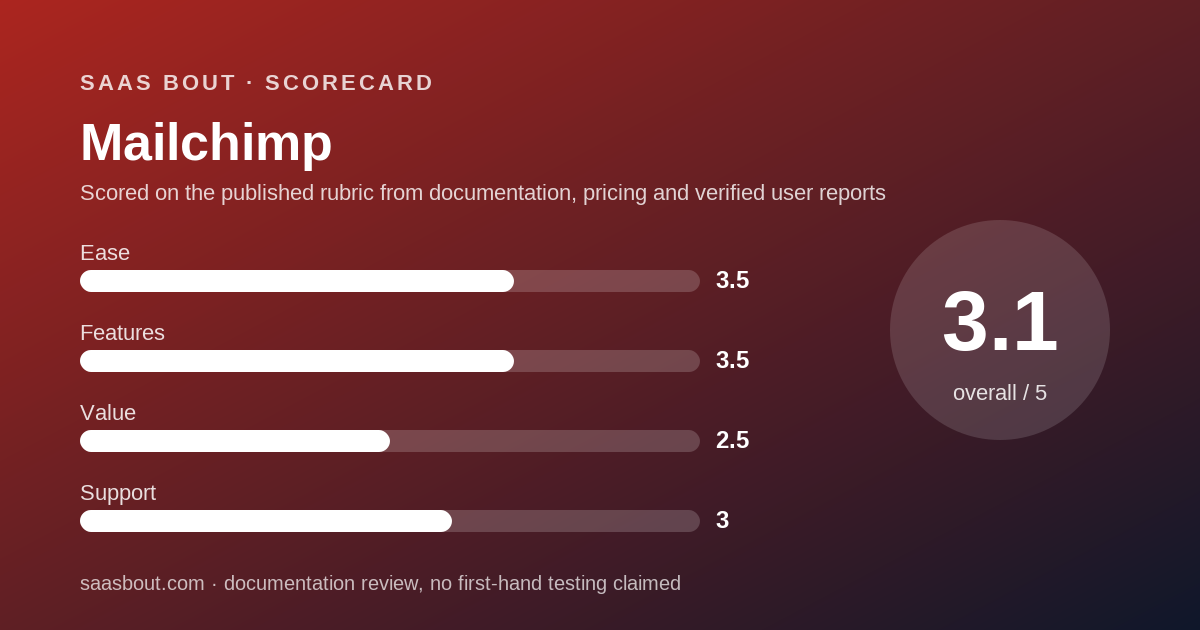
Mailchimp scores 25 on our four-round card: ease 7, features 7, value 5, support 6. It places third in the email marketing division behind Brevo on 32 and ActiveCampaign on 28, and it does not win a round. This is a documentation review. Every figure comes from the Mailchimp marketing pricing page rendered in a headless browser, its own plan comparison table and tooltips, and the public Trustpilot profile, all read on October 21, 2026, and not from paid trials or staged demos. The seat ladder is the best thing here: 1 seat free, 3 on Essentials, 5 on Standard and unlimited on Premium, with named roles at each step. Value scores 5, the lowest in the division, for three reasons. The free plan stops at 250 contacts and 500 sends a month. Overages are billed automatically at a rate the page does not print. And the page displayed a price only at the 0 to 500 contact band, so a buyer with 3,000 names cannot read their own bill. Support scores 6 on a Trustpilot profile showing 2.5 out of 5 with two thirds of reviews at one star. Buy it if you need five logins cheaply. Skip it if the list is growing fast.
Visit Mailchimp
We have no affiliate relationship with this vendor. Link goes to the official site.
Where it is strong
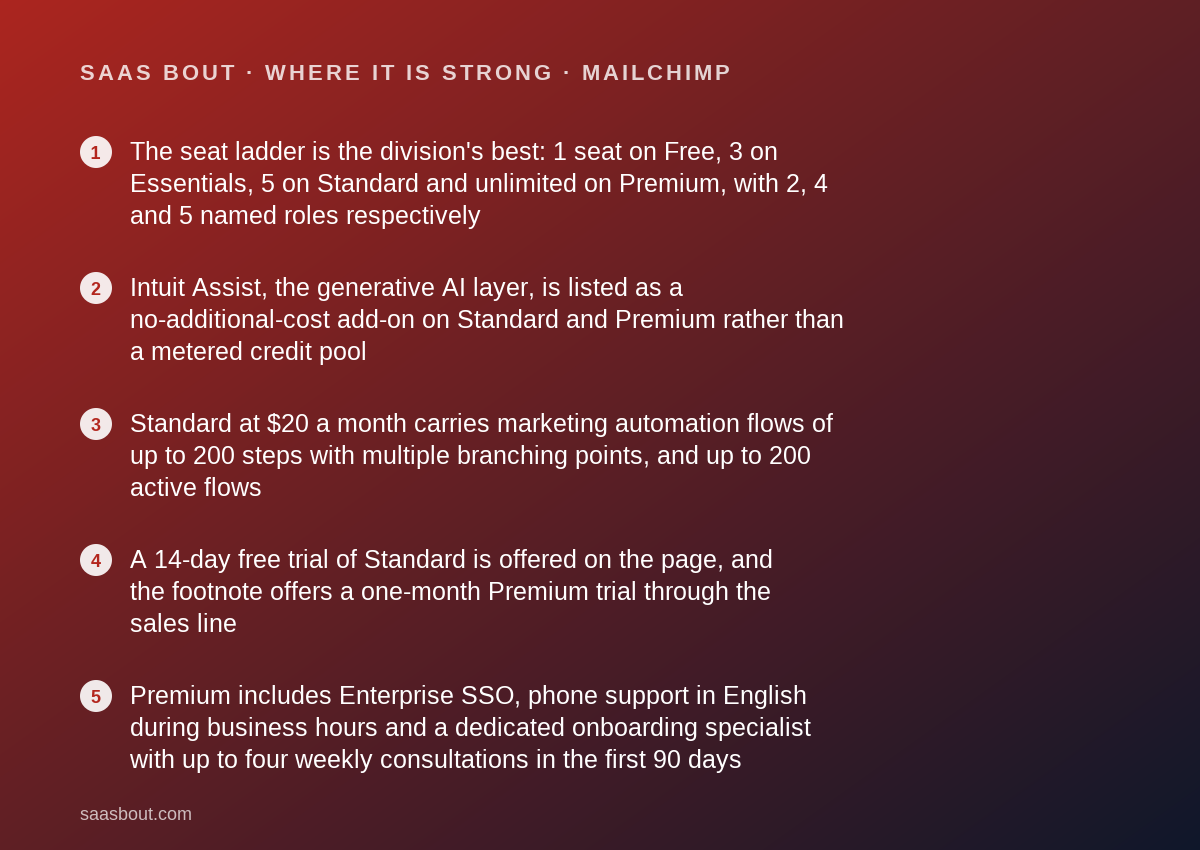
- The seat ladder is the division's best: 1 seat on Free, 3 on Essentials, 5 on Standard and unlimited on Premium, with 2, 4 and 5 named roles respectively
- Intuit Assist, the generative AI layer, is listed as a no-additional-cost add-on on Standard and Premium rather than a metered credit pool
- Standard at $20 a month carries marketing automation flows of up to 200 steps with multiple branching points, and up to 200 active flows
- A 14-day free trial of Standard is offered on the page, and the footnote offers a one-month Premium trial through the sales line
- Premium includes Enterprise SSO, phone support in English during business hours and a dedicated onboarding specialist with up to four weekly consultations in the first 90 days
- Premium migration services are funded by the vendor at three times the subscription payment through a certified partner, per the page's own tooltip
- Billing is offered in 16 currencies and the page states plainly that non-USD figures are estimates and USD is the base
Where it falls short
- The free plan is the weakest in the division: 1 seat, 1 audience, a maximum of 250 contacts and up to 500 sends a month with a 250-a-day ceiling
- Free accounts get email support for the first 30 days only, after which the page lists no support channel at all
- Overages are automatic: the page says overages apply if the contact or send limit is exceeded, and the overage rate is not printed anywhere on it
- The page displayed a price only at the 0 to 500 contact band; higher bands are computed by a selector that returned no figure to a headless browser, so a 3,000-name list cannot be priced from the page
- Send allowances are printed as multiples rather than numbers: 10 times contacts on Essentials, 12 on Standard, 15 on Premium
- The 15 percent discount is described as being for businesses with 10,000 or more contacts, yet the discounted figures of $11.05, $17 and $297.50 were printed on the cards at the 0 to 500 band
- No annual billing discount is offered self-serve; the page directs buyers wanting annual plans to a phone number
- Trustpilot showed 2.5 out of 5 from 1,548 reviews with 66 percent at one star, the worst standing in this division
- Email scheduling, custom reports, dynamic content, branded templates and branding removal are all marked not included on the free plan
At a glance
| Starting price | $13/mo Essentials and $20/mo Standard at the 0-500 contact band; $11.05 and $17 under the 12-month offer |
|---|---|
| Pricing note | From $13 a month for Essentials and $20 for Standard at the 0 to 500 contact band, and from $350 a month for Premium, which includes 10,000 contacts (pricing page, checked October 21, 2026) |
| Top self-serve plan | Premium from $350/mo, which includes 10,000 contacts; $297.50 under the 12-month offer |
| Free plan | 1 seat, 1 audience, max 250 contacts, up to 500 sends a month with a 250-a-day limit |
| What the base price includes | 500 contacts on Essentials and Standard; 10,000 contacts on Premium |
| Monthly send limit | 10x contacts on Essentials, 12x on Standard, 15x on Premium; 500 a month on Free |
| Seats | 1 Free, 3 Essentials, 5 Standard, unlimited Premium |
| Automation | Up to 4 flow steps on Essentials; up to 200 steps and up to 200 flows on Standard and Premium |
| Trial | 14 days on Standard; a one-month Premium trial is offered through the sales line |
| Support channels | Email for the first 30 days on Free; 24/7 email and chat on Essentials and Standard; phone and priority on Premium |
| Overages | Billed automatically if the contact or send limit is exceeded; rate not printed on the page |
| Currencies | 16, with the page stating that non-USD prices are exchange-rate estimates |
What Mailchimp actually is
Mailchimp is four plans multiplied by a contact band. The plan decides which features you get. The band decides what you pay.
That multiplication is the whole product from a buyer's point of view, and it is the reason this fighter loses the value round despite being the best-known name on the card.
The four plans are Free, Essentials, Standard and Premium. The page prints $0, $13, $20 and $350. Only the first three of those belong to the 0 to 500 contact band; the $350 belongs to a band that includes 10,000 contacts.
Send volume is also a multiple rather than a number. Essentials allows 10 times your contact count a month, Standard 12 times and Premium 15 times.
Exceed either dial and the page says overages apply and that the vendor will bill you for them. The rate is not published.
The product sits inside Intuit, and its generative AI layer is Intuit Assist, listed on Standard and Premium as a no-additional-cost add-on rather than a credit pool.
It is not a CRM, though it is often bought as one. Teams who actually need a pipeline should read the CRM fight card for small sales teams before paying for sends.
Who Mailchimp is best for
Mailchimp suits teams who need shared access more than they need cheap volume.
- Teams of three to five people who each want a named login, which Essentials and Standard provide at $13 and $20
- Accounts that need role separation, with 2 roles on Essentials, 4 on Standard and 5 on Premium
- Businesses already inside the Intuit stack, where billing and the assistant layer are shared
- Marketers who want generative AI included rather than charged per credit
- Stores on Shopify, WooCommerce, Square, Wix, Squarespace or Stripe, all named in the integration list
- Lists that are stable in size, the one case where automatic overage billing is harmless
Who should skip it
Three profiles will pay for the brand rather than the product.
- Anyone looking for a workable free tier, since 250 contacts and 500 sends a month is the smallest on this card
- Fast-growing lists, because crossing a band triggers automatic overage billing at an unpublished rate
- Buyers who need to model the bill in advance, which the page does not allow above 500 contacts
What each plan includes (as of October 2026)
Free is $0 and the tooltip is specific: 1 seat, 1 audience, a maximum of 250 contacts and up to 500 sends a month with a 250-a-day ceiling. Sending is paused rather than billed when a limit is hit.
The comparison table prints 'Not included' against the free column for marketing automation flows, email scheduling, custom reports, dynamic content, branded templates, branding removal, role-based access and Intuit Assist. Template access is marked 'Limited'. Support is email for the first 30 days.
Essentials starts at $13 a month, shown as $11.05 for 12 months under the current offer.
It carries 3 seats, 3 audiences, 2 roles, sends at 10 times contacts, automation flows of up to 4 steps, 24/7 email and chat support, and custom-coded templates you can create but must upgrade to send.
Standard starts at $20, shown as $17 for 12 months.
It is the plan most small teams will buy: 5 seats, 5 audiences, 4 roles, and sends at 12 times contacts.
It also carries up to 200 automation flows of up to 200 steps with multiple branching points, Intuit Assist at no additional cost, and one personalised onboarding consultation in the first 90 days.
Premium starts at $350 and includes 10,000 contacts.
Unlimited seats, unlimited audiences, 5 roles, sends at 15 times contacts, Enterprise SSO, popup forms, multivariate testing of up to 8 variations, predictive segmentation, phone and priority support, and a dedicated onboarding specialist with up to four weekly consultations.
How the pricing is structured
Base rate by plan, multiplied by a contact band, with sends derived from the band and overages billed on top.
The selector lists 20 bands, from 0 to 500 up to 1,000,000 and above. On October 21, 2026, in a headless browser, a price rendered for the 0 to 500 band and for Premium's included 10,000, and for no other band.
That is the central problem with this page. A buyer with 3,000 contacts can see the band in the dropdown and cannot see the number attached to it.
The discount wording is the second problem. A banner says businesses with 10,000 or more contacts can save 15 percent on their first 12 months. The cards nonetheless printed $11.05, $17 and $297.50 at the 0 to 500 band.
Those are exactly 15 percent off $13, $20 and $350. We report both readings and recommend confirming which price applies at the payment step.
Annual billing is not sold on the page. Buyers who want it, or any band above 1,000,000 contacts, are given a phone number.
The page is explicit that prices exclude taxes and fees, that non-USD figures are exchange-rate estimates, and that USD is the base currency. Transactional email and SMS sit on separate tabs with their own pricing, not covered on this card.
Round 1, ease: what the 7 is built from
Mailchimp scores 7 on ease, the middle mark, and the score splits between the product and the page.
In favour: the plan comparison table is the most thorough in the division. Every feature row carries a tooltip that says what the plan actually allows, and the automation row names the step limits rather than ticking a box.
The page also runs a short quiz that recommends a plan, and the free plan needs no card. For a first-time email sender, the on-ramp is genuinely the gentlest here.
Against: the thing a buyer came for is the price, and the price is a multiplication the page would not perform above 500 contacts. Two dials are harder to hold in the head than one, and crossing either triggers billing rather than a wall.
The verified record points the same way. Trustpilot reviewers, read October 21, 2026, describe frequent technical errors and billing surprises, including unexpected charges, automatic renewals after pausing and cancellation processes they found convoluted.
Three points come off. Brevo scores 8 in this round for a page that prints every credit step and publishes a machine-readable version of the whole catalogue.
Round 2, features: what the 7 is built from
Features score 7. The toolkit is broad and the distribution across plans is conservative.
Standard is a reasonable plan. Up to 200 automation flows, each up to 200 steps, with multiple branching points, is more automation headroom than a small team will use. Dynamic content, branded templates, custom reports and email scheduling all sit here.
The seat and role ladder is the best on the card and it is a real feature, not a line item. Three named logins on a $13 plan and five with four roles on a $20 plan is something neither rival here matches.
Intuit Assist is the other genuine advantage. It is listed as a no-additional-cost add-on on Standard and Premium, where ActiveCampaign meters advanced AI work against a credit balance.
The limits are at both ends. Essentials caps flows at 4 steps, enough for a welcome sequence and little else, and the free plan has no automation at all.
At the top, Enterprise SSO, multivariate testing, predictive segmentation and funded migration are Premium features at $350 a month.
Three points come off: nothing in the comparison table we read puts a second channel on a cheap plan, and the plan that holds the good automation also holds the branding, scheduling and reporting a free user would consider basic.
Round 3, value: what the 5 is built from
Value scores 5, the lowest round on this card in this division, and three published facts carry the whole deduction.
First, the free plan. 250 contacts, 500 sends a month, 250 a day, one seat, one audience, no automation and support for 30 days. Brevo's free plan caps the daily send at 300 and prints no contact ceiling at all.
Second, the overage. The page says overages apply if the contact or send limit is exceeded and that the vendor bills them automatically. It does not print the rate. A buyer cannot calculate the downside of a good month.
Third, the unreadable band. A 3,000-contact list is the most ordinary case in small-business email, and the page would not show its price. Brevo publishes every step. ActiveCampaign's checkout prices 2,500 contacts at $468 a year.
The seat ladder pulls the round back up. Five logins and four roles for $20 a month is real value for a team, and it is the reason this is a 5 rather than a 4.
Five points come off for a pricing model that asks the buyer to sign before they can see the number.
Round 4, support: what the 6 is built from
Support scores 6, the lowest in this division, and the split between published and reported is the widest too.
Published, and better than rivals in one respect: 24/7 email and chat support on Essentials and Standard, which is more than Brevo offers below $499 a month. Premium adds priority handling and phone support in English during business hours.
Premium also publishes two things nobody else here does. A dedicated onboarding specialist with up to four weekly consultations in the first 90 days. And migration services funded at three times the subscription payment through a certified partner.
The free plan is the counterweight. Email support for the first 30 days, then nothing listed.
No uptime figure, no response-time target and no refund policy appear on the pricing page as read on October 21, 2026.
The verified record is the worst on this card. Trustpilot showed 2.5 out of 5 from 1,548 reviews, with 66 percent at one star and 20 percent at five. The profile was claimed in June 2018 and is labelled as carrying a paid Trustpilot subscription.
Four points come off, chiefly for a review distribution in which two of every three reviewers award the minimum.
What verified users report
Trustpilot was the public review source readable for this fighter on October 21, 2026. G2 and Capterra product pages returned 403 to a fetch and to a headless browser, so no scores from either appear on this card.
The standing is 2.5 out of 5 across 1,548 reviews: 20 percent five star, 5 percent four, 4 percent three, 5 percent two and 66 percent one.
The complaint themes are consistent and operational. Technical errors in the product. Support that answers slowly, with reviewers describing repeated contact-form submissions over days. And billing friction: unexpected charges, renewals after an account was paused, and cancellation processes reviewers found difficult.
The praise, where it appears, is about the interface and the templates, and about individual support agents who resolved things quickly once reached.
Two things should be held together. The vendor's own page claims 4.5 out of 5 based on more than 33,000 reviews across G2, Capterra and TrustRadius. We could not open those sources to check it.
A 1,548-review Trustpilot profile is a small and self-selected slice of a very large customer base, and it describes the unhappy tail rather than the average.
Limits stated by the vendor
Published on the marketing pricing page and in its tooltips as of October 21, 2026.
- Free: 1 seat, 1 audience, maximum 250 contacts, up to 500 sends a month with a 250-a-day limit; sending paused when exceeded
- Monthly send allowance: 10 times contacts on Essentials, 12 times on Standard, 15 times on Premium
- Included contacts: 500 on Essentials and Standard; 10,000 on Premium
- Seats: 1 Free, 3 Essentials, 5 Standard, unlimited Premium; roles 0, 2, 4 and 5
- Audiences: 1 Free, 3 Essentials, 5 Standard, unlimited Premium, with a contact in two audiences counted twice
- Automation flows: not included on Free, up to 4 steps on Essentials, up to 200 flows of up to 200 steps on Standard and Premium
- Overages: billed automatically on paid plans if contact or send limits are exceeded; rate not printed
- Contact bands: 20 steps from 0-500 to 1,000,000 and above; only the 0-500 band rendered a price to a headless browser
- Offer terms: 15 percent off the first 12 months, described as for businesses with 10,000 or more contacts; prices exclude taxes and fees
Alternatives
Brevo. Choose it if the invoice decides, because $18 a month carries unlimited multi-step automation and every email-credit step above the base is printed to the dollar. Otherwise choose Mailchimp when five named logins on a cheap plan matter more than the unit price.
ActiveCampaign. Choose it if the automation is the product and you need unlimited actions, conditional content or predictive sending. Otherwise choose Mailchimp when you want generative AI included rather than metered, and 24 hour chat on a $20 plan.
Both are scored on the same four rounds in our email marketing division.
A CRM, if the shortlist has drifted. Companies buy email tools to fix a sales problem more often than they admit.
Our CRM division scores HubSpot CRM, Pipedrive and Zoho CRM on this same card, with the bout HubSpot CRM vs Pipedrive as the usual decision.
If the inbox you are drowning in is inbound rather than outbound, read our Zendesk review. If the problem is that nobody knows who owns which campaign, start with the project management fight card.
Bottom line
Mailchimp finishes third on a 25 without losing on capability. It loses on legibility.
The plan to buy is Standard at $20 a month at the 0 to 500 contact band, for the 200-step automation flows, five seats, four roles and Intuit Assist at no additional cost.
Do not buy the free plan as a trial of the product. With 250 contacts, 500 sends a month and no automation, it tests almost nothing you are considering paying for.
Before signing at any list size above 500, get the band price in writing. The page lists 20 contact bands and displayed a number for one of them.
Ask what the overage rate is, too. The page commits to billing it automatically and never says what it is.
Every figure above was read on the Mailchimp marketing pricing page, its comparison table and tooltips, and Trustpilot on October 21, 2026.
On that day the page printed a 15 percent discount it described as reserved for lists of 10,000 or more against plans at the 0 to 500 band.
Confirm the price at checkout.
Buy it if
- Several people need their own login cheaply, because 3 seats on a $13 plan and 5 on a $20 plan is the best seat ladder in this division
- You want generative AI included rather than metered, since Intuit Assist is listed as a no-additional-cost add-on on Standard
- Your list size is stable and known, which is the only condition under which automatic overage billing is harmless
- You are already an Intuit customer, where the account, billing and assistant layer are shared
Skip it if
- Your list is growing quickly, because overages are billed automatically at a rate the page does not publish
- You need a usable free tier, since 250 contacts and 500 sends a month is the smallest free plan on this card
- You want to price the plan before signing up, as the page displayed a figure only at the 0 to 500 contact band
Frequently asked
Is Mailchimp still free?
Yes, but narrowly. The free plan allows 1 seat, 1 audience, a maximum of 250 contacts and up to 500 sends a month with a 250-a-day cap, per the pricing page tooltip read October 21, 2026. Email support covers the first 30 days only.
How much does Mailchimp cost for 3,000 contacts?
We could not read it. The page lists a 2,501 to 5,000 contact band in its selector, but no price rendered for any band above 0 to 500 in a headless browser on October 21, 2026. The page's own tooltip says the rate scales with the contact band.
What is the difference between Mailchimp Essentials and Standard?
Automation depth, seats and AI. Essentials at $13 allows flows of up to 4 steps, 3 seats, 3 audiences and 2 roles. Standard at $20 allows up to 200 flows of up to 200 steps with branching, 5 seats, 5 audiences, 4 roles and Intuit Assist at no additional cost.
How many emails can I send on Mailchimp?
The allowance is a multiple of your contact band, not a fixed number. The comparison table lists 10 times contacts on Essentials, 12 times on Standard and 15 times on Premium. The free plan is capped at 500 sends a month with a 250-a-day limit.
What happens if I go over my Mailchimp limit?
On paid plans the page says overages apply and that Mailchimp will bill you for them automatically. The per-unit overage rate is not printed on the pricing page. On the free plan the page says sending is paused instead of billed.
Does Mailchimp have an annual discount?
Not self-serve, as read October 21, 2026. The page offers 15 percent off the first 12 months for businesses with 10,000 or more contacts, and directs buyers wanting annual plans to a sales phone number. Rival vendors in this division print a yearly rate on the page.
Is Mailchimp Premium worth $350 a month?
Only above roughly 10,000 contacts, which is what the $350 includes. It adds unlimited seats, Enterprise SSO, 5 roles, phone support, multivariate testing of up to 8 variations, predictive segmentation and a dedicated onboarding specialist for the first 90 days.
How many integrations does Mailchimp have?
The page claims 300 or more, naming Shopify, WooCommerce, Canva, Zapier, Square, Wix, Squarespace, Stripe, Salesforce, LinkedIn, WordPress and Facebook, and notes that additional terms and fees may apply for third-party integrations.
Sources
- Mailchimp marketing pricing page, plan cards, tooltips and full plan comparison table (rendered in a headless browser) - checked October 21, 2026
- Trustpilot: Intuit Mailchimp reviews - checked October 21, 2026
Update history
- October 21, 2026 - First scorecard. Only the 0-500 contact band rendered a price in a headless browser; the other 19 bands in the selector returned no figure, so plan prices above 500 contacts could not be read. The page printed the 15 percent discounted figures ($11.05, $17, $297.50) on the cards at the 0-500 band while the banner described the discount as being for businesses with 10,000 or more contacts; both reported. G2 and Capterra returned 403 to a fetch and to a headless browser.
Visit Mailchimp
We have no affiliate relationship with this vendor. Link goes to the official site.