 Saas
SaasZoho CRM
The deepest feature list in the division at the lowest Enterprise price, paid for with a longer setup and support sold as a percentage
Scored on the published rubric, from documentation, pricing and verified user reports.
Best for: Teams of 3 to 200 that want custom modules, blueprints, territories and sandboxes at a price most rivals charge for a basic plan, and have someone willing to configure it.
Verdict
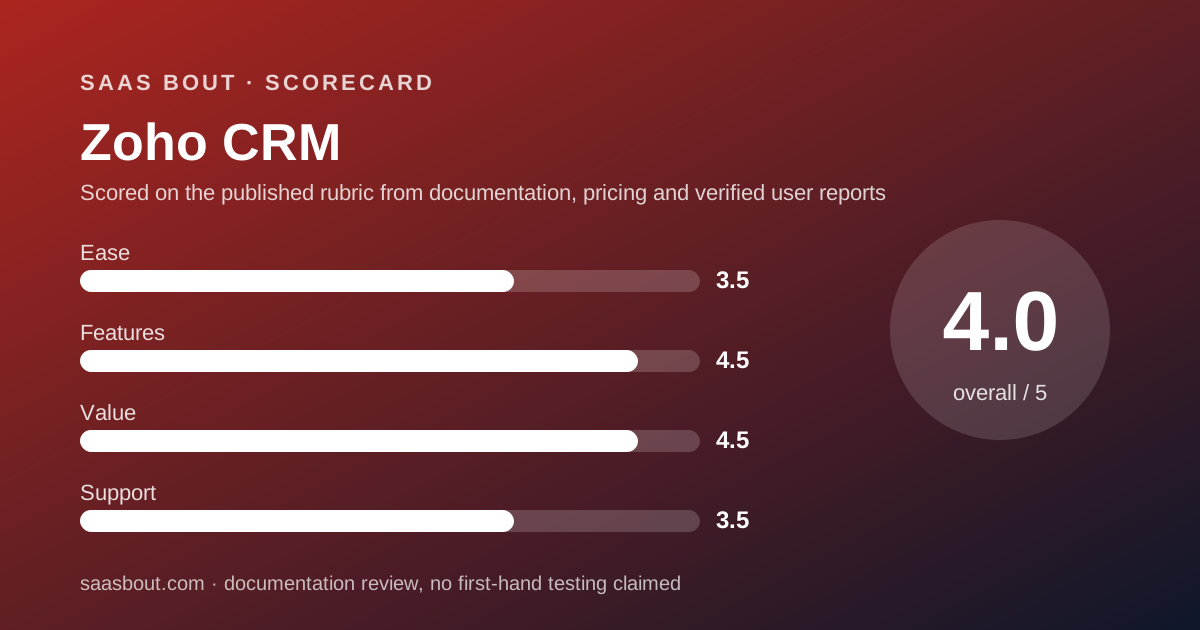
Zoho CRM is the technician of this division: more documented features per dollar than either rival, and the hardest of the three to set up. Features and value both score 9 on our 10-point card. This is a documentation review: every figure comes from Zoho's pricing page, its edition comparison table last updated May 12, 2026, its support plans page and verified user reports on TrustRadius, all read on October 10, 2026, not from paid trials or staged demos. The numbers are striking. Enterprise at $40 per user per month billed annually includes 300 custom fields per module, 200 custom modules, 50 blueprints, territory management, sandboxes and custom functions. HubSpot charges $100 per seat for its equivalent tier and Pipedrive's top plan is $69. Three users are free forever. The two rounds it loses are ease, where verified users describe a long learning curve, and support, where anything beyond 8-by-5 Classic support costs 20 to 30 percent of your subscription on top. Buy it if someone on your team enjoys configuring software. Skip it if you need a rep working on day one.
Visit Zoho CRM
We have no affiliate relationship with this vendor. Link goes to the official site.
Where it is strong
- Free edition for 3 users with leads, deals, workflows and reports, per the pricing page checked October 10, 2026
- Enterprise at $40 per user per month includes territory management, sandboxes, custom functions and 200 custom modules
- Every edition limit is published in a comparison table dated May 12, 2026: fields, modules, storage, workflow rules, mass email
- Lite user licenses at $12 per month on Enterprise and Ultimate for staff who only need partial access
- Classic support with email, phone and chat is included on every paid edition
- Multiple currencies from Standard, CPQ and inventory from Professional, journey orchestration from Enterprise
Where it falls short
- Custom fields are capped at 10 per module on Standard, which pushes most real deployments to Professional
- Premium support costs 20 percent of the subscription, Enterprise support 25 percent with a 50-license minimum
- Classic support is 8 hours a day, 5 days a week, with an 8-hour initial response target
- Free edition stores 5,000 records and 1 GB of files, with 10 email templates
- Verified users consistently describe a long learning curve and a complex setup for workflows and custom modules
What Zoho CRM actually is
Zoho CRM is the sales application inside Zoho's suite of more than 50 business apps. It can run alone, and this scorecard treats it that way, but much of its appeal in user reviews comes from how it connects to Zoho Campaigns, Books, Desk and the rest.
Structurally it is a configurable database with sales workflows on top. Modules for leads, contacts, accounts and deals ship by default, and from Standard upward you add custom modules, custom fields, blueprints and workflow rules.
That is the opposite design philosophy to Pipedrive, which ships one pipeline and asks you to live in it. It is closer to HubSpot CRM in ambition, at a fraction of the per-seat price.
This is a documentation review. Scores come from the pricing page, the edition comparison table dated May 12, 2026, the support plans page and verified TrustRadius reviews, all read on October 10, 2026.
Who Zoho CRM is best for
The published limits and the price per edition decide who should pick this fighter.
- Teams of 3 that need a free CRM with workflow rules and reports, not just a contact list
- Companies with an admin or a partner who will configure modules, blueprints and assignment rules
- Sales organizations with territories, approval processes or multiple teams, which Enterprise covers at $40
- Businesses already on Zoho Books, Desk or Campaigns that want one vendor
- Teams selling across currencies: 5 on Standard, 10 on Professional, 25 on Enterprise, 50 on Ultimate
- Companies with many part-time CRM users, since Lite licenses cost $12 on Enterprise and Ultimate
Who should skip it
Three kinds of team will spend more time configuring than selling.
- Teams that need a rep productive on day one; verified users consistently describe a long learning curve
- Companies that expect 24/7 support inside the subscription price
- Teams that only want a visual pipeline, where Pipedrive is faster and the price gap is small
What the free edition includes (as of October 2026)
The free edition covers 3 users, per the pricing page checked October 10, 2026, and Zoho describes it as free forever. It includes leads, deals, workflows, reports and the mobile app.
The comparison table dated May 12, 2026 gives the ceilings: 5,000 records or 10 MB of data storage, 1 GB of file storage, 10 custom email templates, 50 records per list view and workflow rules at 10 per module with 5 active.
No custom fields, no custom modules, no mass email and no multiple currencies. Reminders are task-only. The free edition has no paid support tier.
Against HubSpot's free tier of 2 users and 1,000 contacts, Zoho gives one more seat and five times the records, but fewer sales tools out of the box. The fight card weighs that trade for a team of 3.
What sits behind the paywall
Standard, at $14 per user per month billed annually, adds assignment rules, sales forecasting, custom modules capped at 10, mass email at 250 per day per org, 100 email templates, cadences, 2 kiosks and 5 currencies. Custom fields are capped at 10 per module, the tightest limit on the card.
Professional, at $23, lifts custom fields to 155 per module and custom modules to 25. It adds CPQ, inventory management, process automation with 3 blueprints, email insights, widgets, Google Ads integration, unlimited email templates and Zia scores at 5 per org.
Enterprise, at $40, is where the depth lives: 300 custom fields per module, 200 custom modules, 50 blueprints, territory management with 150 territories, 3 configuration sandboxes plus 2 with data, custom functions, journey orchestration, customer portals, multi-team management and the Zia AI sales assistant.
Ultimate, at $52, raises the ceilings again: 500 fields, 500 modules, 100 blueprints, 250 territories, 7 plus 3 sandboxes, 5 GB of org file storage plus 1 GB per user, and adds consulting and migration assistance.
How the pricing is structured
Per the pricing page checked October 10, 2026, billed annually per user per month: Standard $14, Professional $23, Enterprise $40, Ultimate $52. Billed monthly: $20, $35, $50, $65. Zoho describes the annual saving as up to 34 percent. Local taxes are charged on top.
Lite user licenses are $12 per month billed annually or $15 monthly, available on Enterprise and Ultimate only, per the comparison table.
Storage is metered. File storage starts at 1 GB per org plus 512 MB per user on Standard and Professional, 1 GB per user on Enterprise, and 5 GB plus 1 GB per user on Ultimate. Extra file storage is $4.60 per month per 5 GB. Extra data storage is $4 per 100 MB per month for orgs up to 200 users.
Support is the hidden line. Classic is included. Premium support is 20 percent of the subscription fee. Enterprise support is 25 percent of the annual fee with a 50-license minimum. Platinum is 30 percent with a 250-license minimum.
Our editorial arithmetic for 10 users billed annually: Standard $1,680 per year, Professional $2,760, Enterprise $4,800, Ultimate $6,240. Enterprise with Premium support is $5,760. The Pipedrive vs Zoho CRM bout sets these against Pipedrive's tiers.
Ease of use: what the 7 is built from
Zoho CRM scores 7 of 10 on ease, the lowest in this cluster, and the evidence is consistent across sources.
On the positive side, the pricing page is clear, the free edition lets a team start without a card, and the comparison table publishes every limit. Zoho also includes a 15-day onboarding with four 60-minute sessions in Classic support, per the support plans page.
The points come off from verified user reports. On TrustRadius, reviewers who praise the product still describe it as complex for new users, with a long learning curve when setting up workflows and custom modules. Several ask for deeper documentation and more personalized onboarding.
The structural reason is the design: Zoho gives you a database and tools to shape it, where Pipedrive gives you a finished pipeline. The depth that wins the features round is the same depth that costs points here.
Features: what the 9 is built from
Features score 9, tied with HubSpot, and the comparison table dated May 12, 2026 is the evidence.
Automation: workflow rules per module run 30 on Standard, 80 on Professional, 125 on Enterprise and 150 on Ultimate, with an org-wide ceiling of 2,500 rules and 2,000 active. Blueprints for process enforcement start at Professional. Cadences, assignment rules and connected workflows are published per edition.
Customization: custom modules go from 10 to 500 across editions, custom fields from 10 to 500 per module, canvas rules at 100 per module from Standard, kiosks from 2 to 50.
Sales operations: multiple currencies, CPQ with price rules, inventory, territory management, forecasts by territory, customer portals with 1,000 free invites from Professional, and sandboxes from Enterprise.
It drops one point because the AI layer is thin until Enterprise: Zia scores appear at Professional with 5 per org, and the AI sales assistant, forecasts and notifications are Enterprise features. HubSpot ships AI credits on every paid tier.
Value: what the 9 is built from
Value is scored at a realistic team size, and Zoho takes a 9 because its Enterprise tier undercuts both rivals by a wide margin.
At 10 users, Enterprise at $40 per user is $400 per month billed annually. HubSpot's Professional, the nearest tier with unrestricted automation and forecasting, is $1,000 per month plus $1,500 onboarding. Pipedrive Ultimate, with its sandbox and security rules, is $690 per month.
At the entry level, Standard at $14 matches Pipedrive Lite and includes workflow rules, forecasting and custom modules that Lite lacks, though its 10 custom fields per module are a real constraint.
The point it drops is support pricing. A 10-user Enterprise team wanting 24-by-5 coverage pays 20 percent more, and 24/7 coverage is unavailable below 50 licenses. Rivals include faster channels in the seat price. Even so, Zoho with Premium support is cheaper than HubSpot Professional without it.
Support: what the 7 is built from
Zoho publishes its support tiers in detail on the support plans page, checked October 10, 2026, which earns credit on its own.
Classic support is included with every paid edition: email, phone, chat and remote assistance, 8 hours a day, 5 days a week, with an 8-hour initial response target and a 15-day onboarding of four sessions. The free edition has no paid support tier.
Premium support, at 20 percent of the subscription fee, extends coverage to 24 hours on 5 days with a 3-hour initial response and priority handling. Enterprise support, at 25 percent of the annual fee with a 50-license minimum, is 24/7 with a 1-hour response and a technical account manager. Platinum, at 30 percent with 250 licenses, promises a 30-minute response.
The score stops at 7 because the included tier is business hours only with an 8-hour response target, and because every faster option is priced as a percentage of the bill. Pipedrive lists 24/7 live chat on its cheapest plan for no extra charge.
What verified users report
On TrustRadius, Zoho CRM scores 8.4 of 10 across 1,038 ratings, page read October 10, 2026.
The recurring praise: contact and lead organization, the depth of customization, pipeline dashboards that give managers visibility, and integration with the rest of the Zoho suite. Reviewers in industrial and technical B2B sales with long cycles describe it as well suited.
The recurring complaints: the interface feels complex for new users, workflow and custom module setup has a long learning curve, advanced reporting sits on higher editions that small businesses find costly, and third-party integrations are described as occasionally slow.
None of these are quotes we can verify individually. They are themes across a large sample, which is how we weight them.
Limits stated by the vendor
From the feature-wise comparison of editions, last updated May 12, 2026, in the order Free, Standard, Professional, Enterprise, Ultimate:
- Custom fields per module: none, 10, 155, 300, 500
- Custom modules: none, 10, 25, 200, 500
- Workflow rules per module: 10 (5 active), 30 (15 active), 80 (40 active), 125 (75 active), 150 (100 active)
- Mass email per day per org: none, 250, 500, 1,000, 2,000
- Custom email templates: 10, 100, then unlimited
- Data storage for orgs up to 200 users: 5,000 records, 100,000 records, then 10 GB
- Blueprints: none until Professional at 3, then 50 and 100; sandboxes from Enterprise at 3 plus 2, Ultimate 7 plus 3
- Multiple currencies: none, 5, 10, 25, 50; territories 150 on Enterprise, 250 on Ultimate
Alternatives
Two fighters in the same CRM division are worth reading before you sign.
Pipedrive. Choose Pipedrive if your team sells from a pipeline and you want a rep productive this week, with 24/7 chat support included. Otherwise choose Zoho if you need custom modules, territories and sandboxes at $40 per user. Read the Pipedrive review and the Pipedrive vs Zoho CRM bout.
HubSpot CRM. Choose HubSpot if marketing and sales must share one database and you can afford $100 per seat when you outgrow Starter. Otherwise choose Zoho for similar depth at less than half the price. Read the HubSpot CRM review and the HubSpot CRM vs Pipedrive bout to see how the heavyweight fares.
Bottom line
Zoho CRM wins the features and value rounds with a 9 each and loses ease and support with a 7 each. Total 8 of 10, third in the cluster by a narrow margin.
The case for it is arithmetic: Enterprise at $40 per user does what HubSpot charges $100 for. The case against it is time: someone has to build the thing, and the fast support costs extra.
If you have that someone, this is the most CRM per dollar on the fight card. Our scoring rules are on the method page.
Visit Zoho CRM
We have no affiliate relationship with this vendor. Link goes to the official site.