 Saas

Dropbox Sign
The only fighter in this division that prints unlimited signature requests on every published plan, and the only one whose self-serve ladder stops at five users
Scored on the published rubric, from documentation, pricing and verified user reports.
Best for: Teams of one to five people who send a lot of straightforward agreements and want one number on the invoice, with no envelope budget and no overage to model.
Verdict
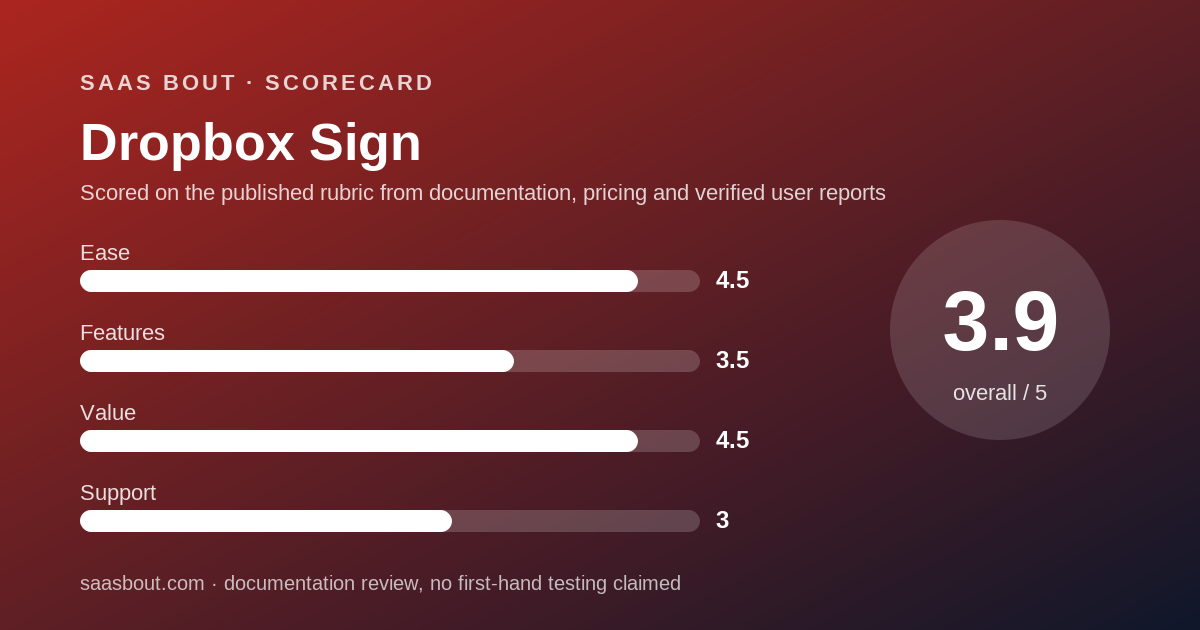
Dropbox Sign scores 31 on our four-round card: ease 9, features 7, value 9, support 6. It takes the e-signature division ahead of PandaDoc on 30 and DocuSign on 28, and it wins on the single line that decides this market. This is a documentation review. Every figure comes from the Dropbox Sign pricing page rendered in a headless browser, the separate API pricing page, the promotional terms footnote and the pricing FAQ, all read on October 24, 2026. No paid trials, no staged demos. Value scores 9 because the plan table says unlimited signature requests on all three plans and adds that there is no worrying about overages, which removes the one calculation that makes rival quotes unreliable. Ease scores 9 for the shortest readable pricing page in the division: three columns, one price each, no credit system. Features scores 7 and that is the honest ceiling: no payment collection, no proposal builder, and advanced signer fields, single sign-on, data residency, multi-teams and advanced reporting all sit on Premium, which is quote-only. Support scores 6. Buy it if volume is your problem. Skip it if a sixth person needs a login.
Visit Dropbox Sign
We have no affiliate relationship with this vendor. Link goes to the official site.
Where it is strong
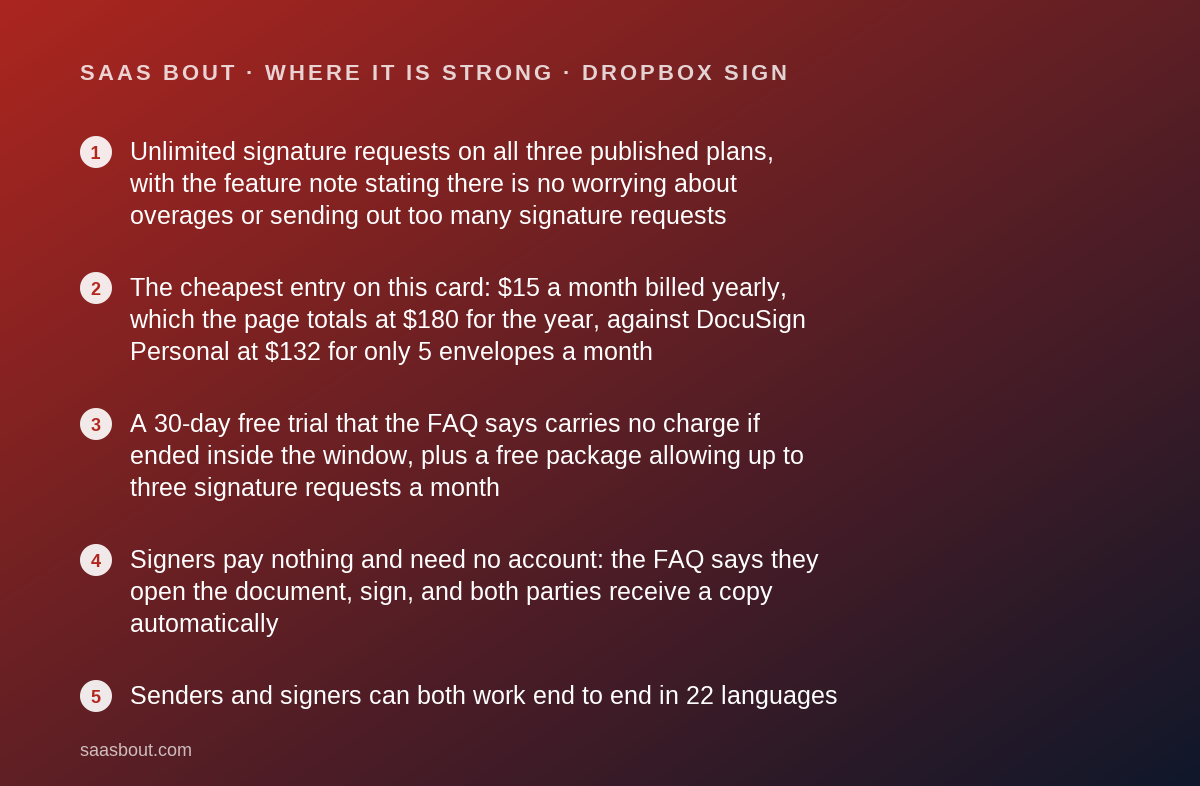
- Unlimited signature requests on all three published plans, with the feature note stating there is no worrying about overages or sending out too many signature requests
- The cheapest entry on this card: $15 a month billed yearly, which the page totals at $180 for the year, against DocuSign Personal at $132 for only 5 envelopes a month
- A 30-day free trial that the FAQ says carries no charge if ended inside the window, plus a free package allowing up to three signature requests a month
- Signers pay nothing and need no account: the FAQ says they open the document, sign, and both parties receive a copy automatically
- Senders and signers can both work end to end in 22 languages
- Security on every plan: the page names SOC 2 Type II, ISO 27001, eIDAS and GDPR compliance, two-factor authentication and AES 256-bit encryption at rest
- Standard at $25 a user a month billed yearly adds bulk send, an admin console with team roles, branding, SMS authentication, reporting and 15 templates
- API pricing is published rather than quoted: a Test mode tier is free and Essentials API starts at $75 a month billed yearly, totalled at $900 a year, for 50 signature requests a month
Where it falls short
- The self-serve ladder stops at five users. Essentials is one user, Standard reads 2 or more with a note that 5-plus users means contacting sales, and Premium reads 5 or more with no price
- Everything an IT department asks for sits on the quote-only plan: single sign-on, data residency, multi-teams, advanced reporting and performance dashboards are all Premium
- Standard's $600 a year headline is a two-seat minimum in disguise, since $25 a user a month over twelve months is $300 for one seat
- No payment collection, no pricing tables, no proposal builder and no quote tool anywhere on the plan table, which makes this a signing product rather than a document product
- HIPAA is not named anywhere on the pricing page; the security row stops at SOC 2 Type II, ISO 27001, eIDAS and GDPR as read October 24, 2026
- The promotional price shown for Essentials is 33 percent off, while the promotion's own terms footnote on the same page says 30 percent off the first year of an annual plan
- Templates are capped at 5 on Essentials and 15 on Standard, so a team with many recurring agreement types outgrows the paid tiers before it outgrows the seats
- Salesforce and the other select integrations carry a footnote reading additional cost add-on, contact sales for details, with no published price
- The public Trustpilot profile for sign.dropbox.com held 2 reviews on October 24, 2026, which is too thin to score
- No uptime figure, no response-time target and no refund policy appear on the pricing page
At a glance
| Starting price | Essentials $15/mo billed yearly ($180/yr); $20/mo billed monthly |
|---|---|
| Pricing note | From $15 a month billed yearly, which the card totals at $180 for the year, or $20 a month billed monthly, for one user and unlimited signature requests (pricing page, checked October 24, 2026) |
| Team plan | Standard $25/user/mo billed yearly, headlined from $600/yr; $30/user/mo billed monthly |
| Top plan | Premium, custom quote only |
| Free plan | Up to three signature requests a month, per the API pricing page FAQ |
| Trial | 30 days, no charge if ended inside the window |
| Signature requests | Unlimited on all three plans, with no overage |
| Seats | Essentials 1; Standard 2 or more with 5-plus by sales contact; Premium 5 or more |
| Templates | Essentials 5; Standard 15; Premium unlimited |
| Security | SOC 2 Type II, ISO 27001, eIDAS, GDPR, two-factor authentication, AES 256-bit encryption at rest |
| Single sign-on and data residency | Premium only |
| API | Separate product and page. Test mode free; Essentials API from $75/mo billed yearly ($900/yr) for 50 requests a month; Standard API from $250/mo billed yearly ($3,000/yr) for 100 |
| Languages | 22 for both senders and signers |
What Dropbox Sign actually is
Dropbox Sign is a signing product priced per seat, not per document. That is the whole argument for it.
There is no envelope. There is no credit. The feature table prints unlimited signature requests on all three plans and says so in plain words.
What you are buying instead is a number of people who may send. One on Essentials, two or more on Standard, five or more on Premium.
That trade is unusually clean. It also sets the ceiling: past five senders the page stops quoting and starts asking you to call.
The product splits into two separately priced halves. The signing app on one page, the API on another, with its own tiers based on monthly request volume.
One practical note for anyone searching. The path sign.dropbox.com/pricing returned the Dropbox Not Found page on October 24, 2026. The working path is /products/dropbox-sign/pricing.
If the agreements you chase are actually internal approvals, the fix is a workflow tool, not a signing seat. Start with our project management fight card.
Who Dropbox Sign is best for
This fighter suits teams whose document count is high and whose headcount is low.
- Solo operators and freelancers who sign a contract with every client and want no per-document maths
- Two to five person agencies, which is exactly the Standard band
- Recruiters and HR teams sending repeat offer letters from a small template set
- On-demand and field services collecting a signature from every worker or customer
- Teams already inside Dropbox, Google Drive, Microsoft Word or HubSpot, all named on the integrations row
- Anyone whose last signing invoice contained an overage line
Who should skip it
Three profiles hit the Premium wall immediately.
- Companies of six or more senders, because the published ladder ends at five
- Anyone with an SSO or data residency requirement, both of which are Premium and unpriced
- Sales teams whose document is a priced proposal, since there is no pricing table or payment field here
What each plan includes (as of October 2026)
Three columns, and the differences are easy to state.
Essentials is one user at $15 a month billed yearly, $180 for the year, or $20 billed monthly.
It carries unlimited signing, unlimited signature requests, signer fields with data validation, the template gallery, 5 templates, template links, 22 languages, reminders, tamper-proof documents, an audit trail and email support.
It does not carry signer attachments, in-person signing, bulk send, branding, the admin console, reporting or SMS authentication. All six are marked not included.
Standard is $25 a user a month billed yearly, headlined from $600 a year, or $30 billed monthly. It adds all six of those, plus 15 templates and the select integrations row reading Salesforce and more.
Premium is a quote. It is the only column with advanced signer fields, advanced signer tools, multi-teams, single sign-on, data residency, advanced reporting, performance dashboards and unlimited templates.
One row on that table is worth a second look. Certifications is marked not included on Essentials while the Security row, which itself names SOC 2 Type II, ISO 27001, eIDAS and GDPR, is ticked on all three.
We print the cells as they read. A buyer who needs a certification letter should ask which plan that row actually gates.
How the pricing is structured
Seat price, billing term, done. No credits, no allowances, no add-on catalogue.
Billed yearly, Essentials is $15 a month and Standard $25 a user. Billed monthly they are $20 and $30. That is a 25 percent and a 17 percent difference, editorial arithmetic from the published figures.
The Essentials card prints the annual total itself: $180. Fifteen times twelve is 180, so that pair is internally consistent.
Standard prints from $600 billed yearly. Twenty-five times twelve is $300, so the $600 headline is two seats. The card does not say that; the arithmetic does.
On the day we read it the page also showed a promotional price: $10.05 a month and $120.60 billed yearly for Essentials, $17.50 a user and from $420 for Standard. Both multiply out cleanly.
Here the page disagrees with itself. The promotion's own terms footnote says 15 percent off the first three months of a monthly plan, or 30 percent off the first year of an annual plan.
But $17.50 is 30 percent off $25, while $10.05 is 33 percent off $15. The Essentials discount shown is three points deeper than the terms describe.
We report both and no further. A promotional price is not a list price, and whichever number the checkout shows is the one that binds.
The API is a separate purchase with its own ladder
This is the part most comparisons miss, because it lives on a different page.
The signing plans above do not include API access. The API is its own product with its own tiers, priced on monthly signature request volume.
Test mode is free and described as build and test the API.
Essentials API, billed yearly, runs $75 a month at 50 requests, $125 at 100, $275 at 250 and $450 at 500. The page prints the annual totals beside them: $900, $1,500, $3,300 and $5,400. Every pair multiplies out.
Billed monthly the same four steps are $100, $165, $365 and $600.
Standard API, billed yearly, starts at 100 requests and runs $250 a month and $3,000 a year, then $450 and $5,400, then $625 and $7,500. Billed monthly: $300, $540 and $750.
Premium API is a quote. It is the tier carrying data residency, premium branding, multiple domains, embedded templates and electronic ID for qualified signatures under eIDAS.
So the honest summary is that the word unlimited applies to the signing app and not to the API. On the API side you buy a request band like everywhere else.
Round 1, ease: what the 9 is built from
This is the clearest pricing page in the division and the score reflects it.
Three columns. One number each, in two billing modes. A feature table of about thirty rows where every cell is a tick, a cross or a figure.
No credit currency to decode. No envelope definition to read twice. No add-on catalogue with its own prices. Nothing on the page says requires usage credits, which is a sentence that appears ten times on PandaDoc's table.
The tooltips are specific rather than decorative. The Users tooltip defines a sender. The FAQ separates who is a sender from who is not, which matters because the plan is priced per sender.
One point comes off, and it is the promotional discount that does not match its own footnote.
A second point would have come off for the dead /pricing path, except that the navigation link on the site points at the working URL. A searcher who guesses the short path lands on a 404; a visitor who clicks does not.
Round 2, features: what the 7 is built from
Seven is a fair score for a product that does one job and declines the rest.
What is here and complete: unlimited signing and requests, signer fields with validation, signing order, in-person signing, signer attachments, templates and template links, bulk send, reminders, a non-editable audit trail, tamper-proof documents, 22 languages, an admin console with team roles and branding.
What is absent from every column: payment collection, pricing tables, a product catalogue, a proposal editor, approval workflows and any quoting tool.
That is not an oversight. It is a different product category, and buyers should treat the two as separate purchases rather than rival ones.
Three points come off for where the remaining depth sits. Advanced signer fields, advanced signer tools, multi-teams, single sign-on, data residency, advanced reporting and performance dashboards are all Premium, and Premium has no price.
A five-person company that needs conditional logic in a form cannot buy it from the page. It has to ask.
Template caps cost part of a point too. Five templates on Essentials and fifteen on Standard is tight for any team with more than a handful of recurring agreement types.
Teams that need the signed document to feed a pipeline should read our Zoho CRM review alongside this one.
Round 3, value: what the 9 is built from
This round is where the division is decided, and the comparison is direct.
DocuSign Personal is $132 for the year on an annual commitment and includes 5 envelopes a month, which is 60 a year. Dropbox Sign Essentials is $180 for the year and includes unlimited signature requests.
Forty-eight dollars buys the removal of the cap. That is the single best-value line on this card.
At team size the gap widens. Three people on Dropbox Sign Standard billed yearly is $25 a user a month, so $900 for the year, with no sending limit.
Three people on DocuSign Business Pro billed on an annual commitment is $540 each, so $1,620, with 300 envelopes between them and an unpublished overage rate past that. Both totals are editorial calculations from the published per-seat prices.
One point comes off for the two-seat minimum hidden inside the $600 headline, and for the Premium wall that arrives at six users with no number attached.
Nothing is deducted for the absent payment and proposal features. A product should not lose a value round for declining to be a different product.
The free package deserves a line. Three signature requests a month is small, but it is a permanent zero-cost route for someone who signs a lease twice a year.
Round 4, support: what the 6 is built from
Published: email support on Essentials, email plus paid options for 5-plus users on Standard, and email and paid options on Premium.
That phrasing is the problem. Paid options is not a channel and not a price.
The feature tooltip is warmer than the table, saying all customers have access to email and chat support. The table's own support row says Email on all three columns.
Not published, as read on October 24, 2026: any uptime figure, any response-time target, any support hours, any refund policy.
The verified record is unreadable rather than bad. Trustpilot's profile for sign.dropbox.com held 2 reviews, which is no sample at all, so no score from it appears here.
The parent company's profile covers Dropbox storage rather than the signing product. G2 and Capterra returned no readable figure to a headless browser.
Four points come off: no written commitment of any kind, and no public review base large enough to check the ones implied.
Two stay for the 30-day trial, which the FAQ says carries no charge if ended in time, and for the clear statement that signers never pay.
Limits stated by the vendor
Published on the pricing page, its feature table and the API pricing FAQ as of October 24, 2026.
- Senders: Essentials 1; Standard 2 or more, with 5-plus users directed to sales; Premium 5 or more
- Signature requests: unlimited on all three plans, with the table stating no overages
- Templates: 5 on Essentials, 15 on Standard, unlimited on Premium
- Free package: up to three signature requests a month
- Trial: 30 days, no charge if ended inside the window
- Premium-only rows: advanced signer fields, advanced signer tools, multi-teams, single sign-on, data residency, advanced reporting, performance dashboards
- Select integrations including Salesforce: footnoted as an additional cost add-on, contact sales for details
- Security as named on the page: SOC 2 Type II, ISO 27001, eIDAS, GDPR, two-factor authentication, AES 256-bit encryption at rest. HIPAA is not named
- Languages: 22 for senders and signers
- API, priced separately: Test mode free; Essentials API $75 to $450 a month billed yearly for 50 to 500 requests; Standard API $250 to $625 a month billed yearly from 100 requests; Premium API by quote
Alternatives
DocuSign. Choose it if a regulator or client contract names a control: HIPAA through a BAA, 21 CFR part 11, FedRAMP moderate and data residency are all on its table and none is on this one. Otherwise choose Dropbox Sign when volume is the problem.
PandaDoc. Choose it if the document is a priced proposal with a payment button, or if you want a free tier allowing five documents a month rather than three requests.
Otherwise choose Dropbox Sign when you only need a signature and you need a lot of them.
Both are scored on the same four rounds in our e-signature division.
If the real delay is people rather than paper, a signing seat will not fix it. Our work management division scores Asana, Trello and monday work management, with the bout Asana vs monday work management.
And if contracts stall before they are sent, the problem is the pipeline. Read the CRM fight card for small sales teams.
Bottom line
Dropbox Sign takes the division on a 31 by removing the one number that makes every rival quote unreliable.
The plan to buy is Essentials at $15 a month billed yearly, $180 for the year, if one person sends. Standard at $25 a user a month billed yearly if two to five people do.
Do the seat arithmetic before you read the headline. Standard's from $600 a year is two seats, not one.
Start on the free package or the 30-day trial. Three signature requests a month is a real permanent tier, and the trial carries no charge if you end it in time.
Count your template types, not just your people. Five on Essentials and fifteen on Standard is the limit that bites first.
If you need single sign-on, data residency or a sixth sender, accept that this becomes a sales conversation with no published anchor price. That is the cost of the clean page.
Every figure above was read on the Dropbox Sign pricing page, the API pricing page and their FAQs on October 24, 2026. Confirm prices, seat counts and promotional terms at the payment step.
Buy it if
- Your volume is the problem, because unlimited signature requests on every plan removes the only number rivals meter
- Your team is five people or fewer, which is where the published ladder ends
- You want one line on the invoice, with no credits, no envelope budget and no overage rate to chase
- You already live in Dropbox, Google Drive, Microsoft Word or HubSpot, all four named on the integrations row of every plan
Skip it if
- A sixth person needs a login, since the page sends you to sales rather than showing a price
- You need single sign-on, data residency or multi-teams, all three of which are Premium and therefore unpriced
- The document is a proposal, not a contract, because there is no pricing table, product catalogue or payment collection on any plan
Frequently asked
How much does Dropbox Sign cost?
Essentials is $15 a month billed yearly, which the card totals at $180 for the year, or $20 a month billed monthly. Standard is $25 a user a month billed yearly, headlined from $600 a year, or $30 a user a month billed monthly. Premium is quote only. Read October 24, 2026.
Is Dropbox Sign really unlimited?
For signature requests, yes, on all three published plans. The feature note says you will always have as much as you need and that there is no worrying about overages. Templates are not unlimited: Essentials allows 5 and Standard 15.
Does Dropbox Sign have a free plan?
Yes, a small one. The API pricing page FAQ says a free package is available allowing up to three signature requests a month. There is also a 30-day free trial of the paid features, with no charge if you end it inside the window.
How many users can Dropbox Sign have?
Essentials is one user. Standard reads 2 or more with a note that for 5-plus users you contact the vendor. Premium reads 5 or more and has no published price. So five is where the self-serve ladder ends, as read October 24, 2026.
Why does Standard say $600 a year when the price is $25 a month?
Because the headline assumes two seats. Twenty-five dollars a user a month over twelve months is $300 for one seat and $600 for two, which matches the from figure on the card. Editorial arithmetic from the published per-seat price.
Which Dropbox Sign plan includes single sign-on?
Premium only, and Premium has no published price. The same column is the only one carrying data residency, multi-teams, advanced reporting, performance dashboards, advanced signer fields and advanced signer tools.
Is Dropbox Sign HIPAA compliant?
The pricing page does not say. Its security row names SOC 2 Type II, ISO 27001, eIDAS and GDPR and stops there, and HIPAA appears nowhere on that page as read on October 24, 2026. Ask the vendor in writing before relying on it.
Do people I send documents to have to pay?
No. The FAQ says signers pay nothing, ever, need no Dropbox Sign account and need no training. They receive an email, open the document and sign, and both sides get a copy.
Sources
- Dropbox Sign pricing page, plan cards, full feature table and promotional terms footnote (rendered in a headless browser) - checked October 24, 2026
- Dropbox Sign API pricing page, request-volume tiers, API feature table and FAQ - checked October 24, 2026
- Trustpilot: sign.dropbox.com profile, read for review volume - checked October 24, 2026
Update history
- October 24, 2026 - First scorecard. The promotional price shown for Essentials ($10.05/mo, $120.60/yr) is 33 percent off the $15 list price, while the promotion's own terms footnote on the same page says 30 percent off the first year of an annual plan; both reported. Standard's from $600 a year headline implies a two-seat minimum that the card does not state. The short path sign.dropbox.com/pricing returned the Dropbox Not Found page; the working path is /products/dropbox-sign/pricing. The Certifications row is marked not included on Essentials while the Security row naming SOC 2 Type II and ISO 27001 is ticked on all three plans. HIPAA is not named on the pricing page. Trustpilot held 2 reviews for sign.dropbox.com, too thin to score; G2 and Capterra returned no readable figure to a headless browser.
Visit Dropbox Sign
We have no affiliate relationship with this vendor. Link goes to the official site.