 Saas

Clockify
The cheapest paid seat in this division and the deepest feature list, sold across five tiers plus a suite bundle and a second, cheaper class of kiosk seat
Scored on the published rubric, from documentation, pricing and verified user reports.
Best for: Teams that want invoicing, scheduling, profitability and single sign-on from one vendor on the lowest published per-seat price in the time tracking division.
Verdict
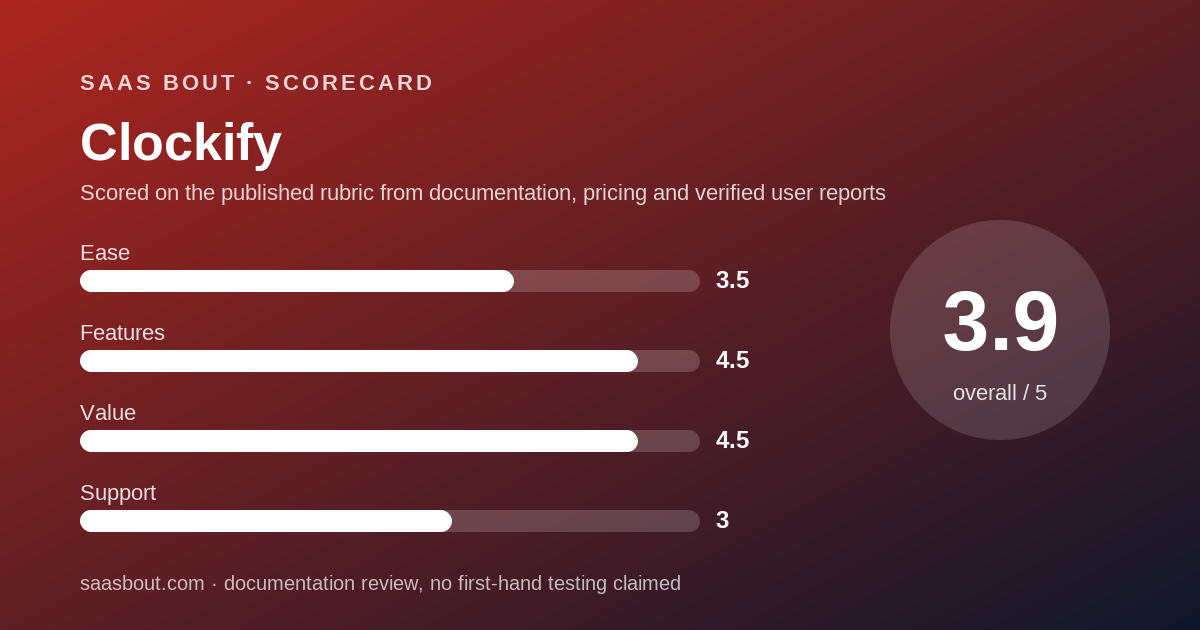
Clockify takes the time tracking card with 31 of 40: ease 7, features 9, value 9, support 6. It finishes ahead of Harvest on 29 and Toggl on 28. This is a documentation review. Every figure here comes from the Clockify pricing page rendered in a headless browser, the plan offer list embedded in that page as structured data, and the public Trustpilot profile, all read on October 26, 2026. No trial accounts, no staged demos. Value scores 9 because Standard is US$5.49 a seat a month billed annually, which is roughly half the entry team price of either rival, and because kiosk-only workers are billed on a separate cheaper seat class from US$0.79. Features scores 9: invoicing, expenses, scheduling, forecasting, labour cost and profit, SSO, SCIM and audit log all appear on published tiers. Ease scores 7 and that is the cost of the depth: five paid price points, a sixth bundle price, two seat classes and a free plan the page describes two different ways. Support scores 6, the weakest round, because the dedicated success representative is gated behind seat thresholds and no response time appears anywhere.
Visit Clockify
We have no affiliate relationship with this vendor. Link goes to the official site.
Where it is strong
- Standard is US$5.49 a seat a month billed annually, or US$6.99 billed monthly, which is the lowest price in this division for a tier that includes invoicing and timesheet approvals
- The free plan is a real tier rather than a trial, and carries the timer, timesheets, the auto tracker, calendar sync, mobile and desktop apps, a Pomodoro timer, idle detection, integrations and reports
- Kiosk-only workers are billed on a separate limited seat class from US$0.79 a month billed annually on Basic, rising to US$2.39 on Enterprise, so shop-floor headcount does not pay a full seat
- Invoicing, recurring invoices, timesheet approval, time locking, attendance and overtime all land on Standard at US$5.49, a tier below where either rival puts approvals
- Pro at US$7.99 adds scheduling, forecasting, expenses, labour cost and profit, budgets and estimates, multiple currencies and email reports, which is an unusually wide tier for under US$100 a seat a year
- Enterprise at US$11.99 publishes single sign-on, a custom subdomain, SCIM provisioning, account control and an audit log, so the security list has a number next to it rather than a sales call
- Data region hosting in the EU in Germany, the UK, the USA or Australia is a published Pro feature, with the page noting it excludes data used for the CAKE.com account
- The seat definition is spelled out: every active or invited user on the Team page occupies one paid seat, including the owner, admins, managers and members, and deactivated users do not
Where it falls short
- The page describes its own free plan two ways. The plan card reads For up to 5 users; the offer list embedded in the same page as structured data describes the free plan as unlimited users, projects and reports
- Six published price points plus two seat classes make this the hardest page in the division to read, and nothing on it totals a year for you
- Surveillance features sit on a mid tier: activity monitoring, GPS tracking, force timer and kiosk photo capture all arrive on Pro at US$7.99, which is a workforce policy decision priced like a reporting upgrade
- The dedicated success representative on Basic and above is qualified by headcount: at least 120 seats on Basic, 90 on Standard, 60 on Pro, 40 on Enterprise and 30 on the bundle
- No uptime figure, no support response target and no refund window appear anywhere on the pricing page as read October 26, 2026
- The page carries an aggregate rating of 4.8 from 9,218 reviews in its structured data with no source named for either number
- Trustpilot's own structured data for clockify.me showed 3 out of 5 from 86 reviews on October 26, 2026, which is a small sample and a long way from 4.8
- Prices are shown in a currency chosen from the reader's general location, so a buyer outside the United States has to confirm that the figure on screen is the US dollar figure
- The CAKE.com Bundle at US$12.99 is cheaper than the combined value the page prints at US$27.97, but the footnote says the bundle does not include data regions for Clockify
- Annual totals are editorial arithmetic throughout: US$47.88 a seat a year on Basic, US$65.88 on Standard, US$95.88 on Pro and US$143.88 on Enterprise
At a glance
| Free plan | Yes, at US$0. The plan card says for up to 5 users; the embedded offer list says unlimited users, projects and reports |
|---|---|
| Starting paid price | Basic US$3.99/seat/mo billed annually; US$4.99 billed monthly |
| Pricing note | Free at US$0, then from US$3.99 per seat per month billed annually, or US$4.99 billed monthly (pricing page, checked October 26, 2026) |
| Main team plan | Standard US$5.49/seat/mo billed annually; US$6.99 billed monthly |
| Upper tiers | Pro US$7.99 annually or US$9.99 monthly; Enterprise US$11.99 annually or US$14.99 monthly |
| Suite bundle | CAKE.com Bundle US$12.99 annually or US$15.99 monthly, covering Clockify, Pumble and Plaky at Enterprise feature level |
| Kiosk seats | Limited seats from US$0.79 a month billed annually on Basic, US$1.19 Standard, US$1.59 Pro, US$2.39 Enterprise |
| Annual cost per seat | US$47.88 Basic, US$65.88 Standard, US$95.88 Pro, US$143.88 Enterprise, all editorial calculations; the page prints no annual total |
| Seat definition | Every active or invited user on the Team page, including owner, admins, managers and members. Deactivated users do not occupy a seat |
| Invoicing | Standard and above |
| Single sign-on | Enterprise. SCIM provisioning and audit log also Enterprise |
| Data residency | Pro and above, in the EU in Germany, the UK, the USA or Australia |
| Support | Dedicated success representative from Basic upward if the account qualifies on headcount. No response time or uptime figure published |
What Clockify actually is
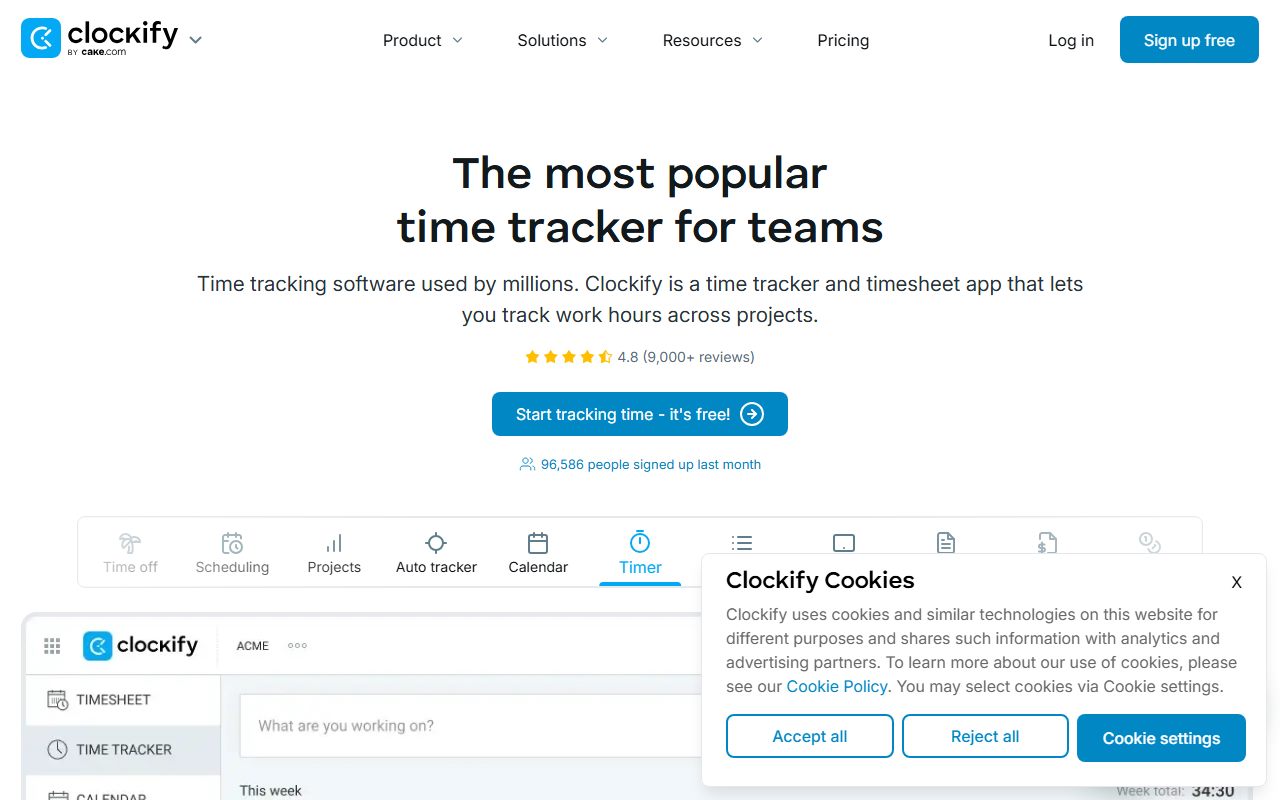
Clockify is a timer with a business suite behind it, sold by the cheapest seat in this division.
The product sits inside CAKE.com, alongside Pumble for team chat and Plaky for project management. The pricing page sells all three together as one bundle line.
That shape explains the ladder. Five paid tiers exist because the vendor is selling an administration layer, then a billing layer, then a profitability layer, then a security layer.
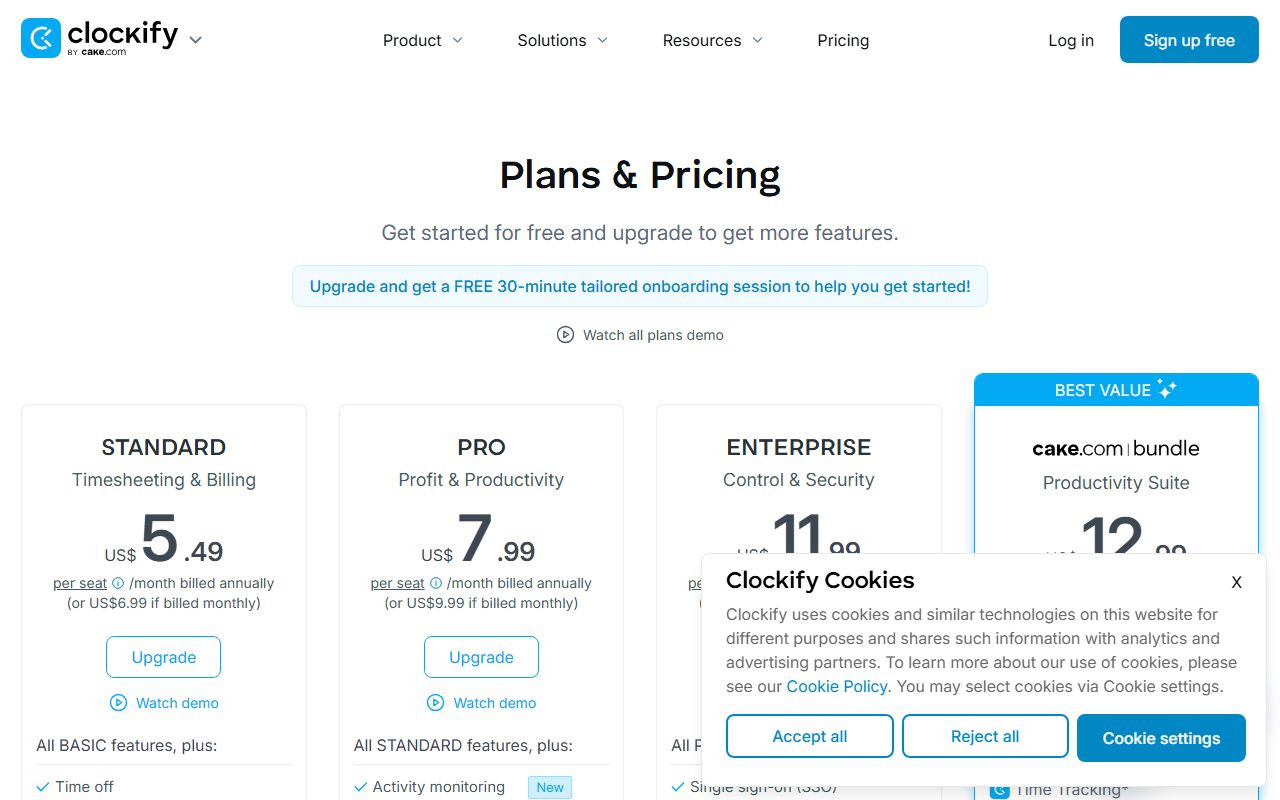
Basic at US$3.99 a seat a month billed annually is administration: adding time for other people, hiding data from regular users, required fields, bulk edit, imports.
Standard at US$5.49 is billing: invoices, recurring invoices, approvals, locked periods, attendance and overtime.
Pro at US$7.99 is margin and monitoring: labour cost and profit, budgets, scheduling, forecasting, and also activity monitoring and GPS tracking.
Enterprise at US$11.99 is security: single sign-on, a custom subdomain, SCIM provisioning, account control, an audit log.
There is also a second class of seat. Kiosk-only users, the people who clock in at a shared device, are billed from US$0.79 a month rather than a full seat.
Teams whose real problem is which projects the hours belong to should settle that first. Our project management fight card scores that division separately.
Who Clockify is best for
The fit follows the price and the seat classes, not the feature count.
- Teams where the per-seat number is the deciding factor, since Standard is US$5.49 a month billed annually
- Businesses with a mix of desk staff and clock-in staff, because the kiosk seat is a separate cheaper line
- Agencies that bill clients from tracked hours and want invoicing on a mid tier rather than a top one
- Operations that need labour cost against billed rate, which arrives on Pro at US$7.99
- Buyers whose security review names SSO, SCIM and an audit log, all priced on Enterprise at US$11.99
- Organisations with a data residency requirement, offered on Pro in the EU in Germany, the UK, the USA or Australia
Who should skip it
Three profiles will struggle with the page or the product.
- Teams with a stated no-monitoring policy, since activity monitoring and GPS tracking are mid-tier features here
- Buyers who need one simple price, because six published price points and two seat classes take real comparison work
- Anyone who needs a written support commitment, as no response target or uptime figure is published
What each plan includes (as of October 2026)
Free is labelled Time Tracking and priced at US$0. The card lists unlimited tracking, the timer, timesheets, the auto tracker, calendar sync, mobile and desktop apps, a Pomodoro timer, idle detection and reminders, integrations, team activity and reports.
How many people that covers is the one thing the page says twice, differently. The card reads for up to 5 users. The offer list embedded in the same page describes the free plan as unlimited users, projects and reports.
Both strings were read on October 26, 2026 and both are printed here. Confirm the headcount at signup before planning around it.
Basic is labelled Administration at US$3.99 a seat a month billed annually. It adds adding time for others, hiding time and pages, required fields, bulk edit and the kiosk.
The same tier brings decimal format, time audit, time estimates, custom exports, project templates, historical rates, imports, breaks, favourites, split time and billable rates.
Standard is Timesheeting and Billing at US$5.49. It adds time off, invoicing, recurring invoices, approval, lock time, attendance and overtime, targets and reminders, the manager role, task rates, rounding, the QuickBooks integration and kiosk customisation.
Pro is Profit and Productivity at US$7.99. It adds activity monitoring, scheduling, forecasting, expenses, labour cost and profit, budgets and estimates, custom fields, multiple currencies, user fields, email reports, alerts, force timer, GPS tracking, kiosk photo capture and data region.
Enterprise is Control and Security at US$11.99. It adds single sign-on, a custom subdomain, SCIM provisioning, account control and an audit log.
The CAKE.com Bundle is US$12.99 and carries Enterprise features across Clockify, Pumble and Plaky, minus Clockify data regions.
How the pricing is structured
Two numbers per paid tier, no annual totals, and a seat definition that is unusually precise.
Billed annually the ladder is US$3.99, US$5.49, US$7.99 and US$11.99 a seat a month, with the bundle at US$12.99. Billed monthly it is US$4.99, US$6.99, US$9.99, US$14.99 and US$15.99.
The annual discount works out at 20 percent on Basic, Pro and Enterprise, 21.5 percent on Standard and 18.8 percent on the bundle. Those five percentages are editorial calculations from the published figures.
The page carries no save-percentage badge on the billing toggle. The only percentage printed is 53 percent, and that belongs to the bundle against a combined value of US$27.97 a seat a month.
Annual totals are also absent. At the annual rates a seat runs US$47.88, US$65.88, US$95.88 and US$143.88 a year, which is again editorial arithmetic.
The seat rule is stated plainly, and it is the kind of sentence most vendors leave to a help article. Every active or invited user listed on the Team page occupies one paid seat, including the owner, admins, managers and members. Deactivated users do not.
That matters for a growing team. An invitation sent and never accepted still bills.
One geography warning. The page says it uses the reader's general location to show prices in the most relevant currency, and offers a manual currency switch. Every figure in this review was read in the US dollar view on October 26, 2026.
The free plan is described two different ways on the same page
This is the single thing to resolve before building a plan around the free tier.
The visible plan card, under the heading FREE and the label Time Tracking, reads US$0 and then For up to 5 users.
The same page carries an offer list in its structured data, listing six offers from US$0.00 to US$12.99. The free entry there is described as unlimited users, projects, and reports.
Those two statements cannot both be operational. One is a headcount cap and the other is an explicit absence of one.
What the structured data does confirm is the paid ladder. Its six prices, 0.00, 3.99, 5.49, 7.99, 11.99 and 12.99 in US dollars, match the five plan cards and the bundle exactly.
So the embedded data is reliable on price and contradicts the card on headcount. We print both rather than pick one.
The practical move for a small team is to sign up and read the member limit inside the workspace. If the cap is five, Basic at US$3.99 is the next step and it is a cheap one.
Round 1, ease: what the 7 is built from
The page is well built. The product catalogue behind it is the widest in the division, and width costs clarity.
What earns the 7: every tier is described as the previous tier plus a named list, each feature carries a plain-language explanation underneath, and the seat definition is printed on every card rather than buried.
The kiosk table is also honest work. Four prices, two billing modes, one sentence explaining who qualifies.
Three points come off for the count. Six published price points, two seat classes and a bundle mean a finance team has to build a comparison before it can answer what Clockify costs.
Part of one point goes for the missing annual totals. Harvest prints US$108 per seat billed annually next to its monthly figure; this page leaves the multiplication to the reader.
The rest goes to the free-plan contradiction. A page that answers its own central question twice, differently, has not been proofread against itself.
Round 2, features: what the 9 is built from
Clockify wins the features round because nothing on this card is missing from its published tiers.
The tracking side is complete at zero: timer, timesheet, auto tracker, calendar sync, Pomodoro, idle detection, offline mobile and desktop apps.
The billing side arrives at US$5.49: invoices, recurring invoices, approvals, locked periods, attendance and overtime, task rates, rounding, QuickBooks.
The margin side arrives at US$7.99: labour cost against billable rate, budgets and estimates, expenses with receipts, multiple currencies, scheduling and forecasting.
The administrative side arrives at US$11.99 with a number attached: single sign-on, SCIM provisioning, a custom subdomain, account control, an audit log. Neither rival publishes a price for SSO on a self-serve card the same way.
One point comes off, and it is not for an absence. It is for what the Pro tier bundles in alongside the margin tools: activity monitoring, force timer, GPS tracking and kiosk photo capture.
Those are workforce surveillance capabilities sold at the same step as profitability reporting. A buyer upgrading for labour cost reports is also buying a monitoring switch, and that deserves a separate decision.
Teams tracking hours against tasks will want to see the two systems side by side. Our card scores ClickUp and Asana on the planning side of the same workflow.
Round 3, value: what the 9 is built from
This is where the bout is won, and the margin is not close.
Standard is US$5.49 a seat a month billed annually, so US$65.88 a seat a year by editorial arithmetic.
Harvest Teams is US$9 a seat a month, printed on its own page as US$108 per seat billed annually. Toggl Starter is US$9 a seat a month, so US$108 a year.
At three seats for a year, that is US$197.64 against US$324 against US$324. Clockify delivers invoicing and approvals at that price; neither rival puts approvals on its entry team tier at all.
Pro at US$7.99 is still below both rivals' entry price and carries profitability, scheduling, forecasting and expenses.
The kiosk seat adds a second kind of saving that neither rival offers. A warehouse with thirty clock-in workers and four office users pays four full seats plus thirty limited seats from US$0.79.
One point comes off for the bundle maths. US$12.99 against a printed combined value of US$27.97 is a real saving, but the comparison is against two products a time tracking buyer did not set out to purchase.
The other half point goes to the geography note. A price shown in the reader's local currency is convenient and makes verification harder, and every figure here had to be read in the US dollar view.
Round 4, support: what the 6 is built from
Six is the weakest round on this card, and it is earned by silence rather than by a bad promise.
Not published on the pricing page as read October 26, 2026: any uptime figure, any response-time target, any refund window, any named support channel per tier.
What is published is a dedicated success representative, listed from Basic upward and marked if qualified. The qualifying rule is headcount: at least 120 seats on Basic, 90 on Standard, 60 on Pro, 40 on Enterprise and 30 on the bundle.
Read against the audience for a US$3.99 plan, those thresholds put the named contact out of reach of almost every small team paying for it.
The verified record is thin on both sides. The page's own structured data claims an aggregate rating of 4.8 from 9,218 reviews and names no source for either figure.
Trustpilot's structured data for clockify.me showed 3 out of 5 from 86 reviews on October 26, 2026. Eighty-six reviews is a small sample for a product this widely used, so treat it as a signal rather than a verdict.
G2 and Capterra product pages returned no readable rating to a headless browser, so neither appears here.
Four points come off: three for publishing no commitment of any kind, one for an unsourced rating on the vendor's own page.
Limits stated by the vendor
Published on the pricing page and its embedded offer list as of October 26, 2026.
- Free plan headcount: the plan card says up to 5 users; the embedded offer list says unlimited users, projects and reports
- Seats: every active or invited user on the Team page bills, including owner, admins, managers and members; deactivated users do not
- Invoicing, approvals, time off and locked periods: Standard and above
- Expenses, labour cost and profit, budgets, scheduling, forecasting, multiple currencies: Pro and above
- Activity monitoring, force timer, GPS tracking, kiosk photo capture: Pro and above
- Data region hosting in the EU in Germany, the UK, the USA or Australia: Pro and above, excluding data used for the CAKE.com account
- Single sign-on, custom subdomain, SCIM provisioning, account control, audit log: Enterprise only
- Dedicated success representative: 120 seats on Basic, 90 Standard, 60 Pro, 40 Enterprise, 30 bundle
- Kiosk seats: US$0.79 Basic, US$1.19 Standard, US$1.59 Pro, US$2.39 Enterprise, billed annually
- CAKE.com Bundle excludes data regions for Clockify, per the footnote under the bundle card
Alternatives
Harvest. Choose it if the invoice is the point and you want the price arithmetic printed for you. Its page shows US$108 per seat billed annually next to the monthly figure.
Otherwise choose Clockify when the per-seat number has to come down.
Toggl. Choose it if your team will refuse monitoring software outright. Its pricing page states plainly that it does not take screenshots or record keystrokes, browsing history or location. Otherwise choose Clockify when you need invoicing and approvals under US$6 a seat.
Both are scored on the same four rounds in our time tracking division.
If the real gap is that nobody knows which project the hours belong to, start upstream. Our card scores monday.com Work Management and Trello, with the bout Asana vs monday.com.
And if the hours being argued over are billable client hours, the pipeline matters as much as the timer. Read the CRM fight card for small sales teams.
Bottom line
Clockify takes 31 on this card by charging the least and publishing the most.
Start on Free. It carries the timer, timesheets, the auto tracker, calendar sync and reports at US$0, and the only open question is the headcount.
The plan to buy for most small teams is Standard at US$5.49 a seat a month billed annually, which is US$65.88 a seat a year by editorial arithmetic. That is where invoicing and timesheet approvals live.
Go to Pro at US$7.99 only if you want labour cost and profitability, and decide separately about the monitoring features that arrive with them.
Ask two questions before signing. What is the real free-plan user limit, given the page says five in one place and unlimited in another. And what support response time, if any, the contract commits to, since the page commits to none.
If part of your headcount only clocks in and out, price the kiosk seats separately. From US$0.79 a month, that line alone can decide the bout.
Every figure above was read on the Clockify pricing page, its embedded offer list and Trustpilot on October 26, 2026. Confirm prices, currency and the free-plan limit at the signup step.
Buy it if
- Price per seat is the deciding number, because Standard at US$5.49 a month billed annually undercuts the entry team tier of both rivals by roughly half
- Part of your headcount only clocks in and out, since kiosk-only staff are billed from US$0.79 a month on a separate limited seat
- You need invoicing and approvals without an upper tier, as both land on Standard rather than on the most expensive plan
- Security review will ask for SSO, SCIM and an audit log, all of which carry a published Enterprise price of US$11.99 a seat a month
Skip it if
- Your team will not accept monitoring software, because activity monitoring, GPS tracking and kiosk photo capture are standard Pro features here
- You want one price to explain to a finance team, since six published price points and two seat classes take a spreadsheet to compare
- You need a support commitment in writing, as no response target, uptime figure or refund window is published on the pricing page
Frequently asked
Is Clockify free?
Yes, and the page gives two different answers on the size of it. The free plan card reads for up to 5 users at US$0. The offer list embedded in the same page as structured data describes the free plan as unlimited users, projects and reports.
How much does Clockify cost per user?
Billed annually: Basic US$3.99, Standard US$5.49, Pro US$7.99, Enterprise US$11.99 a seat a month. Billed monthly: US$4.99, US$6.99, US$9.99 and US$14.99. All four figures were read on the pricing page and in its embedded offer list on October 26, 2026.
Which Clockify plan includes invoicing?
Standard, at US$5.49 a seat a month billed annually. That tier also brings time off, recurring invoices, timesheet approval, time locking, attendance and overtime, targets and reminders, the manager role, task rates, rounding and the QuickBooks integration.
What is a kiosk seat and what does it cost?
It is a cheaper seat class for people who reach Clockify only through a shared clock-in device. Billed annually it is US$0.79 a month on Basic, US$1.19 on Standard, US$1.59 on Pro and US$2.39 on Enterprise, with monthly rates of US$0.99 to US$2.99.
Does Clockify monitor employees?
On Pro and above it can. Activity monitoring, GPS tracking, force timer and kiosk photo capture are all listed as Pro features at US$7.99 a seat a month. That is a policy choice to make before buying, not a reporting switch to flip later.
How much does Clockify cost for a year?
The page prints no annual total. At the published annual rates a seat costs US$47.88 a year on Basic, US$65.88 on Standard, US$95.88 on Pro and US$143.88 on Enterprise. Those four figures are editorial calculations from the monthly numbers.
What is the CAKE.com Bundle?
One price for Clockify, Pumble and Plaky at Enterprise feature level: US$12.99 a seat a month billed annually, or US$15.99 monthly. The page puts the combined value at US$27.97 and badges the saving at 53 percent. A footnote excludes Clockify data regions.
Does Clockify have good reviews?
The two readable numbers disagree. The pricing page carries an aggregate rating of 4.8 from 9,218 reviews in its structured data with no source named. Trustpilot's own structured data for clockify.me showed 3 out of 5 from 86 reviews on October 26, 2026.
Sources
- Clockify pricing page: plan cards for Free, Basic, Standard, Pro, Enterprise and the CAKE.com Bundle, the kiosk seat table and the plan offer list embedded as structured data (rendered in a headless browser) - checked October 26, 2026
- Trustpilot: Clockify by CAKE.com, aggregate rating in the page's structured data - checked October 26, 2026
Update history
- October 26, 2026 - First scorecard. The pricing page describes its own free plan two ways: the plan card reads For up to 5 users while the offer list embedded in the same page as structured data describes the free plan as unlimited users, projects and reports; both strings reported with the read date rather than one chosen. The six prices in that embedded offer list (0.00, 3.99, 5.49, 7.99, 11.99, 12.99 USD) match the five plan cards and the bundle exactly, so the embedded data was treated as confirmation on price. Annual totals are not printed, so US$47.88, US$65.88, US$95.88 and US$143.88 a seat a year are editorial calculations. The page's structured data claims 4.8 from 9,218 reviews with no source named; Trustpilot's own structured data showed 3 out of 5 from 86 reviews on October 26, 2026. G2 and Capterra returned no readable rating to a headless browser.
Visit Clockify
We have no affiliate relationship with this vendor. Link goes to the official site.