 Saas

Calendly
The most complete scheduling feature table in this division, sold on four price points plus two upsell columns that quietly double the seat rate
Scored on the published rubric, from documentation, pricing and verified user reports.
Best for: Sales and recruiting teams that already run HubSpot or Salesforce and need routing, round robin and 24/7 chat support more than they need the lowest seat price.
Verdict
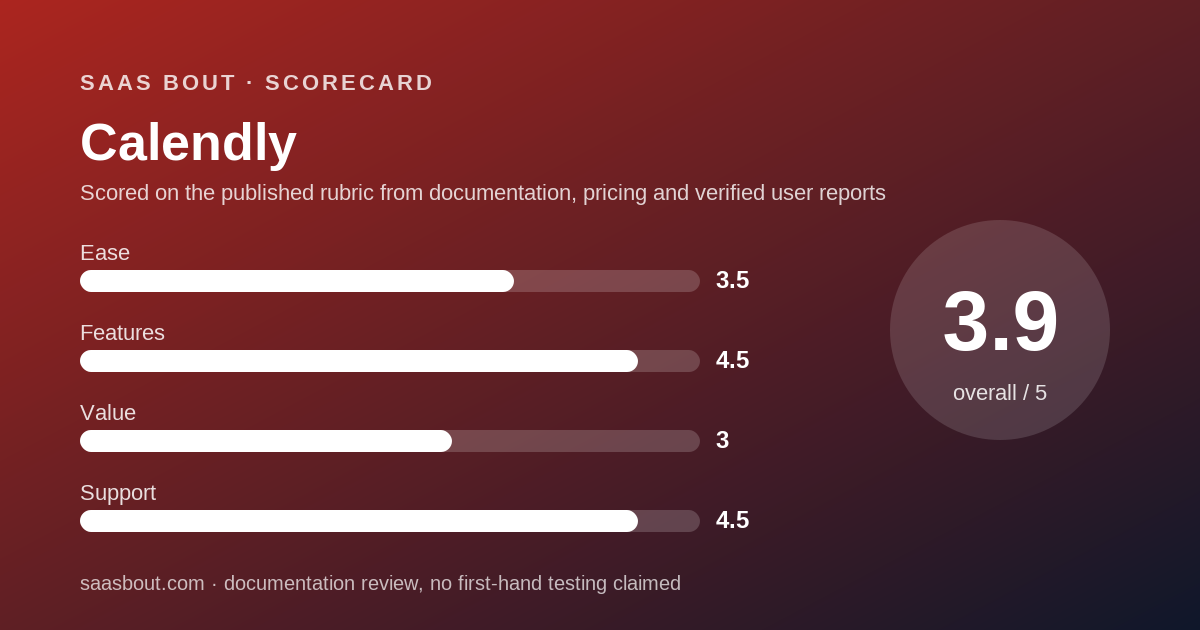
Calendly scores 31 on our four-round card: ease 7, features 9, value 6, support 9. It takes first place in the meeting scheduling division ahead of SavvyCal on 30 and Cal.com on 29. This is a documentation review. Every figure comes from the Calendly pricing page rendered in a headless browser, the plan catalogue embedded in that page's markup, its 63-row plan comparison table and the structured data carrying its pricing FAQ, all read on October 28, 2026. No trial accounts and no staged demos. Features scores 9 because no rival on this card publishes lead routing by HubSpot assignment, round-robin distribution, meeting packages, invoicing and SCIM provisioning on the same table. Support scores 9 for one reason that is rare anywhere: 24/7 email support is ticked on the free plan, and 24/7 chat is ticked from the first paid tier. Ease scores 7 because the same page that explains the product so well also sells six different seat prices. Value scores 6, the lowest in this division, because Teams at $16 a seat a month billed annually is the dearest entry to team scheduling on this card.
Visit Calendly
We have no affiliate relationship with this vendor. Link goes to the official site.
Where it is strong
- 24/7 email support is ticked on every plan including Free, and 24/7 chat support is ticked from Standard upward, per the comparison table read October 28, 2026
- The feature table runs 63 rows and marks every cell with a tick, a cross, a number or the word Add-on, so there is very little to guess at
- Teams at $16 a seat a month billed annually publishes round-robin distribution, lead routing forms, admin-managed event types, Salesforce record updates and HubSpot assignment routing
- The free plan is permanent rather than a clock, and the 14-day trial of a paid plan takes the whole team: the FAQ states trial members are downgraded to Free, not locked out
- Payments are native on the first paid tier: Stripe and PayPal at booking, custom payment links, prepaid meeting packages, invoices, discounts and coupon codes
- The annual discounts print their own percentages and the arithmetic holds: Standard $12 monthly against $10 annual is 17 percent, Teams $20 against $16 is 20 percent
- SAML single sign-on is available as a paid add-on on Teams rather than being locked to the $15k Enterprise floor
Where it falls short
- Value is the weakest round here. Teams at $16 a seat a month billed annually is 33 percent above Cal.com's team tier and 60 percent above SavvyCal's entry plan on the same billing basis
- The free plan allows one event type and one calendar connection. That is the tightest free tier in this division by a wide margin
- Calendar connections cap at 6 on every paid plan, including Enterprise. A rival on this card publishes unlimited calendar connections at $10 a seat
- Round-robin distribution is a Teams row, not a Standard row, so shared availability costs $16 a seat a month billed annually rather than $10
- The Notetaker and Callie add-on columns sit beside each paid plan and change Standard from $10 to $18 and Teams from $16 to $24 on annual billing
- Enterprise starts at $15,000 a year, and phone support, SCIM, group provisioning, the data deletion API and Salesforce routing all sit behind that floor
- No uptime figure and no support response target appear anywhere on the pricing page or its comparison table
- The AI rows on Enterprise read Inquire rather than a tick or a cross, so the top plan is the one row block the page declines to answer
At a glance
| Free plan | Yes. $0, one event type, one calendar connection, one-on-one scheduling, customisable booking page, browser extension |
|---|---|
| Entry paid price | Standard $10/seat/mo billed annually; $12/seat/mo billed monthly |
| Pricing note | Free for one event type, then Standard at $10 per seat per month billed annually or $12 monthly, and Teams at $16 billed annually or $20 monthly (pricing page, checked October 28, 2026) |
| Main team plan | Teams $16/seat/mo billed annually; $20/seat/mo billed monthly |
| Add-on columns | Notetaker and Callie: Standard $18 and Teams $24 per seat per month billed annually; $24 and $32 monthly |
| Top plan | Enterprise, starts at $15,000 per year |
| Calendar connections | 1 on Free, 6 on Standard, Teams and Enterprise |
| Round robin | Teams and Enterprise only |
| Single sign-on | SAML, listed as Add-on on Teams, included on Enterprise |
| Trial | 14 days, downgrades to Free at the end, extra trial members cost nothing |
| Support | 24/7 email on all plans; 24/7 chat from Standard; phone and dedicated account support on Enterprise only |
| Payments at booking | Stripe and PayPal from Standard upward |
| Invoice payment | Available on Standard or Teams for $5,000, and on Enterprise for $15,000 |
What Calendly actually is
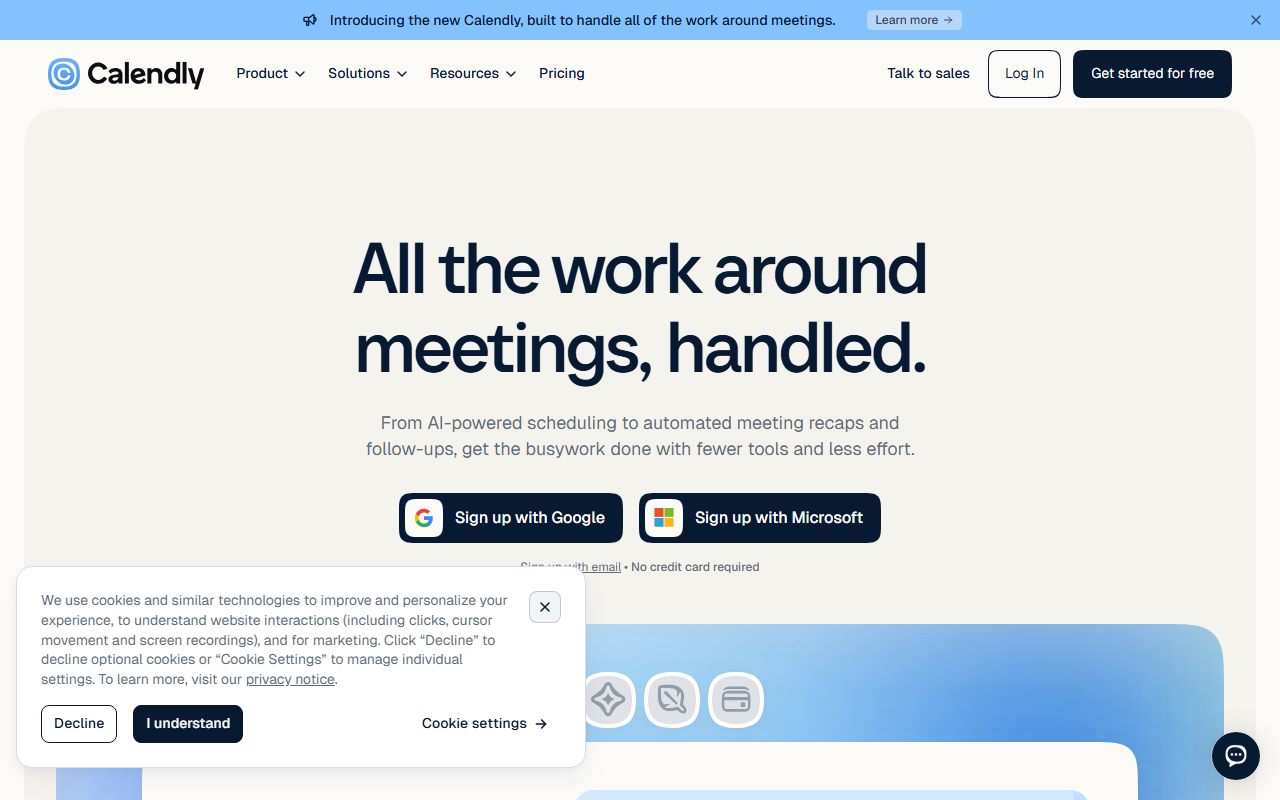
Calendly is a booking link that grew a CRM router bolted to its side. That one sentence explains both the depth of the feature table and the shape of the price list.
The core job has not changed. You publish availability, an invitee picks a slot, the event lands on a connected calendar and both sides get reminders.
What sits above that job is the product now. Routing forms screen inbound leads and send them to the right person. Round robin spreads bookings across a pool.
Two newer layers appear as separate columns rather than separate plans. Notetaker records and transcribes meetings on Zoom, Google Meet and Microsoft Teams. Callie, marked Beta on the page, schedules over email.
That structure is why the pricing page carries six seat prices rather than two. Read the columns before the rows.
Who Calendly is best for
The fit is narrower than the feature count suggests, and it is defined by whether inbound meetings have to be sorted before they are booked.
- Sales teams running HubSpot or Salesforce, because assignment routing for both is a published Teams row
- Recruiting teams that need round robin across a panel plus admin-managed event types for consistency
- Consultants who take payment at booking, since Stripe, PayPal, packages and invoices start on the $10 tier
- Support-sensitive buyers, given 24/7 email on every plan and 24/7 chat from Standard upward
- Teams whose security review demands SAML but whose budget cannot reach a $15,000 Enterprise floor
- Marketing teams tracking booking conversion, as Google Analytics and Meta Pixel are listed from Standard
Who should skip it
Three profiles will find either the bill or a specific cap wrong, and all three are visible on the page before you sign anything.
- Anyone whose decision is the seat price, because Teams is the dearest entry to team scheduling on this card
- Anyone connecting more than six calendars to one account, since that number never moves
- Solo users who need more than one booking link, because the second event type is a paid feature
What each plan includes (as of October 2026)
Free is $0 and labelled Always free on the card. It carries one event type, one calendar connection, one-on-one scheduling, a customisable booking page and the browser extension.
Standard is $10 a seat a month billed annually. It opens unlimited event types, multiple calendar connections capped at six, automated reminders, cancellation policies, payments via Stripe and PayPal, and removal of Calendly branding.
Teams is $16 a seat a month billed annually. It adds round-robin distribution, routing forms that screen and assign leads, centrally managed event types, Marketo and Pardot connections, and Salesforce record updates.
Enterprise starts at $15,000 a year. It adds Salesforce lookup routing, Microsoft Dynamics 365 and Power Automate, SCIM provisioning, group provisioning, domain control, a data deletion API and phone support.
The seat definition is printed on both paid cards: a seat is needed to connect a calendar and host meetings, and invitees never need one.
How the pricing is structured
Two billing cycles, two paid plans, two add-on columns and one quoted floor. Six numbers in total, and the page prints all of them.
Billed annually, Standard is $10 a seat a month and Teams is $16. Billed monthly they are $12 and $20.
The discount labels are printed as percentages and both check out. Standard is marked Save 17 percent, which is $10 against $12. Teams is marked Save 20 percent, which is $16 against $20.
Enterprise is the only tier billed by the year rather than the seat. The card reads Starts at $15k per year, with a Talk to sales button in place of a signup.
One payment detail is worth lifting out of the FAQ. Payment by invoice is offered on Standard or Teams at $5,000 and on Enterprise at $15,000, which puts a floor under anyone who cannot pay by card.
The add-on columns quietly double both paid tiers
This is the part of the card most likely to surprise a buyer, and it is the reason ease scores 7 rather than 9.
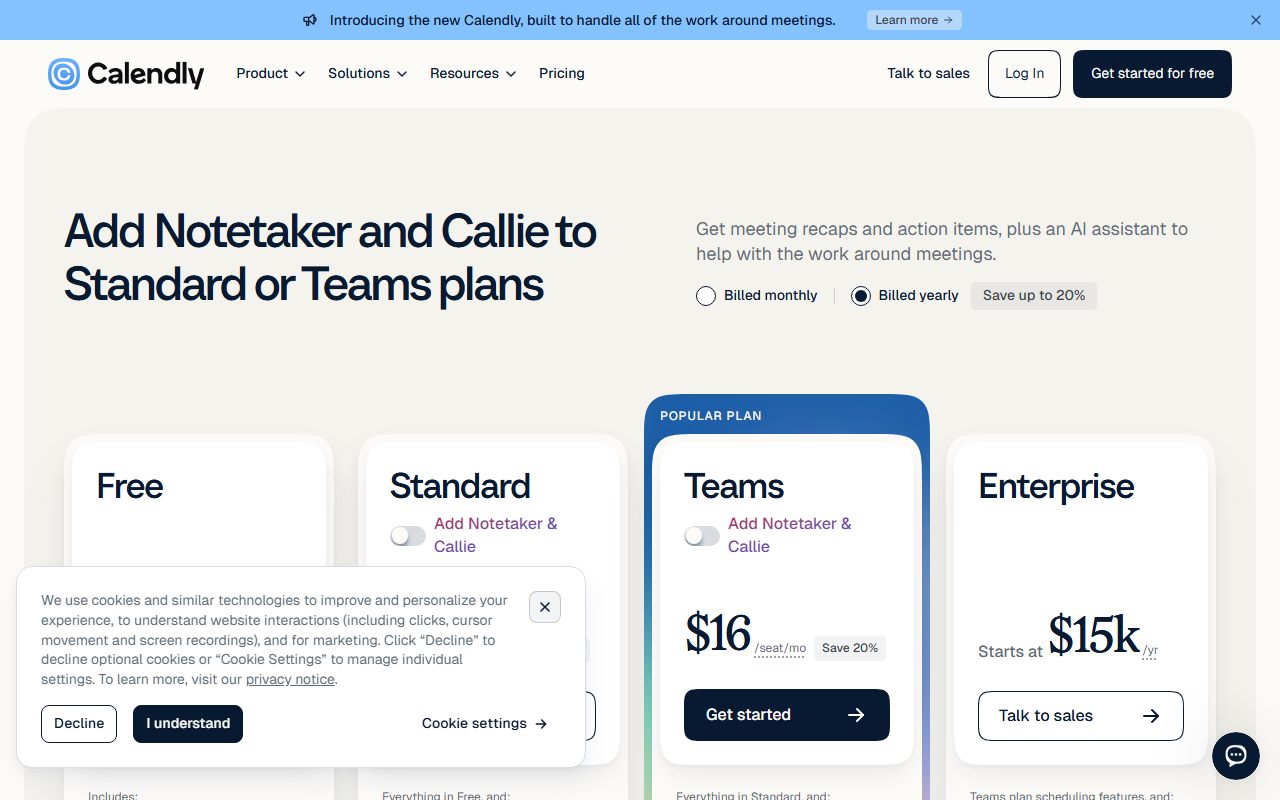
Each paid plan card carries a toggle reading Add Notetaker and Callie. Switching it does not change plan. It changes the price of the plan you are already looking at.
With the toggle on, Standard moves from $10 to $18 a seat a month billed annually, and from $12 to $24 monthly. The page labels that column Standard Plus.
Teams moves from $16 to $24 billed annually, and from $20 to $32 monthly. That column is labelled Teams Plus.
So the real annual seat ladder is $10, $16, $18 and $24, not $10 and $16. Both Plus columns are marked Save 25 percent, and both percentages check against their monthly twins.
What the money buys is recordings, transcripts, shareable meeting recaps, a bot that joins Zoom, Google Meet and Microsoft Teams, and the Callie assistant marked Beta.
Round 1, ease: what the 7 is built from
Seven is a good mark held back by one deliberate complication, not by sloppiness.
What earns it: four plan cards, a working monthly and annual toggle, printed discount percentages, a 63-row comparison table where every cell is a tick, a cross, a number or the word Add-on, and a seat definition written in plain English on each paid card.
The table also avoids the trick that spoils most rivals. Where a feature is partially available it prints a number, such as the 1 and 6 on the calendar connection row, rather than a tick that means something different per column.
What holds it back: the Plus toggle. A reader who scans the page once will quote $10 and $16 to a colleague and be wrong by eight dollars a seat a month if Notetaker is wanted.
One further gap. Six rows in the Enterprise column read Inquire instead of a tick or a cross, all of them on the AI features. The most expensive plan is the one with the least readable row.
Round 2, features: what the 9 is built from
Nine is the highest mark we have given in this division, and it is earned on breadth rather than on any single row.
No other card here publishes lead routing forms, round-robin distribution, HubSpot assignment routing, Salesforce record updates, Marketo and Pardot connections, SCIM provisioning and a data deletion API on one table.
The payments block is similarly complete and starts early. Stripe and PayPal collection at booking, custom payment links for one-off fees, prepaid meeting packages, project invoices, custom terms, discounts and coupon codes are all Standard rows.
The contacts block is quietly useful and partly free. Auto-generated contact profiles, relationship history, notes, reminders and custom fields are ticked even on the $0 plan.
One genuine hole sits in the middle of all that depth. Calendar connections stop at six on every paid plan, which is a hard cap on anyone running a shared pool across many mailboxes.
Round 3, value: what the 6 is built from
Six is the lowest round on this card, and it is a price judgement rather than a quality judgement.
The number most teams will actually pay is the Teams rate, because round robin and routing are the reason to buy Calendly at all. That rate is $16 a seat a month billed annually.
By our arithmetic from the published figure, ten seats on Teams is $1,920 a year. The page does not print that total anywhere.
The comparison that hurts is inside this division. Round robin and shared availability are included in the $10 entry plan of one rival and in the $12 team plan of another, while Calendly places them at $16.
There is a real counterweight. Standard at $10 a seat already carries payments, invoicing, branding removal and unlimited event types, which some rivals reserve for a higher tier or do not sell at all.
Value would score higher if the free plan allowed a second event type. One link is less than every rival offers free.
Round 4, support: what the 9 is built from
Nine is the best support mark on any card we have scored in this division, and it rests on two rows that are ticked unusually low down the ladder.
Twenty-four hour email support is ticked in all four columns, including Free. Help Centre and community access are ticked in all four as well.
Twenty-four hour chat support is crossed on Free and ticked on Standard, Teams and Enterprise. Paying $10 a seat a month buys live chat at any hour, which is not normal at that price.
What is reserved: phone support, dedicated account support, dedicated onboarding and personalised account consultations are all Enterprise only, which means a $15,000 annual floor.
What is missing, and it costs the tenth point: no response time target and no uptime commitment appear anywhere on the pricing page or its table. Twenty-four seven describes the hours, not the speed.
Limits stated by the vendor
All published on the pricing page, its embedded plan catalogue or its 63-row comparison table as of October 28, 2026.
- Event types: one on Free, unlimited on Standard, Teams and Enterprise
- Calendar connections: 1 on Free, 6 on Standard, Teams and Enterprise
- Multi-person meeting types: crossed on Free, unlimited on all paid plans
- Round robin: Teams and Enterprise only
- Routing forms and lead screening: Teams and Enterprise only
- Salesforce record updates: Teams and Enterprise. Salesforce lookup routing: Enterprise only
- SAML single sign-on: Add-on on Teams, included on Enterprise
- SCIM, group provisioning, domain control and the data deletion API: Enterprise only
- Trial: 14 days, then automatic downgrade to Free
- Invoice payment: $5,000 minimum on Standard or Teams, $15,000 on Enterprise
Alternatives
Two other schedulers sit on this card, and the choice between them turns on one question each.
Cal.com. Choose it if a single user needs unlimited booking links for nothing, or if a team of twelve wants round robin at a lower annual seat rate. Otherwise choose Calendly when inbound leads must be routed by CRM assignment.
SavvyCal. Choose it if the clearest pricing page and unlimited calendar connections matter more than CRM depth, and if nobody on the team needs a free seat. Otherwise choose Calendly when 24/7 chat support is part of the requirement.
If the scheduling decision is really a CRM decision, start one step earlier. Our CRM fight card for small sales teams scores the systems that Calendly routes into, and the HubSpot CRM and Pipedrive cards cover the two most commonly paired with it.
For teams weighing scheduling against the rest of the stack, the best project management software for small teams guide and the Asana vs monday.com bout use the same four rounds.
The same seat arithmetic applies to anything billed per person. Clockify and Asana are both scored on this site with the ten-seat total spelled out, for exactly that reason.
Bottom line
Calendly takes 31 on this card with the deepest feature table in the division and the highest seat price in it.
Start on Free only if one booking link is genuinely the whole job. One event type and one calendar connection is a demonstration, not a plan.
Standard at $10 a seat a month billed annually is the sweet spot for solo professionals and small consultancies. Unlimited links, payments, invoicing, branding removal and 24/7 chat is a lot for ten dollars.
Teams at $16 is the plan the product is built around, and the only reason to pay it is routing. Round robin, screening forms and CRM assignment are what the extra six dollars buys.
Check the Plus toggle before you quote a budget. If Notetaker is wanted, the real numbers are $18 and $24 a seat a month billed annually.
And confirm the calendar count. Six connections per account is the one hard cap on this card that no amount of money removes.
Buy it if
- Leads have to land on the right rep automatically, because routing forms, HubSpot assignment routing and round robin are all published Teams rows
- Someone will need support at three in the morning, since 24/7 email is ticked on every plan and 24/7 chat from Standard
- You take money at the moment of booking, as Stripe, PayPal, packages, invoices and coupon codes all start on the $10 tier
- The security review will ask for SAML, which is sold as an add-on on Teams instead of being locked to the $15,000 Enterprise floor
Skip it if
- The seat price is the deciding number, because $16 a seat a month billed annually is the highest entry to team scheduling on this card
- You need more than six calendars on one account, since the connection cap does not move above 6 on any plan
- One free link is all you will ever need, as the free plan allows exactly one event type and the paid value starts at the second one
Frequently asked
Is Calendly free?
Yes, with one event type and one calendar connection. The free plan also carries one-on-one scheduling, a customisable booking page, the mobile app, the browser extension, meeting polls and 24/7 email support. Read October 28, 2026.
How much does Calendly cost per user?
Standard is $10 a seat a month billed annually or $12 billed monthly. Teams is $16 billed annually or $20 monthly. The Notetaker and Callie columns raise those to $18 and $24 annually. Read October 28, 2026.
How much does Calendly cost for a 10-person team?
Teams at $16 a seat a month billed annually works out to $1,920 a year for ten seats, by our arithmetic from the published rate. Standard at $10 a seat would be $1,200. Neither figure is printed on the page.
Which Calendly plan has round robin?
Teams, at $16 a seat a month billed annually. Round-robin meeting distribution is crossed out on Free and on Standard in the 63-row comparison table. Lead routing forms and admin-managed event types start on the same tier.
How many calendars can Calendly connect?
One on Free and six on Standard, Teams and Enterprise. The row reads Connect calendars and the number does not increase on the top plan. Checked on the comparison table, October 28, 2026.
What happens at the end of the Calendly trial?
The pricing FAQ states that after the 14-day trial the account is automatically downgraded to the Free tier and can be used indefinitely from there. Team members invited into a trial are downgraded with it, at no cost.
Does Calendly include single sign-on?
SAML single sign-on is marked Add-on on Teams and included on Enterprise. SCIM user provisioning, group provisioning and domain control are Enterprise only, and Enterprise starts at $15,000 a year.
Is Calendly worth it against cheaper schedulers?
It depends on whether you need routing. Calendly is the only card in this division publishing CRM assignment routing and 24/7 chat. If a single shared link is the whole job, the price gap is hard to defend.
Sources
Update history
- October 28, 2026 - First scorecard. Monthly and annual rates for Standard, Teams and both Plus columns were taken from the plan catalogue embedded in the pricing page markup, which carries USD, GBP and EUR for each tier; the USD pair for each plan was checked against its printed savings percentage and all four hold. The $1,920 ten-seat figure is editorial arithmetic from the published $16 annual rate and is not printed by the vendor. The Enterprise floor of $15k per year is the vendor's own printed figure. The six Enterprise AI rows reading Inquire are reported as published rather than as unavailable. No uptime figure and no support response target were readable on the pricing page or its comparison table on October 28, 2026.
Visit Calendly
We have no affiliate relationship with this vendor. Link goes to the official site.