 Saas

Help Scout
The clearest pricing page in the help desk division and the only free plan that seats a whole small team, held back by a feature table that stops short of voice
Scored on the published rubric, from documentation, pricing and verified user reports.
Best for: Support teams of 2 to 25 that answer email, chat and social messages, want a published cap for every limit they might hit, and would rather pay for AI by the resolution than by the seat.
Verdict
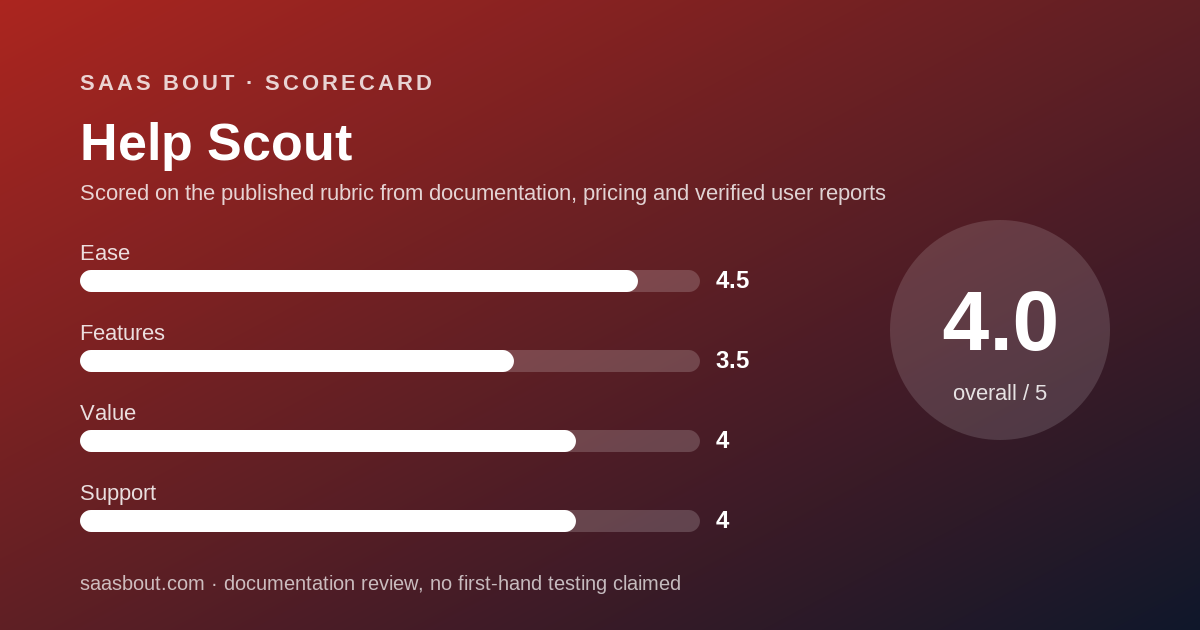
Help Scout takes the help desk division with a 32 on our four-round card: ease 9, features 7, value 8, support 8. This is a documentation review. Every figure below comes from the Help Scout pricing page, its startup programme page and its public Trustpilot profile, all read on October 13, 2026, and not from paid trials or staged demos. Ease scores 9 because the pricing page prints a number against almost every limit a small team will meet: inboxes, Docs sites, workflows, light users, API calls per minute, reporting history. Value scores 8 because the free plan seats 5 users with 1 inbox and 100 contacts a month, because Standard is $25 per user on the Annual toggle, and because AI is metered at $0.75 per resolved conversation rather than sold as a per-seat add-on. Features scores 7, the lowest of the three fighters on this card: phone and voice appear only as integrations, and SSO, HIPAA and IP restrictions sit on Pro or as add-ons. Support scores 8 for priority support published per plan, a dedicated onboarding specialist on Pro and a 99.99 percent figure in the site footer. Buy it if your queue is email, chat and social. Skip it if you need an in-product phone channel.
Visit Help Scout
We have no affiliate relationship with this vendor. Link goes to the official site.
Where it is strong
- The free plan seats 5 users with 1 inbox, 1 Docs site and 100 contacts a month, per the pricing page checked October 13, 2026
- Standard is listed at $25 per user per month with the Annual toggle pre-selected, against $19 at Freshdesk and $55 for the cheapest multichannel Zendesk plan
- AI Answers is billed at $0.75 per resolution with a monthly spending cap and a 3-month free trial of unlimited resolutions from account creation
- Nearly every limit is printed: inboxes, Docs sites, workflows, light users, articles, Beacons, reporting history and API calls per minute
- AI Assist and AI Summarize are listed as unlimited on all three paid plans, with AI Drafts unlimited on Plus and Pro
- The startup programme gives incorporated tech startups under two years old and under $1 million ARR six months free on Plus
Where it falls short
- Phone and voice are listed as available only through an integration on every plan, including Pro
- SSO and SAML are an add-on on Standard and Plus and only included on Pro; HIPAA compliance is an add-on below Pro
- The Pro plan is listed as unlimited users with a minimum of 10, so a team of 6 that needs SSO pays for 10 seats
- The two monthly figures a buyer needs are not both printed: the page shows one price set with the Annual toggle active, and the monthly set loads only after clicking
- The light-user numbers on the plan card and in the comparison table do not read the same way: the card says up to 50 light users on Pro, the table says 15 included with a maximum of 50
- Trustpilot carries only 42 reviews, too few to settle anything, and 36 percent of them are one star
At a glance
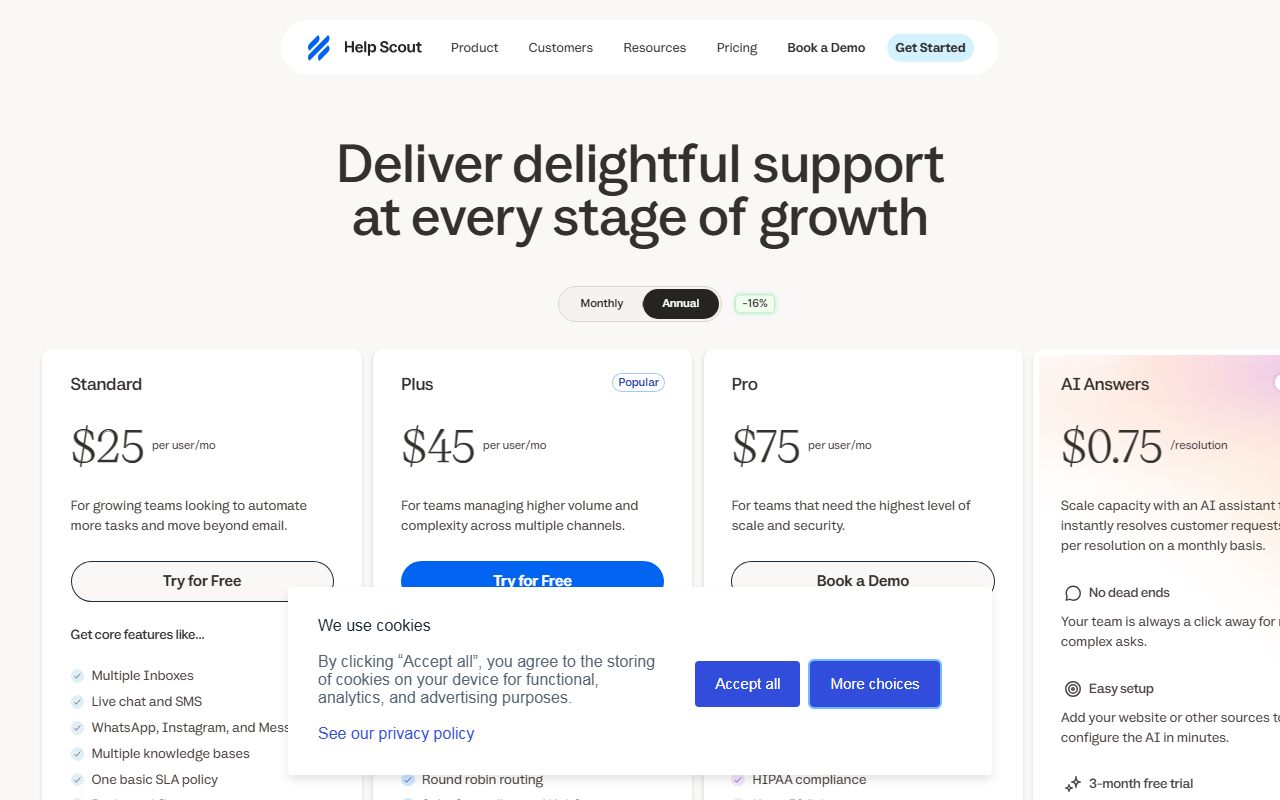
| Starting price | $25/user/mo on the Annual toggle (Standard); Plus $45; Pro $75 |
|---|---|
| Pricing note | From $25 per user per month on the Annual toggle, with a free plan for 5 users and AI billed at $0.75 per resolution (pricing page, checked October 13, 2026) |
| Free plan | Free: 5 users, 1 inbox, 1 Docs site, 100 contacts/mo, 10 saved replies, 10 tags, 10 articles |
| Seat minimum | None on Free, Standard or Plus; Pro is listed as unlimited users with a minimum of 10 |
| Seat ceilings | Free up to 5 users, Standard up to 25, Plus up to 50, Pro unlimited |
| Trial | 15 days on Standard or Plus with no credit card; Pro trial by sales request |
| AI pricing | AI Answers $0.75 per resolution, monthly cap available, 3 months free from account creation |
| Support channels | Email support on Standard; priority support on Plus and Pro; onboarding specialist and CSM on Pro |
| API | 200 calls/minute on Standard, 400 on Plus, 800 on Pro; Free limited to 1 integration |
| Integrations | Access to 100+ apps, per the comparison table; Free limited to 1 |
What Help Scout actually is
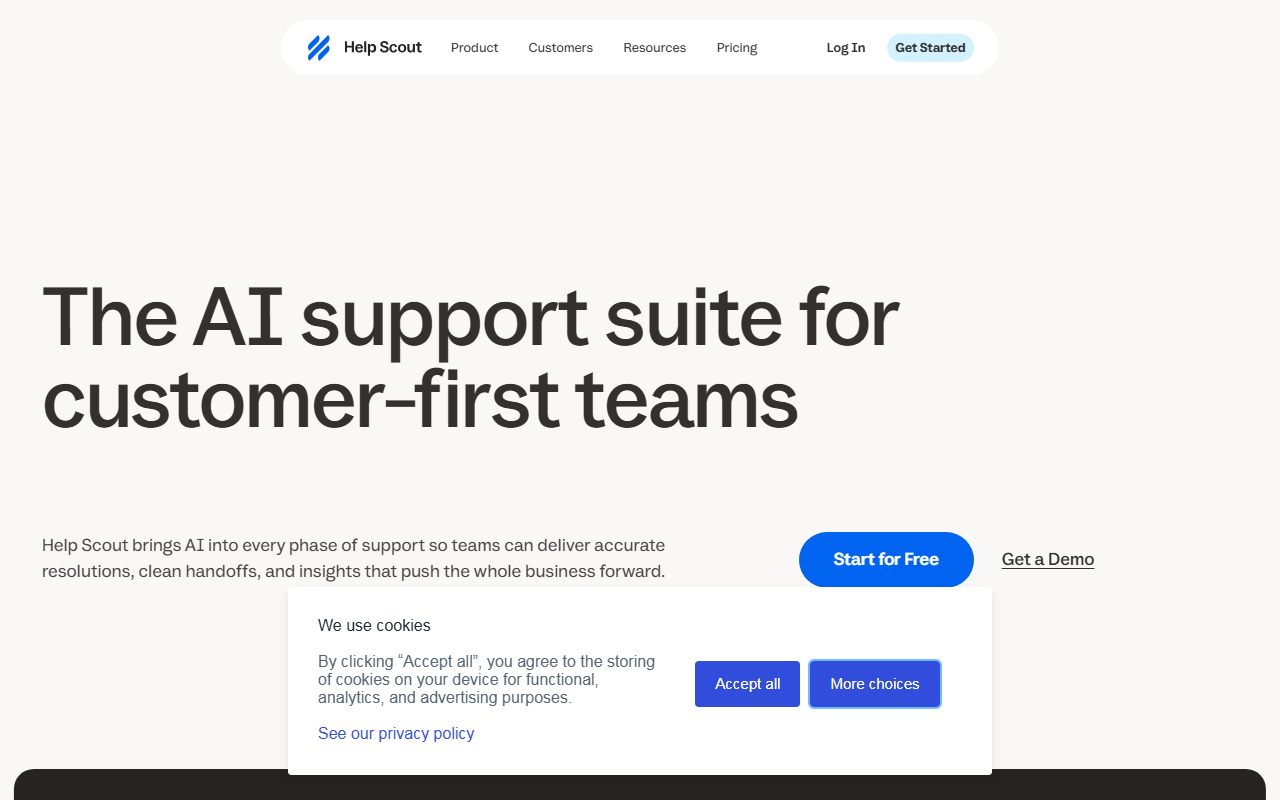
Help Scout is a shared inbox with a knowledge base, a chat widget and an AI layer bolted to the side of it.
The unit of work is a conversation, not a ticket, and the product is built so a customer never sees a reference number.
Around the inbox sit Docs sites for self-service, a Beacon widget for in-page help, workflows for automation and reporting with a fixed history window per plan.
That is the whole product, and the discipline shows on the card. It scores 9 on ease and 8 on value, and 7 on features, the lowest of the three fighters we scored in this division.
It is not a CRM and it is not a project tracker. A team that needs a deal pipeline should read the CRM fight card for small sales teams instead, and a team that needs task boards should read our Asana review.
Who Help Scout is best for
Help Scout suits teams whose queue is text and whose budget has to be predictable.
- Teams of 2 to 5, who fit inside the free plan with 1 inbox, 1 Docs site and 100 contacts a month
- Teams of 6 to 25, the ceiling of the Standard plan at $25 per user per month on the Annual toggle
- Teams answering email, live chat, WhatsApp, Instagram and Messenger, all listed as built-in channels
- Buyers who want a monthly AI bill they can cap, since AI Answers is $0.75 per resolution with a spending cap
- Incorporated tech startups under two years old with under $1 million ARR, who get six months free on Plus
- Teams that want a published number for every limit rather than a sales call
Who should skip it
Three profiles will hit a wall in the feature table rather than in the price.
- Teams whose customers call, because phone and voice are listed as integration-only on all three paid plans
- Teams under ten people that need SSO or HIPAA, since both sit on Pro and Pro carries a 10-seat minimum
- Teams running a contact centre with IVR, call recording and queue controls, none of which appear on this page
What the free plan includes and what each plan adds (as of October 2026)
The free plan is the most generous entry point in this division on seats and the tightest on everything else.
It lists 5 users, 1 inbox, 1 Docs site, 100 contacts a month, 10 saved replies, 10 tags, 10 articles, 1 Beacon, 30 days of reporting history and a limit of one integration.
Standard at $25 per user per month raises users to 25, inboxes to 2, Docs sites to 2 and reporting history to two years.
It adds live chat, WhatsApp, Instagram and Messenger, one basic SLA policy, 150 basic workflows, unlimited contacts and 200 API calls a minute.
Plus at $45 raises users to 50, inboxes to 5 and Docs sites to 3. It adds 500 advanced workflows, two advanced SLA policies, round robin routing and a secure customer portal.
Plus also unlocks internal teams, company grouping, unlimited AI Drafts, Salesforce, Jira and HubSpot connectors, 5 included light users, all-time reporting, priority support and 400 API calls a minute.
Pro at $75 is listed as unlimited users with a minimum of 10. It adds 10 inboxes, 5 Docs sites, unlimited workflows and SLA policies, load balancing and 800 API calls a minute.
Pro is also where the security row unlocks: SSO and SAML, HIPAA compliance and IP restrictions, plus 15 included light users, an onboarding specialist, a strategic account manager and preferred Aircall pricing.
Extra capacity is priced separately. Additional inboxes are $10 a month paid annually or $12 a month; additional Docs sites are $20 a month paid annually or $24 a month.
How the pricing is structured
Per user, per month, with a Monthly and Annual toggle and a badge reading minus 16 percent on the annual side.
In the page markup read on October 13, 2026 the Annual button carried the active state, so the printed $25, $45 and $75 are the annual rates.
That matters, and the page does not spell it out. The monthly figures only render after a click, so they could not be read.
The add-on prices give the shape of the gap: $10 against $12 for an inbox, $20 against $24 for a Docs site.
AI is the second line on the bill and it is metered, not rented. AI Answers is $0.75 per resolution, charged monthly, with a cap a buyer can set and automatic shutoff for the rest of the cycle once the cap is hit.
New accounts get three months of free unlimited AI Answers resolutions starting the day the account is created, and the page says pre-paid discounts are available without naming them.
For 10 users billed annually, Standard is $250 a month and Plus $450 a month, editorial calculations from the published per-user rates. Pro at 10 seats, its own minimum, is $750.
Payment is by Visa, American Express, Mastercard or Discover, with wire or ACH available on some annual payments. Free accounts need no payment method at all. The page does not state a refund policy.
Round 1, ease: what the 9 is built from
Help Scout takes the ease round because its pricing page does the buyer's arithmetic for them.
Count the numbers in the comparison table and you get a figure for users, light users, inboxes, contacts, saved replies, tags, views, custom fields, customer properties, SLA policies, workflows, Docs sites, articles, Beacons, reporting history and API calls a minute.
That is unusual. In this division the normal pattern is a tick in a box and a sales call for the number behind it.
The product model helps too. One inbox, one widget, one Docs site is a configuration a two-person team can finish in an afternoon, and the free plan lets them finish it without a purchase decision.
One point comes off for the toggle. A page that hides the monthly price behind a click, while quoting both annual and monthly rates for its add-ons in the FAQ, is making the buyer work for the comparison.
The round is about the first week. Zendesk scores 6 here and Freshdesk 8, both for pages that are harder to read than this one.
Round 2, features: what the 7 is built from
Features score 7, the lowest mark on this card, and the reason is one word: voice. Phone is listed as available via integration on Standard, Plus and Pro, with preferred Aircall pricing on Pro.
There is no native telephony, no IVR, no call recording, no queue controls.
Within text channels the table is strong. Email, live chat, WhatsApp, Instagram and Messenger are built in, alongside Docs sites, a Beacon widget, surveys, CSAT and NPS and a secure customer portal.
Automation is tiered by count rather than by capability: 150 basic workflows on Standard, 500 advanced on Plus, unlimited advanced on Pro. SLA policies follow the same pattern, one basic, two advanced, then unlimited.
AI is the strongest part of the table. AI Assist and AI Summarize are listed unlimited on all three paid plans, AI Drafts unlimited on Plus and Pro, and AI Answers available on all three at $0.75 a resolution.
The security row is where the gating bites. SSO and SAML are an add-on on Standard and Plus, HIPAA an add-on below Pro, IP restrictions an add-on below Pro. Three points come off for voice and for that gating.
Round 3, value: what the 8 is built from
Value scores 8 and the free plan is most of the reason. Five users, one inbox and 100 contacts a month at no cost is the only plan in this division that seats a whole small support team for nothing.
Against paid rivals the headline is mid-table. Standard at $25 per user sits above Freshdesk Growth and Zendesk Support Team at $19 and below Zendesk Suite Team at $55, per the three pricing pages read October 13, 2026.
The comparison turns on what $25 buys. It includes live chat, WhatsApp, Instagram, Messenger, a knowledge base and 150 workflows. Zendesk Support Team at $19 shows a dash against messaging, live chat, help centre and voice in its own comparison table.
AI pricing is the other half of the score. Metering at $0.75 per resolution with a hard cap is a different financial risk from a per-seat AI add-on, and it is the only one of the three that a buyer can bound in advance.
Two points come off for the Pro minimum and the add-on ladder. A team of six that needs SSO pays for ten Pro seats, $750 a month, an editorial calculation, where Standard for six would have been $150.
Round 4, support: what the 8 is built from
Support scores 8 because the plan-by-plan commitment is printed.
The comparison table lists email support on Standard, priority support on Plus and Pro, an onboarding specialist as an add-on below Pro and included on Pro, and a CSM as an add-on below Pro and included on Pro.
The site footer prints a status figure of 99.99 percent. The page does not state response-time targets or support hours, and there is no published uptime SLA with a credit attached, so the figure is a claim rather than a commitment.
Verified reports are thin but the best of the three. Trustpilot showed a TrustScore of 3.4 out of 5 from 42 reviews on October 13, 2026, with 40 percent five star and 36 percent one star.
Zendesk sat at 1.8 from 738 and Freshdesk at 1.5 from 412 on the same day.
Two points come off. Forty-two reviews is not a sample, and the one-star share is still more than a third. The complaints are specific: signup bugs, SMS failures during registration and slow replies while an account is being set up.
What verified users report
Trustpilot is the only public review source we could read for this fighter on October 13, 2026. G2 and Capterra both returned 403 to a fetch and to a headless browser, so no scores from either appear on this card.
The praise is about longevity and shape. Reviewers describe multi-year use, an interface they call intuitive, a built-in knowledge base they did not have to buy separately, and account managers they can reach.
The complaints cluster in two places. The first is onboarding: signup errors, SMS verification failures and slow replies during trial setup.
The second is change: one reviewer describes an annual bill moving from $1,500 to $7,500, and several object to features being replaced by alternatives they prefer less.
One detail is worth flagging for buyers comparing old articles with the current page. Several reviewers praise per-contact pricing as cheaper than rivals. The page read on October 13, 2026 prices per user and treats contacts as a limit.
We could not date that change from the page itself.
Limits stated by the vendor
Published on the pricing page as of October 13, 2026.
- Users: up to 5 on Free, up to 25 on Standard, up to 50 on Plus, unlimited on Pro with a minimum of 10
- Inboxes: 1 on Free, 2 on Standard, 5 on Plus, 10 on Pro; extras $10 a month paid annually or $12 a month
- Docs sites: 1, 2, 3 and 5 by plan; extras $20 a month paid annually or $24 a month
- Light users: 5 included on Plus and 15 on Pro, with maximums listed as 25 on Plus and 50 on Pro; the Pro card instead reads up to 50 light users
- Workflows: 150 basic on Standard, 500 advanced on Plus, unlimited advanced on Pro
- SLA policies: 1 basic on Standard, 2 advanced on Plus, unlimited on Pro
- API: 200 calls a minute on Standard, 400 on Plus, 800 on Pro; Free limited to 1 integration
Alternatives
Freshdesk. Choose it if the entry price is the whole argument and you want one ladder that runs from ticketing to skill-based routing. Growth is $19 per agent per month billed annually against Standard at $25.
Otherwise choose Help Scout, because Freshdesk publishes no free plan at all.
Zendesk. Choose it if you need native voice, data residency choices and 1,800 marketplace apps, and your budget can carry $55 per agent for the cheapest multichannel Suite plan. Otherwise choose Help Scout and keep the $30 per seat.
A CRM, if the queue is not really a queue. Teams that think they want a help desk sometimes want a pipeline.
Our CRM division scores HubSpot CRM, Pipedrive and Zoho CRM on the same four rounds, and the two bouts that settle most of it are HubSpot CRM vs Pipedrive and Pipedrive vs Zoho CRM.
If the real problem is work not reaching the right person, that is a task tool: see our Asana review.
Bottom line
Help Scout takes the help desk card with a 32 by winning the ease round outright and losing nothing badly.
The plan to buy is Standard at $25 per user per month on the Annual toggle: email, live chat, WhatsApp, Instagram, Messenger, a knowledge base, 150 workflows and 200 API calls a minute, $250 a month at 10 seats on an editorial calculation.
Start on the free plan if you are five or fewer. It is the only plan in this division that seats a whole small team at no cost.
The honest caveat is voice. If your customers phone you, this is the wrong fighter and the page says so plainly, which is more than most pricing pages manage.
Read the CRM fight card for small sales teams if what you are really buying is a pipeline.
Every figure above was read on the Help Scout pricing page, its startups page and its Trustpilot profile on October 13, 2026, with the Annual toggle active. Confirm the billing period at checkout before you budget.
Buy it if
- Your whole team fits in five seats, because the free plan covers 5 users, 1 inbox and 100 contacts a month at no cost
- You want every cap printed before you buy, which this pricing page does more thoroughly than any rival in the division
- You would rather meter AI than rent it, since AI Answers charges $0.75 per resolved conversation with a spending cap
- You are an incorporated startup under two years old with under $1 million ARR, which qualifies for six months free on Plus
Skip it if
- Phone is a real channel for your customers, because voice is listed as integration-only on every plan
- A security review will demand SSO and you are under ten people, since SSO is included only on Pro and Pro has a 10-seat minimum
- You need a native contact centre with IVR and call recording, which this product does not list at all
Frequently asked
Is Help Scout free?
There is a free plan. It covers 5 users, 1 inbox, 1 Docs site, 100 contacts a month, 10 saved replies, 10 tags, 10 articles, 1 Beacon and 30 days of reporting history, per the pricing page checked October 13, 2026. Integrations are limited to one.
How much does Help Scout cost for 10 people?
Standard works out at $250 a month and Plus at $450 a month for 10 users, editorial calculations from the $25 and $45 per-user rates shown with the Annual toggle active on October 13, 2026. Pro would be $750 at its $75 rate, which is also its 10-seat minimum.
What is a Help Scout AI resolution and what does it cost?
AI Answers costs $0.75 per resolution. The FAQ defines a resolution as a conversation closed by AI with no human help, and says it is not counted if the customer escalates, searches the knowledge base or asks for more help. Only one resolution is charged per conversation.
Does Help Scout charge per contact or per user?
Per user on the page read October 13, 2026: Standard $25, Plus $45 and Pro $75 per user per month. Contacts appear as a limit rather than a price, capped at 100 a month on Free and listed as unlimited on all paid plans. Some public reviews still describe a per-contact model.
Does Help Scout support phone support?
Not natively. The comparison table lists phone and voice as available via integration on Standard, Plus and Pro, with preferred Aircall pricing on Pro. SMS is also listed via integration. Email, live chat, WhatsApp, Instagram and Messenger are listed as built-in channels.
How long is the Help Scout free trial?
15 days on Standard or Plus with no credit card required, per the pricing FAQ checked October 13, 2026. A Pro trial requires a conversation with sales. Separately, AI Answers comes with three months of free unlimited resolutions starting the day the account is created.
Does Help Scout offer discounts?
Two are published. Help Scout for Good is described as a discount for qualifying non-profits and B Corporations. The startup programme offers six months free on Plus to new customers that are incorporated tech startups under two years old with under $1 million in annual recurring revenue.
Sources
- Help Scout pricing page, plan cards, full feature comparison and FAQ - checked October 13, 2026
- Help Scout for Startups programme page - checked October 13, 2026
- Trustpilot: Help Scout reviews - checked October 13, 2026
Update history
- October 13, 2026 - First scorecard. Pricing page read with the Annual toggle carrying the active state in the page markup, so printed prices are annual rates; monthly rates render only after a click and could not be read. Light-user counts differ between the Pro plan card and the comparison table; both reported. G2 and Capterra returned 403 to a fetch and to a headless browser, so neither appears as a source.
Visit Help Scout
We have no affiliate relationship with this vendor. Link goes to the official site.