 Saas

Harvest
The clearest pricing page in this division, with the annual total printed for you, sold on a base rate that meters invoices, projects, clients and tasks at a rate the page never prints
Scored on the published rubric, from documentation, pricing and verified user reports.
Best for: Freelancers and small professional services firms whose tracked hours turn into an invoice, and who want phone support and a readable price page over the lowest seat rate.
Verdict
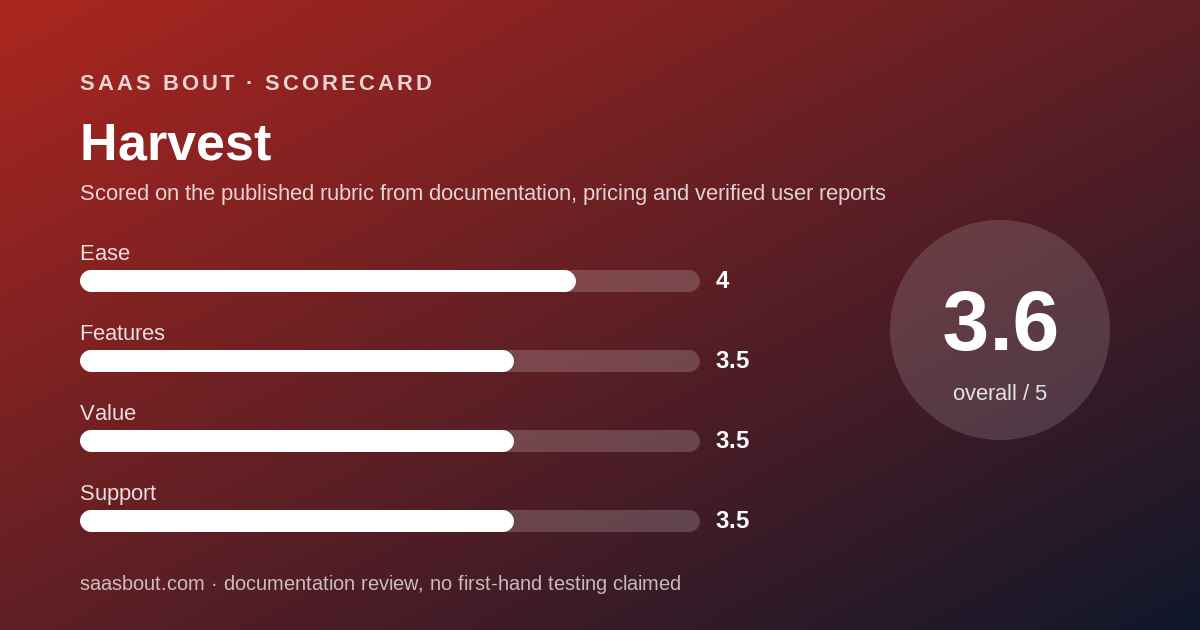
Harvest scores 29 on our four-round card: ease 8, features 7, value 7, support 7. It takes second place in the time tracking division behind Clockify on 31 and ahead of Toggl on 28. This is a documentation review. Every figure comes from the Harvest pricing page rendered in a headless browser, its 22-row plan comparison table, the pricing FAQ on the same page and the public Trustpilot profile, all read on October 26, 2026. No trial accounts, no staged demos. Ease scores 8, the best mark in this division, because the page prints the annual total next to the monthly rate, states that all prices are in US dollars, and runs a comparison table where every cell is either a tick or a number. Features scores 7: invoicing, expenses, estimates and profitability are present, but resource scheduling lives in a separate product called Harvest Forecast. Value scores 7. Support scores 7 on the strength of scheduled phone support on both paid tiers. The open question on this card is the word starting from, which sits above every price because extra invoices, projects, clients and tasks are billed by usage at a rate the page does not publish.
Visit Harvest
We have no affiliate relationship with this vendor. Link goes to the official site.
Where it is strong
- The page prints the annual total next to the monthly rate: $108 per seat billed annually on Teams and $168 on Enterprise, so no reader has to multiply anything
- Teams at $9 a seat a month billed annually covers unlimited seats, team reporting, team capacity, invoicing and accounting integrations with Stripe, QuickBooks Online, Xero and Deel
- Scheduled phone support is a published row on both Teams and Enterprise, which neither rival on this card offers at any price
- The 30-day trial takes no credit card, and the FAQ states that an unconverted trial account is deactivated rather than deleted, with the data kept for a later return
- The free plan is permanent rather than a clock: $0 forever with one seat, two projects, time tracking, invoicing, expense tracking and the Mac and iOS apps
- The annual discount is exactly 20 percent and the arithmetic checks: $17.50 monthly against $14 annual, and $14 times 12 equals the printed $168
- Enterprise at $14 a seat a month publishes profitability reporting, timesheet approval, an activity log, SAML-based single sign-on, custom exports and required notes
- Accounts of 10 or more seats paying annually can request an invoice and pay by ACH or bank transfer, per the payment options answer in the pricing FAQ
Where it falls short
- Every paid price carries the words starting from, because the base rate meters additional invoices, projects, clients and tasks by usage, and no rate for any of those four is printed on the page
- The free plan footnote reads that the usage of some features may require the payment of fees and points to the help centre, which returned a Cloudflare bot-verification page on October 26, 2026
- Two projects on the free plan is the tightest free tier in this division, against a card-stated five users on Clockify and three users on Toggl
- Resource scheduling is not in the product. The comparison table lists a Forecast integration, and Forecast is a separate Harvest product with its own pricing
- Custom reports read Up to 4 on both Free and Teams, so a $108 a year seat buys the same report allowance as the $0 plan
- Profitability reporting, timesheet approval, the activity log and SAML single sign-on are all Enterprise only, which is $168 a seat a year
- The pricing FAQ still refers to upgrading to the premium plan and downgrading to the pro plan, two names that appear nowhere on the plan cards now labelled Free, Teams, Enterprise and Enterprise Plus
- Seats can be added mid-cycle with proration but cannot be removed during the current billing cycle, per the team-size answer in the FAQ
- The page shows G2 at 4.3 from 1,500-plus reviews, Capterra at 4.6 from 4,200-plus and the App Store at 4.8 from 12,000-plus, while its own structured data reports a single rating of 4.8 from 17,700 reviews, which is the sum of those three counts carrying the highest of the three scores
- Trustpilot's own structured data for www.getharvest.com showed 1.6 out of 5 from 24 reviews on October 26, 2026, a very small sample and a very long way from 4.8
- No uptime figure and no support response target appear anywhere on the pricing page
At a glance
| Free plan | Yes. $0 forever, 1 seat, 2 projects, time tracking, invoicing, expense tracking, Mac and iOS apps |
|---|---|
| Starting paid price | Teams from $9/seat/mo billed annually, printed as $108 per seat; $11/seat/mo billed monthly |
| Pricing note | Free for one seat and two projects, then from $9 per seat per month billed annually, printed on the page as $108 per seat, or $11 billed monthly (pricing page, checked October 26, 2026) |
| Upper tier | Enterprise from $14/seat/mo billed annually, printed as $168 per seat; $17.50/seat/mo billed monthly |
| Top plan | Enterprise Plus, custom pricing, contact sales |
| Seats | 1 on Free, unlimited on Teams and Enterprise |
| Custom reports | Up to 4 on Free and Teams, unlimited on Enterprise |
| Metered extras | Additional invoices, projects, clients and tasks are billed on usage above the base rate. No rate published |
| Trial | 30 days, no credit card. Includes paid features except SAML single sign-on |
| Phone support | Scheduled phone support on Teams and Enterprise |
| Single sign-on | SAML-based, Enterprise only |
| Annual discount | 20 percent when paying for the year up front |
| Currency | All prices in USD, stated on the page |
What Harvest actually is
Harvest is a timer built to end in an invoice. That single sentence explains both its plan ladder and its gaps.
The product is now published under Bending Spoons Operations S.p.A., per the copyright line in the page footer read October 26, 2026.
Three self-serve tiers and one quote. Free is one person on two projects. Teams is the working plan. Enterprise is the controls plan. Enterprise Plus is a conversation.
What does not change across tiers is the core: time tracking, expense tracking, invoicing, project estimates and support for both time-and-materials and fixed-fee projects. All four appear on the free plan.
What changes is who can see what, and how deep the reporting goes. Billable and cost rates, team reporting and the accounting integrations arrive on Teams. Profitability and approvals arrive on Enterprise.
The one structural absence is scheduling. Planning who works on what next week is Harvest Forecast, a separate product the comparison table reaches by integration.
Teams whose first problem is the work queue rather than the hours should settle that side first. Our project management fight card scores that division.
Who Harvest is best for
The fit is narrower than the feature list and clearer than most pages in this division.
- Freelancers who need one seat, two projects and an invoice, which the free plan covers at $0
- Agencies and consultancies billing clients from tracked hours with expenses attached
- Firms mixing hourly and fixed-fee work, since both project types are on every plan
- Teams that already run QuickBooks Online, Xero or Stripe, all named integrations on Teams
- Buyers who want the yearly number printed rather than worked out, which this page does
- Any team where somebody will eventually need a scheduled phone call with support
Who should skip it
Three profiles will find the bill or the scope wrong.
- Anyone who must forecast a total, because four usage lines are metered at an unpublished rate
- Teams that need resource scheduling in the same product, which lives in Harvest Forecast
- Budget buyers who need approvals and profitability, both of which are Enterprise only
What each plan includes (as of October 2026)
Free is described as built for individual freelancers and priced at $0 forever. The card lists one seat, two projects, time tracking, invoicing, expense tracking and the Mac and iOS apps.
The comparison table confirms more than the card does. On Free the ticks include web, desktop and mobile apps, both project types, project estimates, reporting basics, 50-plus core integrations and the Forecast integration.
One free row carries a number rather than a tick: custom reports, Up to 4.
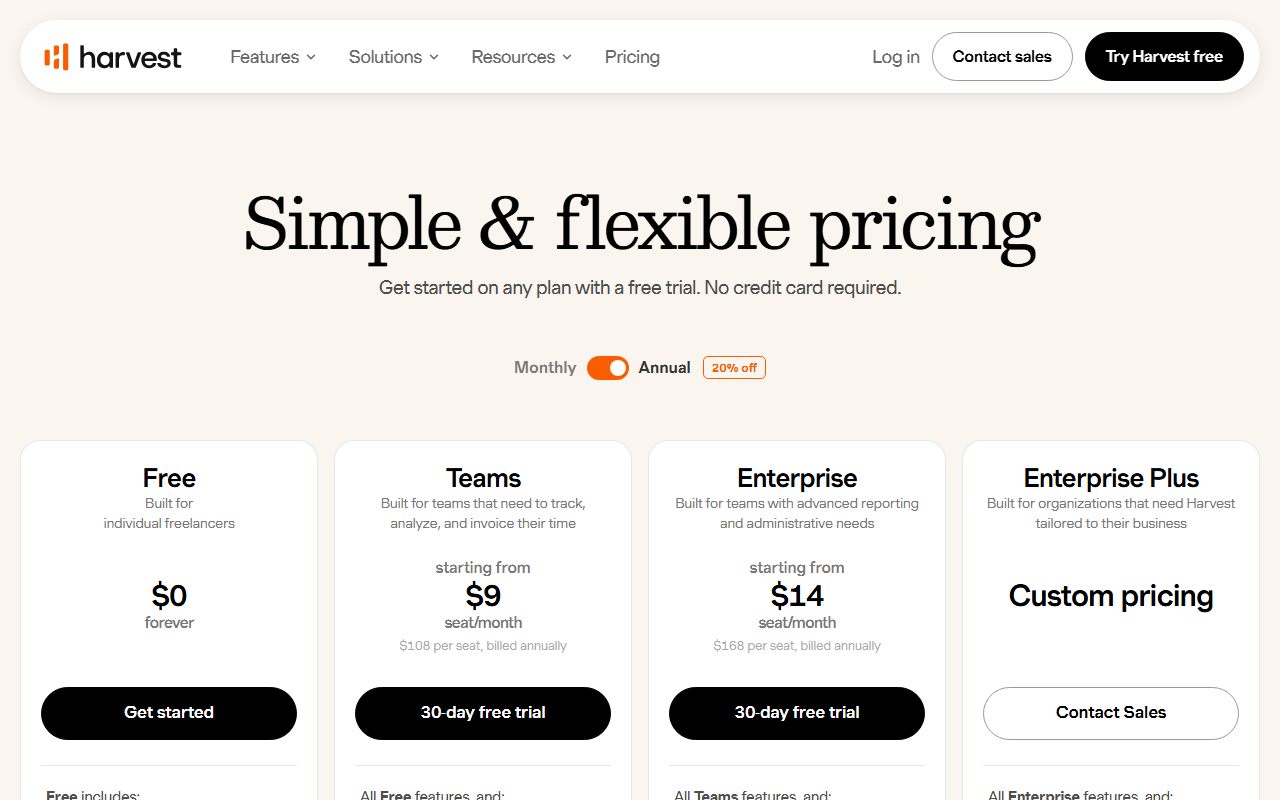
Teams is built for teams that need to track, analyse and invoice their time. It is $9 a seat a month billed annually, printed as $108 per seat, or $11 billed monthly.
It adds unlimited seats, billable and cost rates for teams, team reporting, team capacity, project and people import, the accounting and payment integrations, and scheduled phone support.
It does not raise the report allowance. Custom reports still read Up to 4 on Teams.
Enterprise is $14 a seat a month billed annually, printed as $168 per seat, or $17.50 monthly. It adds unlimited custom reports, profitability reporting, timesheet approval, an activity log, SAML-based single sign-on, custom exports and required notes.
Enterprise Plus is custom pricing. It holds custom integrations, product customisation, a dedicated customer success manager, custom onboarding, assisted data migration, white labelling and privileged access to product development.
How the pricing is structured
Two numbers per paid plan, one printed annual total, and a 20 percent discount that actually checks out.
Billed annually Teams is $9 a seat a month and Enterprise $14. Billed monthly they are $11 and $17.50. The toggle is badged 20 percent off.
The arithmetic holds in both directions. $17.50 less 20 percent is exactly $14. And $14 times 12 is $168, which is the figure the card prints. $9 times 12 is $108, also printed.
That makes Harvest the only page in this division where the annual total is the vendor's number rather than ours.
The page also states that all prices are in US dollars, which matters for a reader outside the United States comparing against pages that localise.
The pricing FAQ adds the practical rules. The 20 percent discount applies when the year is paid up front. Seats can be added at any time at a prorated charge. Seats cannot be removed mid-cycle, only at renewal.
Accounts of ten or more seats paying annually can request an invoice and settle by ACH or bank transfer instead of card.
One naming wrinkle sits in that same FAQ. The answer about changing plans still talks about upgrading to the premium plan and downgrading to the pro plan. Neither name appears on the cards, which read Free, Teams, Enterprise and Enterprise Plus.
The words starting from are doing a lot of work
This is the one thing to get in writing before signing anything here.
The label starting from sits above every paid price, and the page explains why in a line printed under both the Teams and Enterprise cards.
It reads that your base rate includes core features, and that as your team grows, additional invoices, projects, clients and tasks are billed based on what you use, so you are never overpaying.
That is a usage model wearing a per-seat label. Four separate counters can move your bill, and the page prints no allowance and no overage rate for any of the four.
The free plan carries the same shape in miniature. Two projects, one seat, and a footnote reading that the usage of some features may require the payment of fees, with a link to the help centre.
The help centre is where those numbers would be. Its pricing article returned a Cloudflare bot-verification page to a headless browser on October 26, 2026, so the allowances could not be read.
We will not call them unpublished on that basis. We will say plainly that they are not on the pricing page and that we could not reach the help centre on the date above.
The practical ask before purchase is short. How many invoices, projects, clients and tasks does the base rate include, and what does the next one cost. Get all four in the order form.
Round 1, ease: what the 8 is built from
Eight is the best ease mark in this division, and it is earned on the page rather than the product.
What earns it: three cards and one quote, a working monthly and annual toggle, the annual total printed next to the monthly rate, and a currency statement.
The comparison table is the cleanest work on this card. Twenty-two rows, three columns, every cell either a tick, a number or blank.
Two rows carry real values rather than ticks: Seats, which reads 1, unlimited, unlimited, and custom reports, which reads Up to 4, Up to 4, unlimited.
Every row also has a one-line tooltip explaining the feature in plain words.
Two points come off, and both are about the price rather than the layout. First, starting from applies to every paid figure and no allowance table backs it up.
Second, the FAQ still names plans that no longer exist on the page. A buyer reading about a premium plan and a pro plan cannot map either onto Free, Teams or Enterprise.
Round 2, features: what the 7 is built from
Harvest does the invoicing job better than anything else on this card and leaves one whole job to a sibling product.
The billing side is complete from the free tier up: timers, weekly and daily timesheets, calendar imports, expenses with receipts, invoices, and support for time-and-materials alongside fixed fee.
The money side arrives on Teams and Enterprise: billable and cost rates per person, team capacity, team reporting, then profitability by client, project, task or team.
The integration list is specific rather than vague. Stripe, QuickBooks Online, Xero and Deel are named on the Teams card, with 50-plus core integrations as a table row.
Three points come off. The largest is scheduling. Planning a team across projects is Harvest Forecast, which the table reaches as an integration and whose price is not shown here.
The second is the report allowance. Up to 4 custom reports on Free and the same Up to 4 on Teams means the $108 seat buys no additional reporting headroom.
The third is monitoring, and here the absence is arguably a virtue rather than a gap. There is no activity monitoring, no screenshot capture and no GPS row anywhere in the table.
Teams that want hours attached to tasks in a planner will still need the other half of the stack. Our card scores Asana and ClickUp on that side.
Round 3, value: what the 7 is built from
Seven is a fair middle. Harvest is not the cheapest seat here and it is not trying to be.
At three seats on annual billing, Teams is $324 for the year, since the page prints $108 per seat. Clockify Standard at US$5.49 a seat a month works out at US$197.64 by editorial arithmetic. Toggl Starter at $9 a seat is $324.
So Harvest matches Toggl on headline price and sits roughly 64 percent above Clockify.
What the money buys that Clockify's Standard does not is phone support and a printed annual total. What it does not buy is approvals or profitability, both of which Clockify puts below $8 a seat.
The free plan is the weakest in the division on headroom. One seat and two projects is a demonstration rather than a working tier, where Clockify's card offers five users and Toggl's offers three.
Two points come off for the metered extras. A price described as starting from, with four uncounted usage lines behind it, cannot be budgeted from the page alone.
The last point goes to the report cap repeating on a paid tier. Paying $108 a seat a year for the same four custom reports as the $0 plan is hard to defend on the table as published.
Round 4, support: what the 7 is built from
Seven is the joint best support mark in this division, and it rests on one row the rivals do not have.
Scheduled phone support is a published table row, ticked on Teams and Enterprise. Neither Clockify nor Toggl prints a phone channel at any price.
The trial terms are also stated rather than implied. Thirty days, no credit card, paid features included except SAML single sign-on, and an unconverted account deactivated rather than deleted with the data retained.
That last clause is worth more than it looks to a small firm testing a timer across a quarter-end.
Not published on the pricing page as read October 26, 2026: any uptime figure, any response-time target, any refund window.
The verified record is where the page overreaches. Three badges sit under the comparison table: G2 4.3 from 1,500-plus reviews, Capterra 4.6 from 4,200-plus, App Store 4.8 from 12,000-plus.
The page's own structured data then reports a single aggregate rating of 4.8 from 17,700 reviews. Those three counts add to exactly 17,700, and 4.8 is the App Store score alone.
So the structured data applies the highest of three scores to the combined count of all three. That is an editorial reading of the arithmetic, and the arithmetic is on the page.
Trustpilot's structured data for www.getharvest.com showed 1.6 out of 5 from 24 reviews on October 26, 2026. Twenty-four reviews is far too small to rank a product on, and it is printed here only because the vendor's own figure is a 4.8.
G2 and Capterra product pages returned no readable rating to a headless browser, so only the vendor's quoted versions of those two numbers appear.
Limits stated by the vendor
Published on the pricing page, its comparison table and its pricing FAQ as of October 26, 2026.
- Seats: 1 on Free, unlimited on Teams and Enterprise
- Projects: 2 on Free, per the plan card. The comparison table has no projects row
- Custom reports: Up to 4 on Free and on Teams, unlimited on Enterprise
- Billable and cost rates, team reporting, project and people import, accounting integrations, scheduled phone support: Teams and above
- Profitability reporting, timesheet approval, activity log, SAML single sign-on, custom exports, required notes: Enterprise only
- Metered on usage above the base rate: additional invoices, projects, clients and tasks. No allowance or rate published on the pricing page
- Free plan footnote: the usage of some features may require the payment of fees
- Trial: 30 days, no credit card, all paid features except SAML single sign-on
- Seats can be added mid-cycle with proration; seats cannot be removed until renewal
- Annual discount of 20 percent applies when the year is paid up front; 10 or more seats paying annually may request invoice, ACH or bank transfer
- All prices in USD, stated on the page
Alternatives
Clockify. Choose it if the seat price is the deciding number, or if you need invoicing and timesheet approvals below $8 a seat a month. Otherwise choose Harvest when you want the annual total printed and a phone channel on the entry paid tier.
Toggl. Choose it if capacity planning and a stated anti-surveillance position matter more than invoicing. Toggl has no invoicing at all. Otherwise choose Harvest when the hour has to become a bill.
Both are scored on the same four rounds in our time tracking division.
If the billable hours in question belong to a deal that has not closed yet, the pipeline is the bottleneck, not the timer. Our card scores Pipedrive alongside the bout Pipedrive vs Zoho CRM.
And if the document at the end of the project is a signed statement of work rather than an invoice, read the DocuSign review and the CRM fight card for small sales teams.
Bottom line
Harvest takes 29 on this card with the clearest page in the division and the least complete price on it.
Start on Free if you work alone. One seat and two projects with invoicing and expenses attached is enough to test whether the billing loop fits.
The plan to buy for a team is Teams at $9 a seat a month billed annually, which the page itself totals at $108 per seat. Unlimited seats and scheduled phone support come with it.
Go to Enterprise at $14 a seat only if approvals, profitability reporting, an activity log or SAML single sign-on is a written requirement. That is $168 a seat a year.
Before signing, get four numbers that are not on the page: the included allowance and the overage rate for invoices, projects, clients and tasks.
Do not plan on resource scheduling here. That is Harvest Forecast, a separate product, and its price is not shown on this page.
Every figure above was read on the Harvest pricing page, its 22-row comparison table, its pricing FAQ, its own structured data and Trustpilot on October 26, 2026. Confirm prices, allowances and taxes at the checkout step.
Buy it if
- The tracked hour has to become an invoice, because invoicing and expense tracking are on every plan here including the free one
- You want the yearly figure printed rather than calculated, since the card shows $108 and $168 per seat billed annually next to the monthly rates
- Someone will need to speak to a human, as scheduled phone support is a published row on both paid tiers
- Headcount changes often, given unlimited seats on Teams and prorated mid-cycle additions
Skip it if
- You need a predictable total, because extra invoices, projects, clients and tasks are metered at a rate the page does not publish
- You need resource scheduling in the same tool, since that sits in Harvest Forecast, a separate product with separate pricing
- Approvals and profitability are must-haves on a budget, as both are Enterprise only at $168 a seat a year
Frequently asked
Is Harvest free?
Yes, for one person on two projects. The free plan is $0 forever with one seat, two projects, time tracking, invoicing, expense tracking and the Mac and iOS apps. A footnote adds that the usage of some features may require the payment of fees.
How much does Harvest cost per user?
Teams is $9 a seat a month billed annually, printed on the page as $108 per seat, or $11 billed monthly. Enterprise is $14 a seat a month billed annually, printed as $168 per seat, or $17.50 monthly. Read October 26, 2026.
What does starting from mean on the Harvest price?
It means the base rate is not the whole bill. The page states that as your team grows, additional invoices, projects, clients and tasks are billed based on what you use. No rate for any of those four is published on the pricing page.
How much does Harvest cost for a 10-person team?
On Teams billed annually, $108 per seat means $1,080 a year for ten seats before any metered extras. On Enterprise it is $1,680. The FAQ adds that accounts of ten or more seats paying annually can request an invoice and pay by ACH or bank transfer.
Which Harvest plan includes timesheet approval?
Enterprise only, at $14 a seat a month billed annually. That tier also holds profitability reporting, the activity log, SAML-based single sign-on, custom exports, required notes and unlimited custom reports. Teams and Free both cap custom reports at four.
Does Harvest do resource scheduling?
Not inside Harvest. The comparison table lists a Forecast integration on all three plans, and Harvest Forecast is a separate product for scheduling a team across projects. Its price is not shown on the Harvest pricing page.
What happens at the end of the Harvest trial?
The trial runs 30 days with no credit card taken. The FAQ states that an account not upgraded by day 30 is automatically deactivated, that the data is not deleted, and that switching to the free plan during the trial is also an option.
Does Harvest have good reviews?
The readable numbers do not agree. The page shows G2 4.3 from 1,500-plus, Capterra 4.6 from 4,200-plus and the App Store 4.8 from 12,000-plus. Its structured data reports 4.8 from 17,700. Trustpilot showed 1.6 from 24 reviews on October 26, 2026.
Sources
- Harvest pricing page: plan cards for Free, Teams, Enterprise and Enterprise Plus, the 22-row plan comparison table, the pricing FAQ and the rating badges, plus the page's own structured data (rendered in a headless browser) - checked October 26, 2026
- Trustpilot: Harvest, aggregate rating in the page's structured data - checked October 26, 2026
Update history
- October 26, 2026 - First scorecard. Every paid price on the page is prefixed starting from, because the page states that additional invoices, projects, clients and tasks are billed on usage above the base rate; no allowance or rate for any of the four is printed, and the help centre pricing article returned a Cloudflare bot-verification page to a headless browser on October 26, 2026, so this is reported as not on the pricing page and unreachable on that date rather than as unpublished. Annual totals $108 and $168 per seat are the vendor's own printed figures, not editorial calculations, and the 20 percent annual discount checks exactly against $11 and $17.50. The page's structured data reports one aggregate rating of 4.8 from 17,700 reviews while its three visible badges read G2 4.3 from 1,500-plus, Capterra 4.6 from 4,200-plus and App Store 4.8 from 12,000-plus; the three counts sum to 17,700, which is noted as an editorial reading. Trustpilot's own structured data showed 1.6 out of 5 from 24 reviews on October 26, 2026 and is reported with that sample size. The pricing FAQ still names a premium plan and a pro plan that no longer appear on the plan cards.
Visit Harvest
We have no affiliate relationship with this vendor. Link goes to the official site.